
Description
Key Technical Specifications
| Parameter | Specification |
|---|---|
| Product Type | Micro Panel Operator Interface / HMI |
| Manufacturer | OMACO |
| Series | Micro Panel GF0 |
| Part Number | GF0-57CQD-002 |
| Display Size | 5.7 in (145 mm) |
| Display Technology | Color STN |
| Resolution | 320 × 240 (¼-VGA) |
| Interface | Touch-zone operator interface |
| Power Supply | 24 VDC |
| Internal Memory | ~2 GB for project data |
| Configuration Software | GALILEO for GF series |
| Download Interface | Serial interface |
| Expansion | Communication card slot |
| Environmental Temp | 0 to 60 °C |
| Humidity | Up to 95%, non-condensing |
| Dimensions | ~110 × 90 × 60 mm |
| Weight | ~0.26 kg |
| Certification | CE |
| Typical Condition | New surplus, unused surplus, or refurbished |
Product Introduction
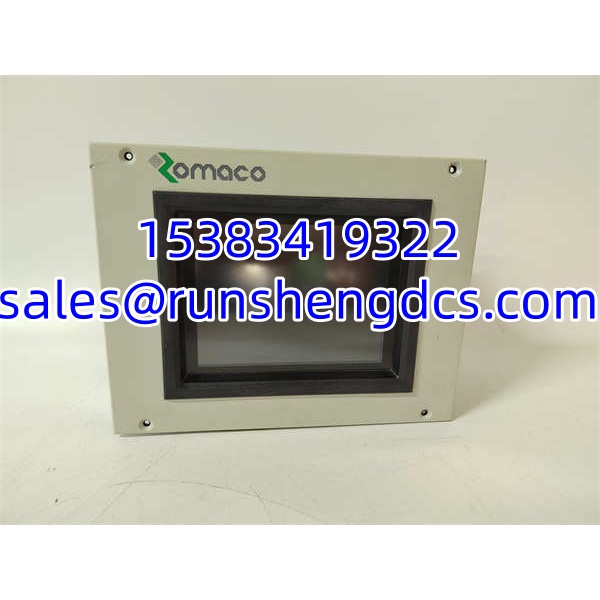
The OMACO GF0-57CQD-002 is a compact Micro Panel GF0 operator interface designed for machines and process stations that need a small, dedicated visualization screen without the footprint of a full industrial PC. It provides a 5.7-inch color STN display with touch-zone interaction, 24 VDC panel power, and internal non-volatile memory for the application project.
This unit is not a standalone controller. It must be configured with GALILEO software and downloaded over a serial connection before it can communicate with the target PLC or automation device. The communication card slot is the key integration point — it determines how the panel talks to the controller, whether through serial, fieldbus, or another supported interface. For legacy racks, skid-mounted equipment, or small OEM machines, the GF0-57CQD-002 is a practical replacement when the original HMI has failed or the project needs to be reloaded.
QA/QC Transparency SOP
- Nameplate and Suffix Verification
Confirm GF0-57CQD-002, revision, serial number, and power rating. The -002 suffix should be matched to the original unit or documented if substituted. - Visual Inspection
Check the front membrane/touch zone for delamination, scratches, or unresponsive areas. Inspect the rear connector, communication card slot, and mounting clips. - Power-Up Test
Apply 24 VDC and verify backlight illumination, boot sequence, and absence of display artifacts. STN panels can show contrast variation; confirm readability under expected lighting. - Communication Card and Serial Download Check
Verify the installed communication card, confirm serial download connectivity, and test GALILEO project transfer if a compatible engineering PC is available. - Touch-Zone and Alarm Validation
Exercise all configured touch zones, navigation screens, alarms, and setpoint writes. Confirm that writes reach the controller and that readbacks update correctly. - Final Packaging
Record firmware version, communication card type, and test results. Pack with anti-static and moisture protection, and label clearly to avoid confusion with other GF0 variants.
Field Engineer Gotchas
- It will not work without a GALILEO project
Risk: A blank or factory-reset GF0-57CQD-002 cannot operate until project data is downloaded.
Solution: Confirm you have the original GALILEO project file, communication settings, and serial download cable. - Communication card must match the controller
Risk: Swapping the panel without verifying the communication card may result in no PLC link.
Solution: Document the card type, slot position, baud rate, node address, and protocol before removal. - Touch-zone panels are not full multi-touch screens
Risk: Operators may expect smartphone-style gestures. GF0 touch zones are typically predefined active areas.
Solution: Train operators and preserve the original screen layout during project migration. - Serial download can be slow or finicky
Risk: Older serial interfaces may require specific drivers, adapters, or baud-rate settings.
Solution: Use a reliable RS-232/USB adapter and confirm COM port settings before starting the download. - Surplus listings may mix GF0 variants
Risk: GF0-57CQD, GF0-57SQD, and GF0-57EQD differ in display technology.
Solution: Require photos of the nameplate, communication card, and rear connector before purchase.
OMACO GF0-57CQD-002
Application Scenarios
- OEM machine HMI replacement
Packaging, conveying, or process skids that originally used a GF0 panel can be restored quickly if the project file is available. - Legacy process station visualization
For older automation systems where the original HMI is obsolete, the -002 can serve as a like-for-like replacement when the communication interface matches. - Small control panel retrofit
Its compact size and 24 VDC supply make it suitable for tight enclosures where a larger touchscreen will not fit. - Commissioning and test stand interface
A portable GF0 panel can be used temporarily to monitor I/O, alarms, and setpoints during loop checks or FAT activities.
FAQ
No. It is an operator visualization panel. The control logic resides in the connected PLC or automation controller.
What software is required?
GALILEO design software for the GF series. The project must be downloaded to the panel via the serial interface.
Can I replace it with another GF0 model?
Only if the display size, resolution, communication card, mounting, and project file are compatible. , GF0-57SQD, and GF0-57EQD are not automatically interchangeable.
Does it support Ethernet?
Not inherently. Network connectivity depends on the installed communication card and the capabilities documented for that specific card.
What if I do not have the GALILEO project file?
The panel can power up, but it will not have a usable application. You would need to recover the project from the original engineering PC, backup media, or the OEM.
Is this still supported by OMACO?
Availability and official support should be confirmed directly with OMACO or an authorized distributor, as this is a legacy micro panel.