
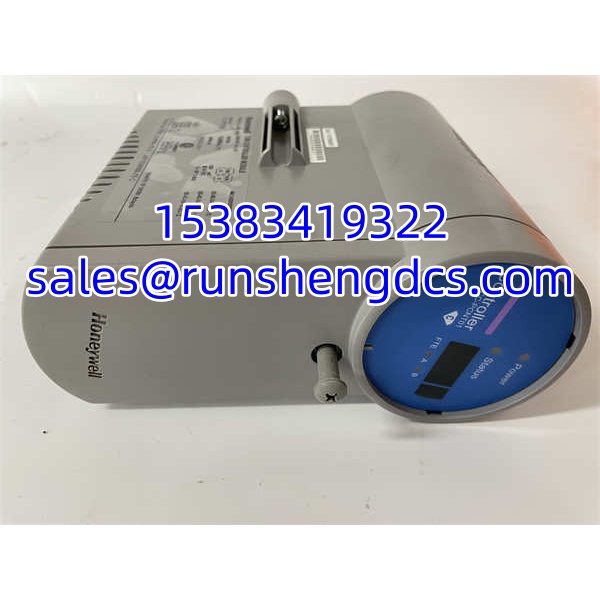

Description
Key Technical Specifications
| Parameter | Value |
|---|---|
| Manufacturer | Honeywell |
| Model | CC-PCNT01 |
| Product Type | C300 Control Processor Module |
| System Platform | Honeywell Experion PKS |
| Controller Family | C300 |
| Typical Base/Carrier | TC-TCNT01 / TCNT01 C300 controller base |
| Control Functions | Continuous, logic, sequential, batch control |
| Redundancy Support | Redundant and non-redundant C300 configurations |
| Firmware Management | CTools; Type/Boot Ver/App Ver must match peer controller |
| Firmware Upgrade Rule | Upgrades may be cross-version; downgrades must be stepwise |
| I/O Integration | Connects to C300 IOTA I/O modules via controller base |
| Network Role | Communicates with CEE, FTE network, and I/O links |
| Status | Legacy/common spare; verify firmware and revision before use |
| Common Mislabels | Power supply, frequency counter, RTD module, IP67 controller |
Product Introduction
The Honeywell CC-PCNT01 is the control processor module for the C300 controller in Experion PKS. It is the module that executes control strategy, handles I/O scanning through the base and IOTA modules, and maintains redundancy state with its peer controller.
This is not a generic PLC or standalone controller. It must be installed in a controller assembly, recognized by the Experion PKS system, and loaded with firmware and application files compatible with the existing control environment. The most common field issue is not mechanical fit, but firmware mismatch: a replacement CC-PCNT01 may power up and appear healthy, yet fail to synchronize because its Type, Boot Ver, or App Ver does not match the primary controller.
QA/QC Transparency SOP
- Intake & Label Verification
Confirm model CC-PCNT01, hardware revision, and serial number. Inspect the module edge connector, mounting hardware, and label integrity. Reject units with bent pins, corrosion, or mismatched labeling. - Base Compatibility Check
Verify compatibility with the installed controller base such as TC-TCNT01/TCNT01 and the associated memory backup module if present. - Firmware Identification
Use CTools to read Type, Boot Ver, and App Ver from the spare controller while it is in Idle/BKUP state. Record these values before installation. - Redundancy Pair Matching
For redundant pairs, confirm that the replacement CC-PCNT01 matches the primary controller firmware level. If upgrading, follow the site-approved firmware path. Do not cross-version downgrade. - Functional & Communication Verification
After insertion, verify controller state transition to BKUP/OK, I/O link status, FTE communication, and strategy execution. Confirm no persistent synchronization faults before returning the pair to full redundancy.
Field Engineer Gotchas
- Misidentified as I/O, power, or frequency module
Risk: Third-party listings sometimes call CC-PCNT01 a frequency counter, RTD module, power controller, or IP67 field device.
Solution: Treat CC- strictly as the control processor PWA.
Blunt warning: If the listing mentions 4–20 mA inputs, pulse counting, or standalone PLC operation, verify against the Honeywell documentation before purchasing. - Firmware mismatch in redundant pairs
Risk: A spare CC- with different Type/Boot Ver/App Ver will not synchronize cleanly.
Solution: Read firmware data with CTools before installation.
War story: A replacement controller powered up and showed OK locally, but the redundancy pair remained out of sync because the application version was one release behind the primary. - Incorrect downgrade path
Risk: Downgrading firmware across multiple releases can leave the controller in an unsupported state.
Solution: Downgrade stepwise only, using the correct firmware package for each release. - Wrong base or memory backup module
Risk: CC- requires the correct controller base and, where applicable, a compatible memory backup module.
Solution: Match the base type and battery backup configuration to the existing rack. - Assuming it is a standalone controller
Risk: CC- cannot run without the assembly, power supply, base, and Experion PKS engineering environment.
Solution: Confirm the full hardware set and PKS release before deployment.
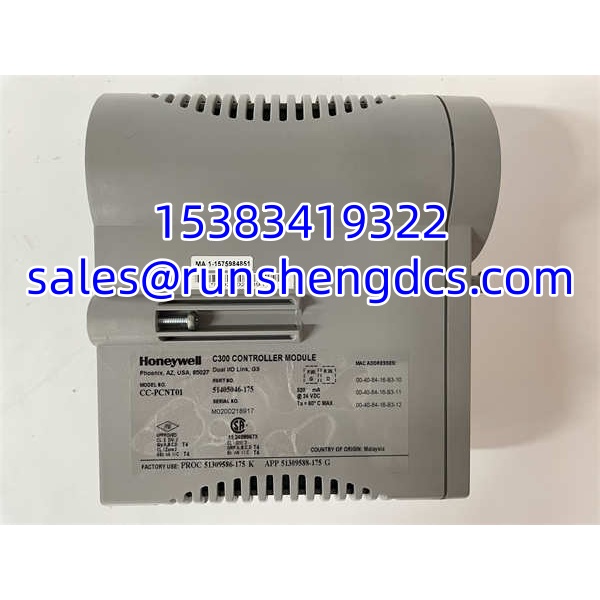
Honeywell CC-PCNT01
Application Scenarios
- Used when a failed or suspect control processor must be replaced in an Experion PKS rack.
- Redundancy pair maintenance
Installed as the backup controller after firmware matching and synchronization testing. - Firmware migration support
Spare CC- modules are often prepared with the correct firmware level before planned PKS upgrades. - Brownfield DCS sparing
Helpful for plants maintaining legacy Experion PKS R4xx/R5xx environments where new hardware lead times are long.
FAQ
It is the Honeywell control processor module for Experion PKS.
No. Listings describing it as a frequency counter, pulse module, or RTD input are incorrect.
Can it run standalone?
No. It must be installed in a controller assembly with the correct base, power supply, and Experion PKS configuration.
What firmware tools are used?
CTools is commonly used to read and load Type, Boot Ver, and App Ver on controllers.
Can firmware be downgraded freely?
No. Upgrades may be cross-version, but downgrades must be performed stepwise.
Does it support redundancy?
Yes. CC- is used in both redundant and non-redundant configurations.
What should I check before buying?
Confirm hardware revision, firmware type, boot version, application version, base compatibility, and redundancy requirements.




