
Description
Product Introduction
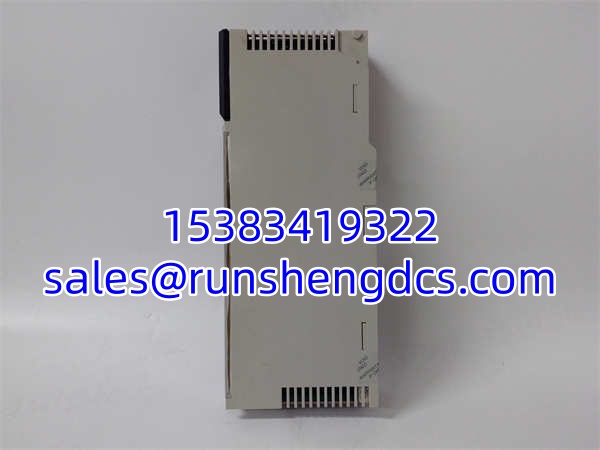
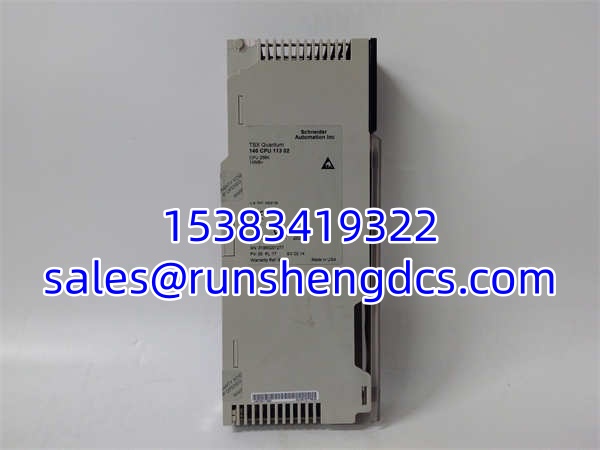
The Schneider 140CPU11302 is a foundational processor for the Modicon Quantum platform, providing 256K of RAM and 8K words of user logic. In plain terms, this is the workhorse CPU that has been running water treatment plants, mining conveyors, and manufacturing lines for decades. It’s not the fastest chip on the block by modern standards, but it’s rock-solid for sequential control and batch processing.
What you need to know right now is the lifecycle reality. This module is firmly in the legacy category, with official Schneider service support winding down in 2026. If you’re reading this, you’re likely maintaining an existing system rather than building a new one. The key decision point is whether to keep patching this 11302 or plan a migration to the M580 or EcoStruxure platform. For now, it still executes Ladder, Function Block, and Structured Text logic reliably, and it supports both Concept and Unity Pro programming environments.
Key Technical Specifications
| Parameter | Specification |
|---|---|
| User Logic | 8K Words |
| RAM | 256K |
| Registers | 10K |
| Memory | 1MB + 1MB+ (Battery Backed) |
| Programming Software | Concept, Unity Pro |
| IEC 61131-3 Support | Yes (with Execloader firmware) |
| Battery | External (140XCP900 or similar) |
| Status LEDs | RUN, ERR, BAT, I/O, COM |
| Operating Temp | 0°C to +60°C |
| Dimensions | Standard Quantum Single Slot |
| Weight | ~0.4 kg |
| Lifecycle | Legacy / Service Ending 2026 |
Compatibility & Replacement Matrix
- Schneider 140CPU11302 → Schneider 140CPU11302 : Direct Replacement — Identical part number, plug-and-play. Verify firmware version matches your existing system.
- Schneider 140CPU11302 → Schneider 140CPU11303 : Upgrade / Direct Fit — The 11303 offers 512K RAM and 16K User Logic. Same physical footprint, same battery, same backplane. Highly recommended if you’re hitting logic limits or need headroom for future changes.
- Schneider 140CPU11302 → Schneider 140CPU31110 : Migration Required — The 31110 is a Unity-only CPU. It does not run Concept logic. You must migrate your project to Unity Pro and re-validate. Physical fit is identical, but software is not backward compatible.
- Schneider 140CPU11302 → Schneider 140CPU43412A : Incompatible for Drop-In — The 43412A is a 486-based CPU with 2MB logic. While it fits the slot, it requires Unity Pro and a full project migration. Not a spare-and-swap replacement.
Quality Inspection & SOP Transparency
Legacy CPUs demand extra scrutiny. Here’s our protocol:
- Incoming Inspection: We verify the part number and check the battery compartment for corrosion. We inspect the backplane connector pins for bending or oxidation—common in racks that have seen multiple card swaps over 15+ years.
- Live Functional Test: We install the CPU into a Quantum 140XCP900 test chassis. We apply power and verify the RUN LED stabilizes within 5 seconds. We connect via Concept or Unity Pro and confirm the CPU is recognized and responds to online commands.
- Memory & Battery Test: We perform a full memory read/write cycle to verify the 256K RAM is intact. We check the battery backup voltage under load to ensure it can retain logic during a power cycle. A weak battery is the #1 cause of “ghost” faults in legacy CPUs.
- Firmware Verification: We read the firmware revision and cross-reference it against your system version. Mismatches here can cause “Module Incompatible” errors or logic execution failures. We can flash matching firmware if needed.
- Final QC & Packaging: After passing a 24-hour burn-in with periodic power cycles, we seal the CPU in an anti-static bag with fresh desiccant. For legacy units, we include a printed test report showing firmware version and memory integrity.
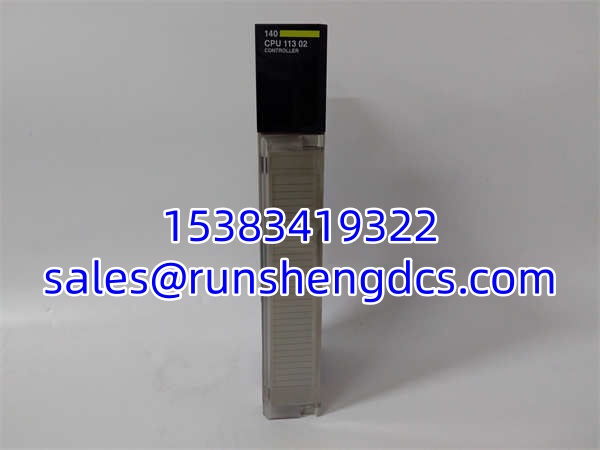
SCHNEIDER 140CPU11302
Common Replacement Pitfalls
- ❗ Firmware Version Mismatch: This is the #1 field headache. A replacement 140CPU11302 may ship with a newer firmware revision than your existing system. If your Concept project was compiled for v2.1 and the new CPU is v3.0, you may get “Version Mismatch” alarms or be forced to recompile and re-download. Always check your current firmware in Concept → PLC → Status before ordering.
- ❗ Battery Failure on First Power-Up: Legacy CPUs sitting in warehouses for years often have dead backup batteries. When you first power it on, the CPU may report “Battery Low” or lose its configuration. Always carry a fresh 140XCP900 battery kit when replacing a legacy CPU. Test the battery voltage before installation.
- ❗ Concept vs. Unity Confusion: The 140CPU11302 supports both Concept and Unity Pro, but your project is locked to one. If your plant runs Concept, do not accept a Unity-only migration as a “direct replacement.” The 11302 will work in both, but your logic file won’t. Verify your programming environment first.
- ❗ IEC 61131-3 Firmware: Not all 140CPU11302 units ship with IEC-capable firmware. If your project uses Function Block Diagram or Structured Text, you may need to download the Execloader utility to flash IEC support. Standard Ladder-only firmware won’t execute FBD blocks. Check the INFOSR file in Concept for IEC compatibility.
FAQ
Q: Can I hot-swap this CPU while the Quantum rack is running?
A: No. The 140CPU11302 does not support hot-swapping. Removing it will cause an immediate process stop and loss of control. Always schedule a controlled shutdown. If you need hot-swap capability, you must migrate to a redundant CPU pair (e.g., 140CPU67160C) with the 140CHS11000 hot-standby module.
Q: My old CPU is 140CPU11302C. Will this 140CPU11302 work?
A: Yes. The C suffix indicates a conformal-coated version for harsh environments. The standard 140CPU11302 is functionally identical but lacks the coating. If you’re in a corrosive or high-humidity environment, insist on the C-suffix version or apply aftermarket conformal coating. For standard control rooms, the non-C version is fine.
Q: What happens after Schneider ends service in 2026?
A: Official repairs, firmware updates, and technical support will cease. Your only source will be the surplus market. We strongly recommend securing 2-3 spare CPUs now and validating them in a test rack. Simultaneously, begin scoping a migration to Modicon M580 or EcoStruxure Control Expert to avoid being stranded.
Q: Can I use this CPU with Unity Pro if my old project is in Concept?
A: The 140CPU11302 hardware supports Unity Pro, but your existing Concept project cannot be opened in Unity. You must use the Concept-to-Unity migration tool (or manual reprogramming) to convert the logic. This is not a simple file open. Plan for 20-40 hours of engineering time for validation and re-testing.
Q: How do I know if the CPU is failing?
A: Watch the front panel LEDs. A flashing ERR LED indicates a fatal fault (check Concept diagnostics). A solid BAT LED means the backup battery is dead—replace immediately. Intermittent RUN LED flickering or random logic freezes often point to memory corruption or backplane communication issues. Always check the battery first before condemning the CPU.