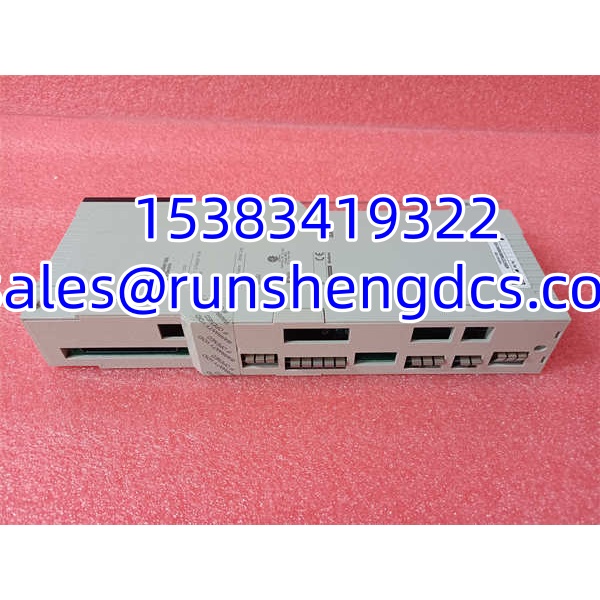

Description
Key Technical Specifications
| Parameter | Value / Notes |
|---|---|
| Product Model | 140CHS11000 |
| Brand | Schneider Electric / Modicon |
| Product Family | Modicon Quantum |
| Module Type | Hot Standby / redundancy communication module |
| I/O Type | 800 Series Sy/Max, remote I/O only |
| Transmission Rate | 10 Mbit/s |
| Transmission Medium | Fiber optic |
| Bus Current Requirement | 700 mA |
| RFI Immunity | 27–1000 MHz, 10 V/m, conforming to IEC 60801-3 |
| Switching Time | 13–48 ms |
| Dimensions | 31 cm × 16.5 cm × 5 cm |
| Weight | 1.06 kg |
Product Introduction
Redundancy modules are easy to ignore until a primary controller drops out and the plant finds out whether the standby path actually works. The Schneider 140CHS11000 sits in that exact gap: it is a Modicon Quantum Hot Standby module used to support redundant controller operation and remote I/O communication, not a general-purpose discrete I/O card.
In a Quantum Hot Standby architecture, this type of module helps maintain communication continuity between the primary and standby systems, especially where 800 Series Sy/Max remote I/O is involved. With a 10 Mbit/s fiber-optic link and a typical switching window of 13–48 ms, it is intended for applications where losing a controller should not immediately mean losing process visibility or control. Bottom line — it is a redundancy/communications component, so its value depends entirely on matching the existing Quantum chassis, firmware expectations, and fiber topology.
QA/QC Transparency SOP
- Intake & Origin Verification
Confirm the full part number 140CHS11000, then record the nameplate data: hardware revision, serial number, date code, and any factory markings. Inspect the chassis, backplane connector pins, fiber ports, and PCB for corrosion, bent pins, cracked housings, or evidence of improper removal. - Live Functional Testing
Install the module in a known-good Modicon Quantum-compatible rack only if the test environment supports safe Hot Standby or redundancy testing. Verify power-up, module recognition, primary/standby status behavior, and communication with adjacent Quantum modules. Do not assume the module is functional just because LEDs light up. - Electrical Parameter Tests
Measure backplane/bus current draw and verify it is consistent with the typical 700 mA requirement. Check continuity on connector pins where applicable. Avoid megger testing fiber-optic or sensitive communication interfaces unless the OEM procedure explicitly allows it. - Firmware/Config Verification
Read any visible firmware, hardware revision, or configuration identifiers. Compare them against the existing Quantum Hot Standby system. A physically correct 140CHS11000 can still fail to synchronize if its revision or configuration does not match the primary/standby controllers. - Final QC & Anti-Static Packaging
Clean the module exterior, cap open fiber ports, and pack in ESD-safe material. Include a test note covering visual condition, revision, power-up status, communication status, and any observed faults. For surplus redundancy modules, photos of the nameplate and fiber ports are more useful than a generic “tested good” claim.
Field Engineer Gotchas
Firmware or hardware revision mismatch
Risk: The module powers up and is recognized, but the Hot Standby pair will not synchronize.
Fix: Match the full part number, hardware revision, and firmware expectations against the existing Quantum system.
War story: A replacement 140CHS11000 looked identical on the shelf, but after installation the standby controller stayed out of sync. The issue was not the fiber — it was a revision/configuration mismatch that prevented proper redundancy handshake.
Fiber link problems
Risk: The module appears healthy, but redundancy communication is unstable or missing.
Fix: Inspect fiber connectors for dirt, damage, or loose seating. Check bend radius, cable strain, and correct port pairing.
Blunt warning: Fiber faults are the most common reason a “good” redundancy module looks bad in the field. Clean the connectors before blaming the module.
Bus current and power budget
Risk: The Quantum rack power supply is already heavily loaded, and adding a 700 mA module pushes the system into marginal operation.
Fix: Check the chassis power supply rating, backplane current budget, and installed module list before installation.
Bottom line — if the rack power is weak, the Hot Standby module may drop out at the worst possible time.
Wrong slot or chassis assumption
Risk: Installing the module in the wrong slot or assuming any Quantum rack will accept it without configuration checks.
Fix: Confirm slot assignment, backplane compatibility, and Hot Standby documentation before powering the rack.
Do not hot-swap blindly in a live redundancy system.
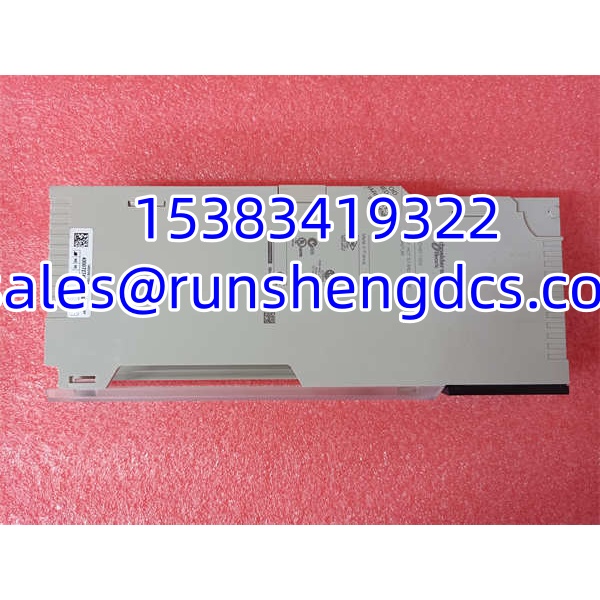
Schneider 140CHS11000
Application Scenarios
- Water and wastewater pump stations
Used where continuous control of pumps, valves, and level systems is required and a single controller failure should not stop process monitoring. - Power generation auxiliary systems
Suitable for control cabinets that depend on Quantum Hot Standby redundancy to maintain visibility of critical auxiliary equipment. - Oil and gas process skids
Applied in remote or semi-remote control systems where fiber-based redundancy communication helps reduce exposure to electrical noise and ground loops. - Mining and minerals processing
Used in conveyor, crushing, or material-handling control systems where controller failover can reduce unplanned downtime. - Legacy Modicon Quantum plant upgrades
Used to keep existing Hot Standby systems running when original spare modules are scarce and a full migration away from Quantum is not scheduled.
Case study — anonymized
A water treatment plant reported intermittent Hot Standby faults after a scheduled outage. The standby controller would not fully synchronize with the primary, and the HMI showed repeated redundancy communication alarms. The maintenance team replaced the suspected CHS module first. The new module powered up cleanly, but the fault returned within an hour. The real cause was a damaged fiber patch cord near the cabinet entry point — not the module itself. Once the fiber was replaced and the connectors were cleaned, both controllers synchronized and the redundancy status returned to normal. Lesson: in fiber-based redundancy systems, check the physical link before condemning the module.
FAQ
Is the 140CHS11000 a standard I/O module?
No. It is a Modicon Quantum Hot Standby / redundancy communication module. It is not a replacement for ordinary discrete or analog I/O cards.
Does this module use fiber optics?
Yes. The 140CHS11000 uses a fiber-optic transmission medium, typically listed at a 10 Mbit/s transmission rate.
Will any 140CHS11000 drop into my Quantum rack?
Not automatically. Physical fit and part number are not enough. You still need to verify hardware revision, firmware compatibility, slot assignment, and Hot Standby configuration.
What does the 13–48 ms switching time mean?
It indicates the typical range for redundancy-related switching behavior. It is not a universal guarantee for every application. Actual switchover performance depends on the full Quantum system configuration, CPU state, network topology, and application logic.
How much bus current does it draw?
The typical bus current requirement is 700 mA. That must be included in the rack power budget before installation.
Is this module still supported by Schneider Electric?
Treat it as legacy Modicon Quantum hardware. Availability and OEM support depend on the installed system age, firmware level, and current service status. For active control systems, confirm support and compatibility with the responsible OEM or service provider before relying on surplus stock.
What should I check before installing a surplus 140CHS11000?
Ask for nameplate photos, hardware revision, serial number, power-up test results, fiber port condition, and any redundancy synchronization test records. If the supplier cannot provide that data, do not install it directly into a live Hot Standby system.