
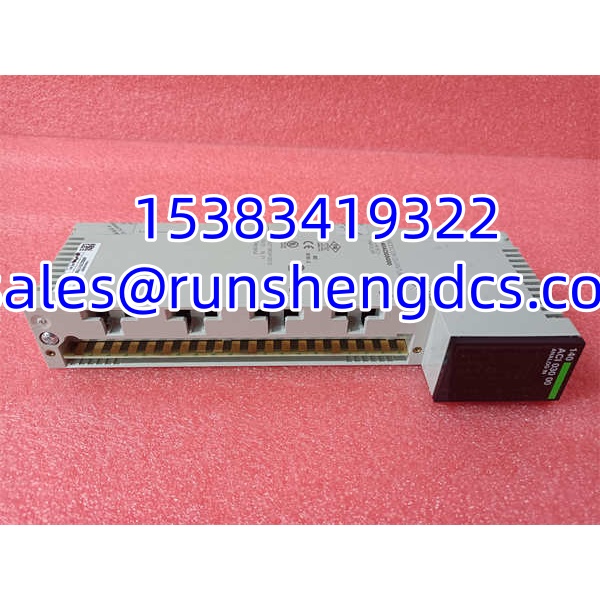

Description
Key Technical Specifications
| Parameter | Value / Notes |
|---|---|
| Brand | Schneider Electric |
| Model | 140ACI03000 |
| Product Family | Modicon Quantum |
| Module Type | Analog Input Module |
| Channel Count | 8 channels |
| Polarity | Single-polarity |
| Input Signals | 4–20 mA or 1–5 VDC |
| Resolution | 12-bit |
| Input Impedance | 250 Ω in current mode; >20 MΩ in voltage mode |
| Accuracy | ±0.05% of full scale, typical |
| Linearity Error | ±0.04% |
| Temperature Drift | ≤0.005% of full scale/°C |
| Common-Mode Rejection | > -72 dB at 60 Hz |
| Response Time | 5 ms |
| Power / Bus Current | 2 W; 240 mA bus current |
| Isolation | 1000 VDC channel-to-bus for 60 seconds; 30 VDC channel-to-channel |
| Operating Temperature | 0°C to 60°C |
| Storage Temperature | -40°C to 85°C |
| Protection Rating | IP20 |
| Diagnostics | Wire-break detection in current mode; undervoltage detection in voltage mode |
| Indicators | Green LEDs for channel/bus status; red LED for fault |
| Configuration | Unity Pro software |
Product Introduction
A bad analog reading can look like a sensor problem when the real issue is the input card. The 140ACI03000 sits in a Modicon Quantum rack and reads process signals from field devices such as pressure transmitters, temperature transmitters, flow meters, and level instruments. It accepts 4–20 mA or 1–5 VDC inputs and converts them into digital values the Quantum processor can use for control, monitoring, alarming, and data logging.
This is an 8-channel, single-polarity module with 12-bit resolution, so it is suited for standard process monitoring rather than high-precision laboratory measurement. It also includes basic diagnostics: wire-break detection in current mode and undervoltage detection in voltage mode. Bottom line — it is a workhorse Quantum analog input card, but only if the application matches its signal type, polarity, isolation, and channel count.
QA/QC Transparency SOP
- Intake & Origin Verification
Read the nameplate for 140ACI03000, revision/hardware codes, serial number, date code, and country of origin. Confirm whether the module is new surplus, used pull, or refurbished. Quarantine units with bent pins, cracked housings, burnt terminals, corrosion, or missing labeling. - Live Functional Testing
Install the module in a known-good Quantum backplane with a verified power supply. Check that the module is recognized by the PLC and that the green status LEDs behave normally. Force known test signals into each channel and confirm the PLC reads reasonable values. - Electrical Parameter Tests
In 4–20 mA mode, inject calibrated current and check each channel for correct scaling and wire-break detection. In 1–5 VDC mode, apply calibrated voltage and check for undervoltage detection behavior. Verify bus current draw is within expected limits and that there is no abnormal heating. - Firmware/Config Verification
Confirm the module configuration in Unity Pro matches the application: channel type, scaling, engineering units, alarm limits, and diagnostic settings. Back up the project configuration before making changes. - Final QC & Anti-Static Packaging
Clean terminals and connector areas. Cap unused channels if required by site procedure. Label the module with part number, serial number, test date, pass/fail status, and tester ID. Package in anti-static material before shipping.
Field Engineer Gotchas
- Single-polarity is not the same as universal analog input
Risk: Assuming the 140ACI03000 accepts bipolar signals, negative current, or arbitrary voltage ranges can lead to wrong scaling or no reading at all.
Fix: Confirm the application uses 4–20 mA or 1–5 VDC only. Do not force 0–10 V, ±10 V, or other unsupported ranges into the module.
Blunt warning: If your transmitter outputs something outside the supported range, this module is not the right fit. - 4–20 mA and 1–5 VDC wiring are not interchangeable
Risk: Wiring a voltage source into a channel configured for current, or vice versa, can produce incorrect readings, fault indications, or module damage.
Fix: Match the field wiring to the channel configuration. Use a series resistor only if the installation requires voltage-to-current conversion and the OEM documentation permits it.
Reality check: A lot of “bad analog card” calls turn out to be wrong wiring at the terminal block. - Unity Pro configuration must match the field device
Risk: The module may be physically fine, but if scaling, range, units, or diagnostics are wrong in the project, the PLC values will look incorrect.
Fix: Before replacing the module, record the original project configuration. After installation, verify scaling against a known field signal.
War story: A replacement module was installed, powered up cleanly, and still showed wrong process values — because the old project scaling did not match the new transmitter range. - Channel-to-channel isolation is limited
Risk: The reference data indicates 30 VDC channel-to-channel isolation. If channels share grounds incorrectly or are connected to floating/offset sources beyond that limit, you can get crosstalk, measurement errors, or damage.
Fix: Keep channel wiring within the isolation limits and follow the OEM wiring diagram.
Bottom line: This is not a fully isolated multi-channel isolation card. Treat the isolation limits seriously.
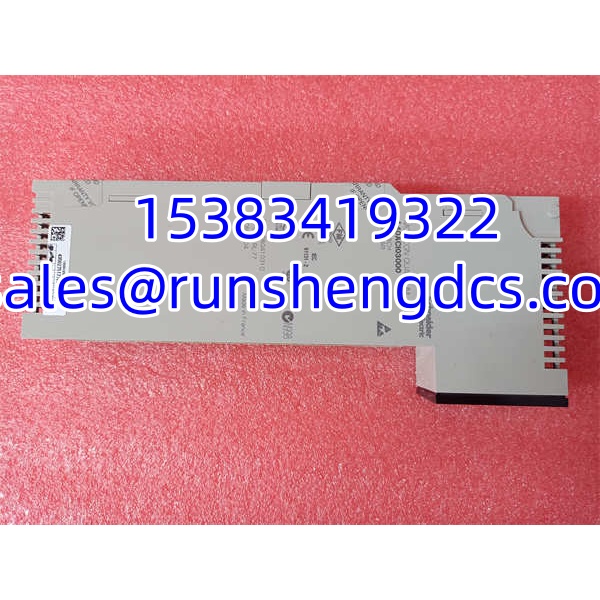
Schneider 140ACI03000
Application Scenarios
- Process monitoring with 4–20 mA transmitters
Used for pressure, temperature, flow, level, or other standard 4–20 mA field instruments connected to a Modicon Quantum PLC. - 1–5 VDC signal acquisition
Suitable for applications where field devices or signal conditioners provide 1–5 VDC process signals. - Machine and utility system monitoring
Common in water/wastewater, HVAC, power, manufacturing, and utility systems where analog process data must be read by the PLC. - Replacement of failed Quantum analog input cards
Can serve as a spare for an existing 140ACI03000 installation, provided the channel type, signal range, and project configuration match.
Anonymized Case Study
A plant had a Quantum rack reporting erratic pressure readings on one analog input channel. Maintenance suspected the field transmitter, but bench testing showed the transmitter output was stable at 12 mA. The technician pulled the 140ACI03000 and inspected the terminal block. One current-input terminal showed corrosion and a loose clamp. After cleaning the terminals, reseating the wiring, and verifying 4–20 mA injection on all eight channels, the module readings returned to normal. The module was not replaced. The lesson: before swapping an analog input card, verify the field wiring, signal source, and PLC scaling first.
FAQ
- What is Schneider 140ACI03000?
It is a Modicon Quantum 8-channel, single-polarity analog input module that accepts 4–20 mA or 1–5 VDC signals and converts them into digital values for the PLC. - Is 140ACI03000 a communication module?
No. It is an analog input module, not a communication module. - What signals does it accept?
The available reference indicates it supports 4–20 mA or 1–5 VDC. Do not assume it accepts other ranges without checking the official Schneider documentation. - Can I use it for 0–10 V or ±10 V signals?
Not without verification. The available reference specifies 1–5 VDC and 4–20 mA. Using unsupported ranges may cause incorrect readings or damage. - Is it compatible with Modicon Quantum?
Yes, it is listed as a Modicon Quantum analog input module and is configured through Unity Pro. Compatibility with a specific CPU, backplane, firmware, or project should still be verified. - Can I replace another 140ACI module with 140ACI03000?
Not automatically. Other 140ACI modules may have different channel counts, signal ranges, polarity, isolation, or diagnostics. Match the full part number and project configuration. - What should I check before installing it?
Check the physical part number, revision, channel type, signal range, wiring, Unity Pro configuration, scaling, isolation requirements, and power/backplane compatibility.




