
Description
Key Technical Specifications
| Parameter | Value |
|---|---|
| Manufacturer | Eaton (Moeller) |
| Product Series | XV-400 HMI / PLC |
| Communication Protocol | Profibus DP (Master) |
| Max Baud Rate | 12 Mbps |
| Physical Interface | 9-pin D-Sub (DB9) |
| Mounting | Internal Plug-in Slot (XV-400) |
| Compatibility | XV-400 Series (≥10.4″ for 2nd slot) |
| Power Supply | Sourced from HMI Backplane |
| Operating Temp | 0°C to +55°C |
| Dimensions | 140 x 110 x 20 mm |
| Weight | ~0.12 kg |
| Product Code | 139853 / MOL139853 |
| Compliance | UL, CE |
Product Introduction
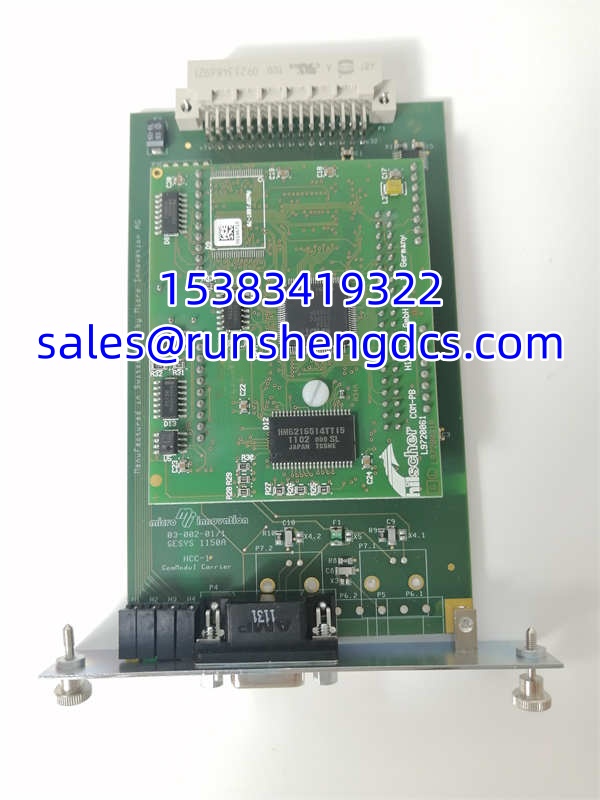
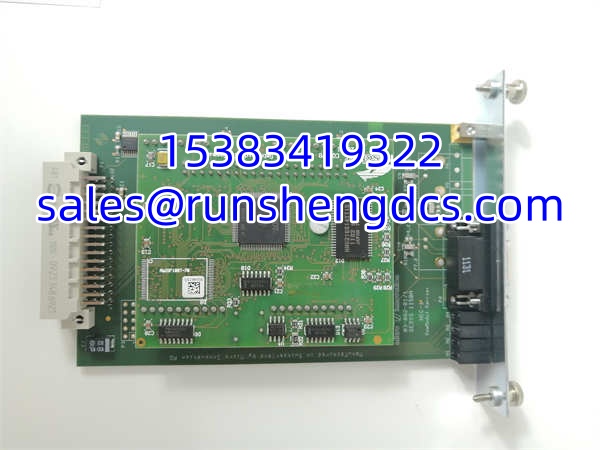
You can’t just bolt a Profibus card onto any XV-400 panel and expect it to work. The EATON DPM-MC2 is a purpose-built communication module that slides into the dedicated expansion slot on XV-400 series HMI/PLC units, transforming a standalone display into a Profibus DP Master node. It handles the physical layer and protocol stack, letting your HMI directly poll drives, remote I/O, and PLCs without needing an external gateway or separate controller.
Bottom line — it’s a clean, integrated solution for legacy Profibus networks. The EATON DPM-MC2 supports up to 12 Mbps and can manage the typical 32-station DP limit, but you must verify your XV-400 panel has the physical slot and backplane support. Smaller panels (under 10.4″) often lack the second slot entirely. Also, don’t confuse this with the DPM-MC1 or newer Ethernet options; the pinout and firmware are not interchangeable.
QA/QC Transparency SOP
- Intake & Origin Verification: We verify the EATON DPM-MC2 PCB revision and Moeller/Eaton part marking (139853). Counterfeit comm modules exist; we check the DB9 connector quality and slot connector pin straightness to rule out pulled or damaged units.
- Live Functional Testing: The module is installed in a verified XV-400 test panel. We configure a basic Profibus DP master project, scan for a known slave device, and verify cyclic data exchange. Baud rate is tested at 1.5 Mbps and 12 Mbps to confirm signal integrity.
- Electrical Parameter Tests: Using a Fluke 87V, we verify the module draws correct current from the backplane and that the DB9 pins show proper termination resistance (typically 110Ω when terminated). We also check for shorted pins on the slot connector.
- Firmware/Config Verification: We read the module’s firmware version via the XV-400 system info menu. Any site-specific GSD files or slave configurations are cleared to factory defaults. We document the firmware rev to ensure compatibility with your existing XV-400 project.
- Final QC & Anti-Static Packaging: After passing, the EATON DPM-MC2 is sealed in an anti-static bag with desiccant. A QC sticker with the test date and firmware version is applied. We include a note on slot compatibility to prevent installation errors.
Field Engineer Gotchas
- Slot Compatibility Trap: The EATON DPM-MC2 requires a physical expansion slot. XV-400 panels under 10.4″ typically have only one slot (occupied by the base comm). If your panel is 7″ or 10.4″, you likely cannot add this module without replacing the entire HMI. War Story: I’ve seen techs order three of these for 7″ panels, only to discover the slot doesn’t exist. Check your panel’s mechanical drawing first.
- Profibus Termination: The EATON DPM-MC2 has internal termination, but it must be enabled via DIP switch or software (depending on XV-400 firmware). If you’re the last node on the bus and termination is off, you’ll get intermittent CRC errors. If you’re in the middle, it must be off. Blunt warning: Don’t guess. Use a Profibus tester to verify termination at both ends.
- GSD File Mismatch: The XV-400 project must include the correct GSD file for every slave on the bus. If the can’t configure a slave, it’s usually a missing or mismatched GSD, not a bad module. Always import the slave’s GSD into the XV-400 project before commissioning.
- Backplane Power Draw: Adding this module increases backplane current draw. If your XV-400 is already powering a PLC option, USB host, and Ethernet, you may be near the limit. Check the XV-400 power budget in the manual. A marginal power supply can cause the to reset under load.
EATON DPM-MC2
Application Scenarios
Retrofit Packaging Line: A 2005-era bottling line uses XV-400 HMIs with Profibus DP to Allen-Bradley PowerFlex drives. The replaces a failed external DP master, restoring direct HMI-to-drive communication without rewiring the entire network.
Water Treatment SCADA Upgrade: A plant is migrating from legacy PLCs to modern Ethernet but still has Profibus DP field devices. The on the XV-400 HMI acts as a temporary gateway, allowing the new SCADA to access old DP slaves via the HMI’s Ethernet port.
Marine Engine Control Panel: Shipboard panels use XV-400 HMIs with to monitor engine parameters via Profibus DP. The module’s compact form factor and backplane power eliminate the need for external gateways in space-constrained control cabinets.
FAQ
Can I use this module in an XV-300 or XV-100 panel?
No. The is mechanically and electrically designed for the XV-400 series only. XV-300 uses different form factors; XV-100 has no expansion slot. Do not attempt to force-fit.
Does this support Profibus DP-V1 or only DP-V0?
The supports DP-V0 (cyclic data) as standard. DP-V1 (acyclic/alarm) support depends on your XV-400 firmware version. Check the XV-400 release notes; older firmware may not support DP-V1 even with this module.
How many slaves can this module handle?
The supports up to 32 DP slaves (standard Profibus DP limit). However, the XV-400 project may have a lower limit depending on memory and scan time. Verify in the XV-400 configuration software.
Is hot-swapping supported?
No. The is not hot-swappable. Power down the XV-400 panel before inserting or removing the module. Hot-plugging can damage the backplane connector or the module itself.
What if my XV-400 doesn’t recognize the module?
Check the slot seating. The must be fully inserted and secured with the captive screws. Also, verify the XV-400 firmware supports the module; very old firmware may require an update. If still unrecognized, the module’s EEPROM may be corrupted.
Can I use this for Profibus PA?
No. The is a DP (Decentralized Periphery) master, not a PA (Process Automation) segment coupler. For PA devices, you need a DP/PA coupler or segment protector, not this module.
What’s the max cable length from the DB9 port?
Follow standard Profibus DP cable length vs. baud rate tables. At 12 Mbps, max segment length is 100m. At 1.5 Mbps, up to 1200m. The does not extend this; it’s a node, not a repeater.