
Description
Product Introduction
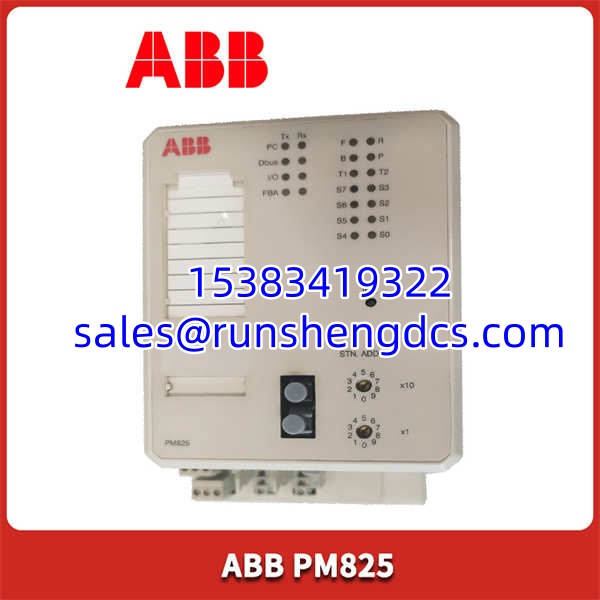
The ABB PM825 is the workhorse CPU for the AC 800M distributed control system. It handles the execution of control applications and coordinates communication across the entire I/O network.
With 32 MB of RAM and a typical scan cycle of 10 ms, it delivers the performance needed for complex process control loops. In my experience, its proven track record in oil and gas applications makes it a go-to choice for engineers who prioritize stability over flashy new features.
Key Technical Specifications
- Processor: 32-bit RISC
- RAM: 32 MB
- Flash Memory: 16 MB
- Typical Scan Cycle: 10 ms
- Communication Ports: 2 x RJ45 (Ethernet), 1 x RS-232-C (COM3), 1 x RS-485/RS-422 (COM4)
- Redundancy: Supported (CPU, communication, power supply)
- Operating Temperature: 0 to +60 °C
- Storage Temperature: -40 to +85 °C
- Power Consumption: ~8 W
- Approvals: CE, UL, CSA, ATEX, IECEx
Compatibility & Replacement Matrix
- PM825 → PM820 : Needs Adaptation — The PM825 has more memory (32 MB vs 16 MB). It can replace a PM820, but you must verify the application size and re-download the project.
- PM825 → PM822 : Direct — Functionally identical for most applications. The PM822 is often just a hardware revision with the same core specifications.
- PM825 → PM864 : Needs Adaptation — The PM864 is a newer, more powerful controller. Replacing a PM825 with a PM864 requires a control builder project conversion and firmware update.
Quality Inspection & SOP Transparency
We don’t just ship boxes; we verify function. Here is how we test an ABB .
- Incoming Inspection: We start with the paperwork, checking the packing list and customs docs for source traceability. The anti-counterfeit check is next: we verify the serial number on ABB’s portal and inspect the label for correct fonts and holograms. Visually, we’re looking for any signs of use—scuffs on the casing, bent pins on the backplane connector, or yellowing plastic.
- Live Functional Test: The module goes into a live ABB AC 800M rack with a PM866 as the baseline. We power it on and watch the boot sequence. The “Run” LED should turn solid green within 30 seconds. We then establish a connection via Control Builder M and download a simple test program to verify the logic solver is working. We also check both Ethernet ports for a successful handshake and run a 24-hour loop test to monitor for any memory leaks or unexpected resets. Test photos and video are available on request.
- Electrical Parameter Test: We perform an insulation resistance test with a 500 V megger, ensuring we get a reading >10 MΩ between the power terminals and the chassis ground. Ground continuity is also verified to be less than 0.1 Ω.
- Firmware Verification: We read the firmware version directly from the module’s service port. For the , we typically see versions in the 3.x or 5.x range. We record this version and photograph any DIP switch settings, though this module has none.
- Final QC & Packaging: After passing all tests, a technician signs the QC sheet. The module is placed in an anti-static bag, sealed, and packed in a double-walled carton with bubble wrap. A “QC Passed” label with the date is affixed to the outside.
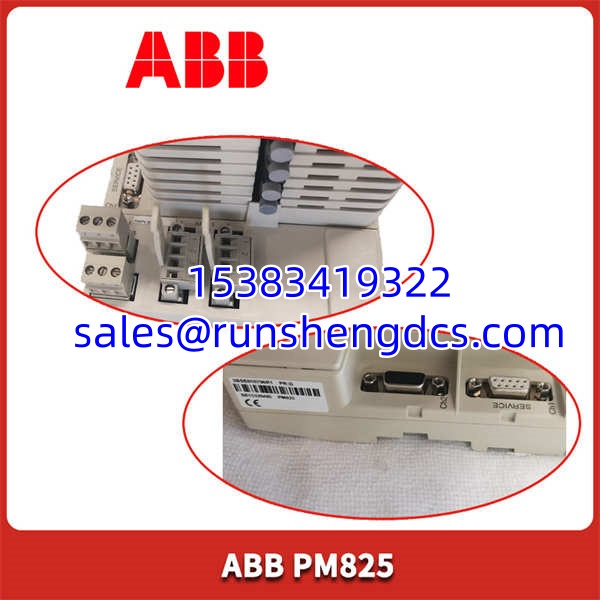
ABB-PM825
Common Replacement Pitfalls
Replacing a CPU is not like changing a lightbulb. One wrong move and you’re looking at hours of downtime.
- Firmware Revision Mismatch: This is the most common headache. You swap in a new , and the PLC throws a “Communication Timeout” error. Why? The new module has firmware v5.1, but the rest of your system is on v3.2. The protocol handshake fails. Always record the firmware version from the old module before you take it out.
- Forgetting the Battery: The uses a battery to maintain the real-time clock and some retentive data. If you swap the module and forget to move the battery from the old one, your system time will reset to 1970, which can wreak havoc on time-stamped events and alarms. Check the battery voltage before you start; if it’s below 3.0V, replace it.
- IP Address Amnesia: The IP address is often stored in the non-volatile memory of the module itself, not just in the project file. If you put in a blank module, your network won’t find it. You’ll need to use the Primary Setup Tool (PST) to assign the correct IP address before Control Builder can connect. Write the IP down. Tape it to the module. Just don’t forget it.
- Application Mismatch: Even if the hardware is the same, the application inside might not be. A new module is empty. You must have a backup of the original
.projfile to download. If you don’t, the system will run, but it won’t do anything. Always, always verify your backups before starting the swap. - ESD Damage: I watched an engineer once grab a CPU module by the connector pins because he didn’t have a wrist strap. It powered up, but it never communicated reliably again. The static discharge fried the comms chip. It’s a $2,000 lesson in using proper ESD procedures.
FAQ
Can I just swap this in directly?
Depends on your situation. If the new has the exact same firmware version as the old one, and you move the battery, then yes, it’s a relatively straightforward swap. If the firmware is different, you’ll need to use Control Builder to synchronize the hardware and download the application, which takes more time.
My system runs AC 800M V5.0 — will this module work?
Yes. The is fully compatible with AC 800M system version 5.0. However, you need to check the specific firmware revision. Well, technically it supports v5.0, but you might need to upgrade the module’s firmware from an older version (like v3.x) to ensure full compatibility with all the features in the V5.0 software suite.
Honestly, it comes down to performance and age. The PM864 is the newer, faster successor. Here is a quick comparison:
| Model | RAM | Typical Scan Cycle | Status |
|---|---|---|---|
| 32 MB | 10 ms | Mature / Stable | |
| PM864 | 64 MB | 5 ms | Current Generation |
If you’re expanding an existing system with PM825s, stick with the . If you’re building new, look at the PM864.
Is this a genuine ABB part?
Yes. We source our stock from authorized distributors and perform the multi-point inspection detailed above. The condition is New Original (New Surplus), meaning it is a genuine, unused part that was likely an overstock from a large project.
Do I need to re-download the entire program?
If the replacement module is empty (which a new one will be), then yes, you must download the application from your engineering station. Make sure you have a verified, up-to-date backup of the .proj file before you start the replacement procedure. Without it, the controller will be a blank slate.