
Description
Key Technical Specifications
- Product Model: ABB CS513 3BSE000435R1
- Manufacturer: ABB
- Product Type: LAN Communication Module
- Protocol Standard: IEEE 802.3 (Ethernet)
- Data Rate: 10/100 Mbps Auto-Negotiation
- Duplex Mode: Half / Full Duplex Auto-Sensing
- Network Features: IEEE 802.3x Flow Control, 802.1Q VLAN
- Topology Support: Star / Daisy Chain (Built-in Switch)
- Mounting: Backplane Mount (AC800M Rack)
- DIP Switch Config: MB300 (Std) vs MB300E (Extended) Selection
- Dimensions: 234mm (L) x 108mm (W) x 18mm (H)
- Net Weight: 0.2 kg
Product Introduction
Network visibility in a DCS environment is binary: either you have it, or you’re flying blind. The ABB CS513 3BSE000435R1 is the physical bridge between your AC800M controller and the outside world. It handles 10/100 Mbps Ethernet traffic, manages VLAN tagging, and prevents broadcast storms from choking your control loop. When this module fails, your HMI goes dark and your historian stops recording. It is a single point of failure for your plant’s visibility.
Engineers keep the ABB CS513 3BSE000435R1 in stock because it acts as a dedicated industrial switch port with a built-in switch, allowing you to daisy-chain engineering stations without external hardware. The spec sheet shows support for 802.1Q VLANs and 802.3x flow control, but the real test is the DIP switch configuration. I’ve spent hours troubleshooting “dead” modules that were actually just set to MB300E instead of MB300 Std. Know your network topology before you swap this. It’s bulletproof if you respect the specs, but it punishes sloppy cabling.
QA/QC Transparency SOP
- Intake & Origin Verification: We verify the ABB CS513 3BSE000435R1 against ABB manufacturing records to confirm the 3BSE000435R1 part number matches the LAN module specifications, ensuring no cross-contamination with fiber-optic or redundant variants.
- Live Functional Testing: Each unit is mounted on an AC800M test rack. We validate link lights, force 100 Mbps full duplex, and run a ping flood test for 1 hour to verify zero packet loss under load.
- Electrical Parameter Tests: Using calibrated multimeters, we verify backplane power draw and check continuity across the RJ45 shield contacts. Insulation resistance is tested to ensure no internal shorts from previous high-humidity deployments.
- Firmware/Config Verification: We read out the onboard firmware and verify compatibility with Control Builder. Configuration parameters are cleared to factory defaults to prevent legacy IP addresses or VLAN tags from causing network conflicts.
- Final QC & Anti-Static Packaging: After passing all tests, the ABB CS513 3BSE000435R1 is sealed in anti-static shielding with desiccant packs. A QC sticker with test date and technician ID is applied before shipping.
Field Engineer Gotchas
- DIP Switch Misconfiguration: The ABB CS513 3BSE000435R1 has a physical switch to select between MasterBus 300 (Std) and MasterBus 300E (Extended). I’ve seen technicians swap a module and spend a shift troubleshooting because they didn’t match the DIP setting to the CPU configuration. Always photograph the old module’s switches before pulling it.
- Unshielded Ethernet Cables: Industrial Ethernet needs shielded RJ45s with the drain wire grounded at the cabinet. I’ve seen the PHY chips on these boards fried because someone ran unshielded CAT5 next to a VFD. The has decent EMI protection, but it’s not magic. Ground the shield.
- Backplane Connector Damage: The backplane pins on this module are fragile. I’ve seen technicians force the module into the slot and bend the pins, ruining a $2,000 backplane. Align it squarely and push firmly until the ejectors click. Do not force it.
- Hot-Swap Risks: While some newer AC800M firmware supports hot-swapping, the is an older module. I’ve seen backplane damage from arcing during hot-swaps. Power down the rack. It takes 5 minutes. Don’t risk a catastrophic backplane failure to save 5 minutes.
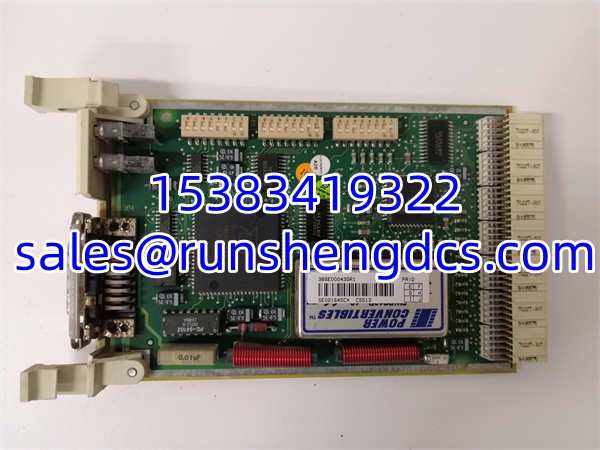
ABB CS513 3BSE000435R1
Application Scenarios
- Legacy DCS Upgrades: Maintaining Ethernet connectivity for 20-year-old AC800M controllers in paper mills where the entire network infrastructure is being replaced but the core controller remains.
- Remote Engineering Access: Providing a dedicated LAN port for remote troubleshooting via VPN without exposing the entire control network to the corporate IT infrastructure.
- HMI Station Integration: Connecting multiple operator workstations to a single AC800M controller using the built-in switch functionality, eliminating the need for an external rack-mounted switch.
FAQ
Generally, no. While some newer firmware supports hot-swap, this is an older module. I’ve seen backplane damage from arcing during hot-swaps. Power down the rack. It takes 5 minutes. Don’t risk a $5,000 backplane to save 5 minutes.
What do the DIP switches actually do?
They select the bus protocol version. Position 1 = MB300 (Standard). Position 3 = MB300E (Extended). If you put a MB300E module in a MB300 slot, the controller might not recognize it, or you’ll get “Bus Error” faults. Always match the old module.
Why is my link light flashing but no ping?
Check your VLAN tagging. The supports 802.1Q. If your switch port is tagged and the module expects untagged (or vice versa), you’ll get physical link but no data. Also, check for IP conflicts. I’ve seen two modules with the same static IP fight for dominance.
Is this module redundant?
No. The is a single LAN port. For redundancy, you need the CI854/CI858 fiber modules or a redundant controller setup with separate LAN modules. This is a single point of failure. Treat it like one.
Can I use standard CAT6 cable?
Yes, but use shielded CAT6 with shielded RJ45 connectors. In an industrial cabinet next to a VFD, unshielded cable is an antenna. The has decent EMI protection, but it’s not magic. Ground the shield at the cabinet entry point.
What if I lost the DIP switch setting?
Look at the controller configuration in Control Builder. It usually lists the communication module type. Or, check the old module’s label; sometimes it’s printed on the side. If all else fails, start with MB300 (Std) and test. MB300E is for extended diagnostics and is less common in older plants.
How do I know if it’s fried?
Solid red fault LED, no link lights, or the controller reports “Communication Module Missing.” If you smell ozone, it’s definitely dead. Don’t try to power it up again.