
Description
Key Technical Specifications
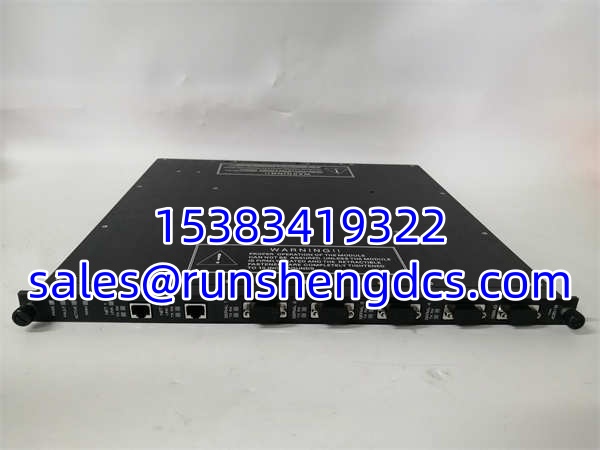
- Product Model: TRICONEX 4351B
- Manufacturer: TRICONEX (Schneider Electric)
- Product Type: Tricon Communication Module (TCM)
- Serial Ports: 4 (RS-232/RS-485, DB-9 connectors)
- Network Ports: 2 Copper Ethernet (10/100BaseT, RJ-45)
- Max Serial Baud Rate: 115.2 Kbps per port (460.8 Kbps aggregate)
- Supported Protocols: Modbus (Master/Slave), TCP/IP, TriStation, TSAA, SNTP
- Port Isolation: 500 VDC
- System Compatibility: Tricon v10.0 and later
- Installation: Hot-swappable in Tricon Rack
Product Introduction
When you’re managing a Safety Instrumented System (SIS), you don’t have the luxury of downtime, and the TRICONEX 4351B is the critical link that keeps your Tricon controller talking to the rest of the plant. This Tricon Communication Module (TCM) bridges the gap between the safety controller and external networks, providing four serial ports and two copper Ethernet ports. I’ve seen plants lose critical Modbus connectivity because they used a cheap, unshielded comm card, but the 4351B is built with 500 VDC port isolation to keep ground loops from frying your safety logic.
Engineers trust the 4351B because it handles the heavy lifting of protocol translation without bogging down the main TMR processors. It supports Modbus TCP/IP, TriStation, and TSAA natively, making it the standard for integrating legacy serial field devices with modern DCS networks. Just a heads-up from the field: this specific module is notoriously picky about alias mapping. If you don’t assign your five-digit Modbus aliases correctly in TriStation, you’ll be chasing your tail trying to figure out why the DCS is reading zeros.
Quality SOP & Tech Pitfalls
The Lab Report:
Communication modules are sensitive to ESD and physical damage. Here is how we verify a 4351B before it ships:
- Visual Inspection: We check the DB-9 and RJ-45 connectors for bent pins or broken plastic. These get abused during field swaps.
- Live Rack Test: We mount it in a Tricon test chassis and verify it boots, passes self-diagnostics, and the PASS LED stays solid green.
- Comms Test: We ping both Ethernet ports and run a Modbus poll to ensure the serial ports are responding.
- Seal Check: Final ESD bag and anti-static seal.
The Engineer’s Warning:
Here is the classic mistake: Mixing TCM models in the same logical slot. The Tricon system does not allow you to mix a 4351B with a 4352A (fiber) in the same logical slot. I once saw a tech shove a 4351B into a slot previously occupied by a fiber module, and the system refused to sync. Also, check your firmware. If your Tricon is running an older version (pre-v10.0), this card won’t even be recognized. Always photograph the old module’s DIP switches and slot position before pulling it.
Installation & Configuration Guide
- Pre-Installation: ⚠️ Verify system redundancy. While the 4351B is hot-swappable, you should ensure the redundant TCM is healthy before swapping. Take a photo of the slot and any DIP switch settings.
- Removal: Label the Ethernet and serial cables. Release the DIN clip gently. Do not yank the module.
- Installation: Verify the logical slot matches the original. Slide the 4351B straight in. Ensure the RJ-45 connectors seat fully. Tighten the mounting screws to secure the backplane connection.
- Power-On & Testing: The module will auto-detect. Watch the PASS, ACTIVE, and LINK LEDs. Open TriStation to verify the module is recognized and the Modbus aliases are still mapped correctly.

TRICONEX 4351B
Compatible Replacement Models
- ✅ Drop-in Replacement: TRICONEX 4351A. The previous revision. Functionally identical for most applications, but verify your TriStation configuration matches.
- ✅ Drop-in Replacement: TRICONEX 4351B. The exact same unit. No configuration changes needed.
- ⚠️ Alternative (Fiber): TRICONEX 4352A. This is the fiber-optic version. Do not use unless you are upgrading to fiber and have the correct SFP modules and cabling.
Frequently Asked Questions (FAQ)
Can I hot-swap this module?
Yes, the 4351B supports hot-swapping. However, if you are replacing a failed module, check the system diagnostics first. If the entire TCM pair is down, you may lose external communications until the new module boots.
Why is my Modbus communication timing out?
90% of the time, it’s an alias mismatch. The 4351B doesn’t use variable names; it uses five-digit numeric aliases. If someone recompiled the logic in TriStation and changed the alias map, your DCS will stop reading data. Check the alias table.
Is the 4351B compatible with Tricon v9.9?
No. This module requires Tricon firmware v10.0 or later. If you are running v9.9, you need the older 4351A or 4351 (no suffix) modules.
Can I use this for TriStation programming?
Yes. Serial Port #4 on the 4351B can be configured specifically for the TriStation interface. Just make sure you don’t assign it as a Modbus port in your configuration.
What happens if I lose one Ethernet port?
The 4351B has two independent ports (NET 1 and NET 2). If one fails, the other will continue to operate. However, if you are using a redundant network setup, verify your switch configuration to ensure failover works as designed.
Does this module support OPC?
No. The embedded OPC server is only available on the 4353 and 4354 models. If you need OPC, you’ll need to upgrade or use an external OPC gateway.