

Description
Product Introduction
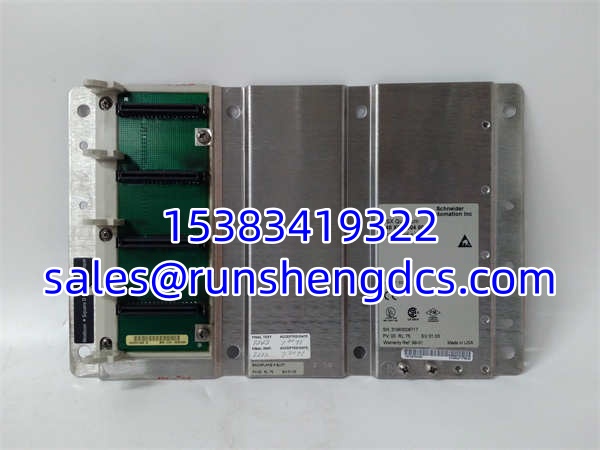
The Schneider 140XBP00400 is the foundational 4-slot backplane for the Modicon Quantum platform. In plain terms, it’s the chassis that holds your CPU, power supply, and I/O cards together, providing both the mechanical mounting and the electrical bus for data and power distribution.
Honestly, if you’re sourcing this in 2026, you’re likely expanding a small local rack or replacing a physically damaged one. It’s a simple, passive component—no firmware to worry about—but it’s critical. A cracked backplane connector or a bent bus pin can cause intermittent communication faults that are a nightmare to troubleshoot. With Schneider’s service support winding down, grabbing a clean, tested unit now is smart insurance for your legacy Quantum system.
Key Technical Specifications
| Parameter | Specification |
|---|---|
| Product Type | Quantum Backplane / Rack |
| Number of Slots | 4 |
| Bus Type | Local Bus (Parallel) |
| Module Compatibility | All Modicon Quantum Series |
| Mounting | DIN Rail or Panel Mount |
| Material | Metal Frame, Plastic Insulators |
| Operating Temp | 0°C to +60°C |
| Dimensions | ~150mm x 130mm x 50mm (Approx.) |
| Weight | ~0.5 kg |
| Lifecycle | Legacy / Service Ending 2026 |
Compatibility & Replacement Matrix
- Schneider 140XBP00400 → Schneider 140XBP00400 : Direct Replacement — Identical part number, plug-and-play.
- Schneider 140XBP00400 → Schneider 140XBP00400C : Direct Upgrade — The
Csuffix indicates conformal coating. Functionally identical but offers better protection against humidity, dust, and corrosive atmospheres. Highly recommended for harsh environments. - Schneider 140XBP00400 → Schneider 140XBP00600 : Physical Upgrade — The 00600 is a 6-slot backplane. It fits the same mounting footprint but gives you 2 extra slots for future I/O expansion. Verify your panel space before upgrading.
- Schneider 140XBP00400 → Schneider 140XBP00400S : Incompatible — The
Ssuffix typically denotes a Safety or Special backplane with different bus wiring. Do not substitute without verifying the exact bus architecture.
SCHNEIDER 140XBP00400
Quality Inspection & SOP Transparency
Backplanes are passive, but we still validate them rigorously:
- Incoming Inspection: We verify the part number and perform a meticulous visual inspection of all 4 slot connectors. We check for bent pins, cracked plastic insulators, or corrosion—common issues in racks that have seen decades of card swaps.
- Continuity Test: We use a multimeter to verify continuity on all critical bus lines (5V, 24V, Data, Ground) across all 4 slots. A single broken trace can brick your entire rack.
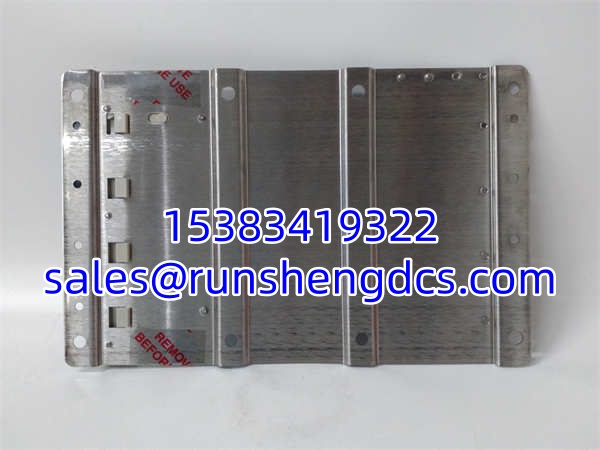
- Mechanical Check: We verify that the DIN rail clips and panel mount holes are intact. We also check that the module guide rails are not worn or cracked, which can cause cards to sit at an angle and damage backplane connectors.
- Insulation Resistance: For refurbished units, we perform a hipot test between the bus bars and the frame to ensure no internal shorts or degradation.
- Final QC & Packaging: After passing, we seal the backplane in a protective bag and pack it in a shock-absorbent carton. We never ship a backplane with bent pins.
Common Replacement Pitfalls
- ❗ Bent Backplane Pins: This is the #1 cause of “new” backplane failures. During shipping or installation, a module can be forced in at an angle, bending the socket pins. Always align the module perfectly before sliding it in. If you feel resistance, stop and inspect. Never force a card.
- ❗ Power Sequencing: The 140XBP00400 distributes 5V and 24V from the power supply module. If you’re replacing a backplane, ensure your power supply is rated for the total load of all installed modules. A marginal PSU can cause voltage sag during module insertion, triggering false faults.
- ❗ Grounding: The backplane frame must be properly grounded. A floating ground can cause noise-induced communication errors or even damage sensitive CPU modules. Verify the grounding strap is connected to a clean earth point.
- ❗ Slot Allocation: Quantum has specific slot rules. The CPU must be in Slot 1, and Power Supplies typically go in Slot 2 or the rightmost slot. Check your manual before populating. Putting a CPU in Slot 3 won’t work.
FAQ
Q: Can I hot-swap modules in this backplane?
A: It depends on the module, not the backplane. The 140XBP00400 itself supports hot-swap bus architecture, but only if your CPU and Power Supply support it. Standard 140CPU11302 CPUs do not support hot-swap. Always check your CPU manual first.
Q: My old backplane is 140XBP00400C. Will the non-C version work?
A: Yes, functionally. The C version just has conformal coating. If you’re in a clean control room, the standard version is fine. If you’re in a wet, dusty, or corrosive area (like a wastewater plant or coastal facility), stick with the C-suffix or apply aftermarket coating.
Q: What happens after Schneider ends service in 2026?
A: Official support stops. Your only source will be surplus. Backplanes are mechanical; they don’t fail often, but when they do, it’s catastrophic. We recommend keeping one spare 4-slot backplane on-site if you have multiple Quantum racks. It’s cheap insurance.
Q: Can I mix Quantum and Modicon M340 modules in this rack?
A: No. The 140XBP00400 is strictly for Quantum modules. M340 uses a completely different backplane and form factor. Do not attempt to force an M340 card into a Quantum slot.
Q: How do I know if the backplane is faulty?
A: Symptoms are usually intermittent: random CPU faults, I/O modules dropping off the bus, or “Backplane Communication Error” in Concept/Unity. Before condemning the backplane, reseat all modules and check power supply voltage. If the problem follows the slot (e.g., any card in Slot 3 fails), the backplane is likely damaged.




