
Description
Key Technical Specifications
| Parameter | Value / Notes |
|---|---|
| Part Number | 140CRA93100 |
| Product Family | Modicon Quantum 140-Series |
| Module Type | RIO drop adapter module |
| RIO Type | S908 RIO |
| Cable Type | Single-cable coaxial RIO |
| Coaxial Cable | 75 Ohm typical for S908 RIO applications |
| Platform | Schneider / Modicon Quantum PLC |
| Typical Use | Remote I/O drops, distributed I/O expansion |
Product Introduction
A failed RIO drop adapter usually does not announce itself as a simple “bad card.” The symptoms tend to look like scattered I/O faults: intermittent channels, dropped remote racks, RIO communication errors, or a whole remote drop going offline while the main chassis keeps running. The Schneider 140CRA93100 fits into that architecture as a S908 RIO drop adapter, meaning it is the remote-side interface that lets a Quantum system talk to a remote group of I/O over a single coaxial RIO cable.
Its practical value is that it supports distributed I/O without running discrete wiring from every field device back to the main controller. In older Quantum installations, 140CRA93100 modules are often the bridge between the main PLC and remote panels, motor control centers, or skid-mounted I/O. Bottom line — it is a RIO communications adapter, not an Ethernet module, and it should only be specified where the system already uses S908 single-cable RIO.
QA/QC Transparency SOP
- Intake & Origin Verification
Confirm the nameplate shows Schneider / Modicon, part number 140CRA93100, hardware revision, serial number, and date code. Photograph the front label, backplane connector, coaxial connector side, and mounting hardware. Reject units where the label is missing, mismatched, or describes a different module type. - Live Functional Testing
Install the module in a compatible Quantum rack or test backplane. Verify that the CPU or RIO drop recognizes the adapter, that the RIO link comes up, and that the module does not report persistent communication faults. If possible, connect a known S908 RIO drop and confirm that remote I/O can be scanned. - Electrical Parameter Tests
Check backplane power, ground paths, terminal continuity, and coaxial connector integrity. Inspect the F-type or coaxial RIO connector for corrosion, bent center pins, damaged threads, or loose shielding. Do not apply external voltage to communication ports unless the OEM manual explicitly permits it. - Firmware/Config Verification
Read the module identification, revision, and RIO configuration from the controller project. Confirm that the PLC project matches the physical module type and drop address. Back up the project before making changes. - Final QC & Anti-Static Packaging
Inspect the module for heat damage, cracked housings, missing screws, or damaged backplane pins. Clean the unit, verify mounting hardware, and pack it in anti-static material with rigid protection. Include test status, revision, serial number, and a note that installation must follow plant LOTO procedures.
Field Engineer Gotchas
Wrong module identity
Risk: The part arrives labeled 140CRA93100, but third-party listings may call it an Ethernet module or generic PLC card.
Fix: Match the physical nameplate to Schneider Modicon Quantum 140CRA93100 — S908 RIO drop adapter.
Blunt warning: If the label or physical connectors do not match a RIO adapter, do not install it as one.
Coaxial cable and connector problems
Risk: RIO communication faults, intermittent drops, or CRC-style errors.
Fix: Use proper 75 Ohm coaxial cable, check connector torque, inspect for crushed cable, corroded F-connectors, or broken shielding.
War story: A remote drop kept dropping offline every few hours. The module was replaced twice before someone checked the cable run. The real fault was a corroded coax connector near a wet cable tray. The module was fine; the physical layer was not.
Drop address / RIO configuration mismatch
Risk: The CPU sees the RIO link, but the remote I/O does not map correctly.
Fix: Confirm the drop address, I/O mapping, module types, and slot assignments in the Quantum project.
Reality check: A good 140CRA93100 can still fail to work if the controller project expects a different drop configuration.
ESD and live backplane insertion
Risk: Inserting or removing the module while the rack is powered can damage the backplane interface or RIO communication circuitry.
Fix: Follow plant LOTO rules and avoid hot-swapping unless the installation explicitly allows it.
Bottom line: Treat it as a precision communications adapter, not a field-replaceable terminal block.
Mixing 140CRA93100 with Ethernet RIO hardware
Risk: Assuming any “CRA” module is interchangeable.
Fix: Confirm whether the existing system uses coaxial RIO or Ethernet-based remote I/O.
Blunt warning: 140CRA93100 is not a drop-in replacement for Ethernet RIO adapters.
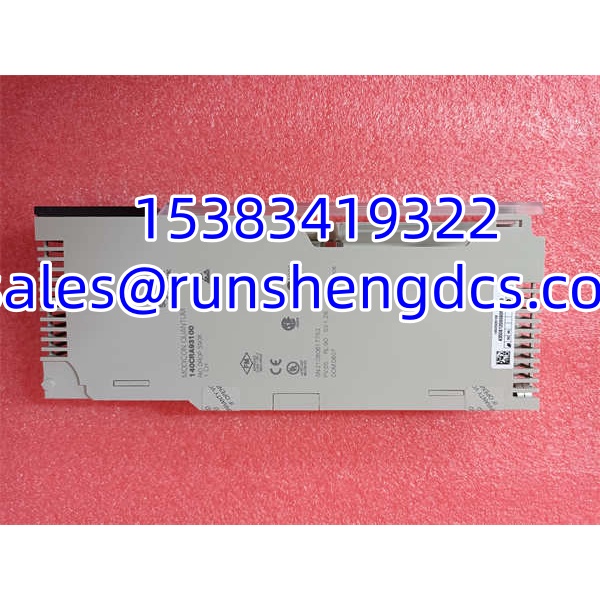
Schneider 140CRA93100
Application Scenarios
- Remote motor control centers, where a Quantum PLC must read status and send commands to MCC I/O located away from the main control cabinet.
- Water/wastewater pump stations, where distributed lift stations or wet-well panels need to report digital and analog I/O back to a central Quantum controller.
- Chemical or process skids, where local I/O is grouped on a remote panel and connected back to the main PLC through a single RIO cable.
- Power plant auxiliary systems, where remote panels for cooling water, lube oil, or utility systems expand the main controller’s I/O footprint.
- Legacy plant expansions, where existing RIO infrastructure is extended rather than replaced with a new Ethernet-based remote I/O system.
Case study — anonymized
A process plant had a remote I/O drop that kept cycling in and out of fault. The SCADA screen showed the entire remote rack as bad, then good, then bad again. Maintenance replaced the 140CRA93100 adapter first. The fault returned within two hours. The real issue was a damaged coaxial cable passing through a cable tray near a vibrating pump skid. The shielding had been nicked, and moisture had corroded the connector. After replacing the coax run, resealing the connectors, and verifying the RIO drop address, the remote I/O stayed online. The lesson: on RIO systems, physical cable and connector health often matter more than the adapter module itself.
FAQ
Is 140CRA93100 an Ethernet module?
No. It is a , typically used for single-cable coaxial remote I/O. Listings calling it an Ethernet communication processor are unreliable.
What does 140CRA93100 actually do?
It acts as a remote RIO drop adapter. It allows a remote group of I/O to communicate with a Quantum RIO system over a single coaxial RIO cable.
Can I replace a 140CRA93100 with an Ethernet RIO module?
Not automatically. The replacement must match the existing RIO architecture. If the system uses single-cable coaxial RIO, an Ethernet RIO adapter will not be a direct replacement without system changes.
Why does the PLC show RIO communication faults after replacement?
Check the drop address, coaxial cable, connectors, I/O mapping, module configuration, and firmware/revision compatibility. A physically correct module can still fault if the RIO configuration does not match.
Is 140CRA93100 compatible with all Quantum CPUs?
Compatibility depends on the CPU, firmware, RIO configuration, and project setup. Verify the controller model, firmware level, and RIO drop configuration before installing the adapter.
Can surplus stock be used in production?
Yes, but only after verification. Confirm the nameplate, revision, physical condition, coaxial connector integrity, and functional test results before installing it in a live control system.
Is this module still suitable for existing plants?
For existing RIO installations, yes — if the hardware is verified and the RIO configuration is supported. For new projects, confirm long-term spare availability and whether a modern Ethernet-based remote I/O architecture is more appropriate.