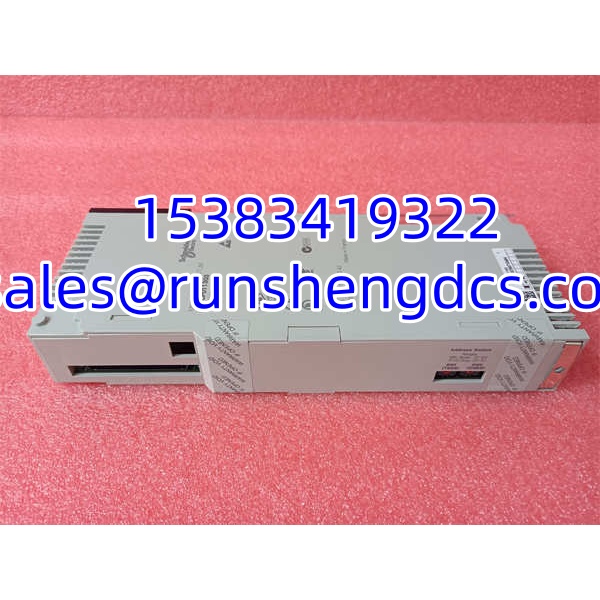

Description
Key Technical Specifications
| Parameter | Value / Notes |
|---|---|
| Brand | Schneider Electric |
| Model | 140CPU11303 |
| Product Family | Modicon Quantum / 140-series PLC |
| Module Type | CPU / PLC processor module |
| Redundancy | Non-redundant |
| Backplane Compatibility | Standard Quantum 140XBP backplane with 140CPS power supply |
| Onboard Communications | Serial port for programming and Modbus |
| Additional Networks | Ethernet, Modbus Plus, TCP/IP typically handled via Quantum communication modules |
| Memory / RTC | Battery-backed memory and real-time clock |
| Programming Tools | Concept, ProWORX, or Unity Pro — firmware-dependent |
| I/O Architecture | No onboard I/O; uses Quantum 140-series discrete, analog, and specialty modules |
| Application Fit | Mid-range logic, local/remote I/O, Modbus-based plant networks |
Product Introduction
In brownfield Quantum systems, the CPU is the part you do not want to guess about. The 140CPU11303 is a Modicon Quantum processor designed for existing 140-series racks, where the main job is keeping discrete sequencing, mid-size process logic, and plant network communications running without forcing a full control-system rebuild. It fits into a standard Quantum backplane and relies on separate Quantum I/O and communication modules rather than carrying onboard I/O.
This CPU is best understood as a compact, non-redundant Quantum controller. It supports battery-backed memory and a real-time clock, which helps retain critical variables and maintain timestamp consistency after power loss. It also provides an onboard serial port for programming and Modbus communications. Bottom line — it is a practical spare or replacement CPU for established Quantum installations, but only if the firmware, memory, backplane, power supply, and project configuration all match.
QA/QC Transparency SOP
- Intake & Origin Verification
Read the nameplate for 140CPU11303, hardware revision, firmware version, serial number, date code, and country of origin. Confirm whether the unit is new surplus, used pull, or refurbished. Quarantine units with bent connector pins, cracked housings, burnt marks, corrosion, or missing labeling. - Live Functional Testing
Install the CPU in a known-good Quantum backplane with a verified 140CPS power supply. Confirm the CPU powers up, enters a normal run or program state, and is recognized by the programming tool. Do not assume a CPU is good just because LEDs light up. - Electrical Parameter Tests
Check backplane power draw, supply voltage tolerance, and terminal/connector integrity. Verify that the battery or memory-retention circuit is not depleted if the application depends on battery-backed memory. Avoid live probing on backplane connectors unless using proper test procedures. - Firmware/Config Verification
Read the firmware version and compare it with the existing project. Back up the current project, hardware configuration, and CPU settings before making changes. Confirm whether the site uses Concept, ProWORX, or Unity Pro, because firmware and project format can limit compatibility. - Final QC & Anti-Static Packaging
Clean connectors and backplane contact areas. Cap unused ports. Label the module with part number, serial number, firmware version, test date, pass/fail status, and tester ID. Package in anti-static material before shipping.
Field Engineer Gotchas
- Firmware mismatch can block a “same part number” replacement
Risk: Two 140CPU11303 modules may share the same base part number but carry different firmware revisions. That can cause project download failures, communication timeouts, or unexpected scan behavior.
Fix: Record the old CPU’s firmware version before removal. Match firmware on the replacement or confirm the programming tool can handle the version difference.
Blunt warning: “Same model number” does not mean “drop-in ready.” Firmware is part of the identity. - Programming tool compatibility is not automatic
Risk: Assuming any Schneider programming software will work can waste commissioning time. The 140CPU11303 may be supported by Concept, ProWORX, or Unity Pro, but firmware and project format matter.
Fix: Use the same tool and version that the original project used whenever possible. If migrating tools, test offline first.
Reality check: A lot of CPU replacements stall at the download step, not the hardware step. - Battery-backed memory can fail silently
Risk: If the battery or memory-retention circuit is weak, the CPU may power up fine but lose retentive data, timestamps, or recipe values after a power cycle.
Fix: Verify battery condition and memory retention before installing the CPU in a live system.
War story: A replacement CPU looked perfect on the bench, but after one power cycle the plant lost retentive counters and had to rebuild the recipe data. Never trust memory retention without testing it. - Backplane and power supply must be verified
Risk: Installing the CPU into a dirty, damaged, or incompatible backplane, or powering it from an unverified 140CPS supply, can cause communication faults, random resets, or hardware damage.
Fix: Confirm backplane type, slot position, power supply model, and supply voltage before installation.
Bottom line: The CPU is only as stable as the backplane and power feeding it.
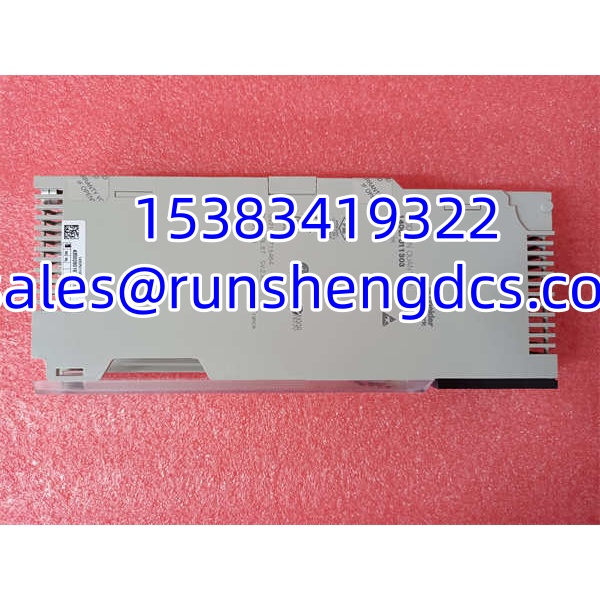
Schneider 140CPU11303
Application Scenarios
- Brownfield Quantum PLC maintenance
Used in existing Modicon Quantum systems where the original CPU has failed and a like-for-like replacement is needed to avoid full system migration. - Mid-range discrete and process control
Suitable for applications running moderate logic, local I/O, remote I/O, and Modbus-based plant communications. - Utility and manufacturing control racks
Common in water/wastewater, power, HVAC, packaging, and general manufacturing systems built around the Quantum 140-series ecosystem. - Plant network integration with Modbus
Can serve as the main CPU in systems where the onboard serial port handles programming and Modbus communications, with additional networks handled by separate Quantum communication modules.
Anonymized Case Study
A plant had a Modicon Quantum rack fault on an aging production line. Maintenance identified the failed processor as 140CPU11303 and pulled a surplus replacement from stock. Before installation, the technician recorded the original CPU’s firmware version, hardware revision, and project filename. The replacement CPU had the same base model number but a different firmware revision. Instead of forcing a download, the team loaded the project offline, checked hardware configuration compatibility, and verified communication settings before installing it in the rack. The CPU powered up cleanly, but full acceptance required confirming retentive data, timestamps, and Modbus communication with the existing HMI. The lesson: a matching part number gets you in the rack; matching firmware and configuration gets you back into production.
FAQ
- What is Schneider 140CPU11303?
It is a Modicon Quantum CPU module, used as the main processor in a Modicon Quantum 140-series PLC system. - Is 140CPU11303 an analog module?
No. It is a CPU / PLC processor module, not an analog input or analog output module. - Does it have onboard I/O?
No. The 140CPU11303 does not carry onboard I/O. It uses separate Quantum 140-series discrete, analog, and specialty I/O modules. - What programming software does it use?
It can be programmed with Schneider tools such as Concept, ProWORX, or Unity Pro, depending on firmware and project format. Verify the exact tool and version before attempting a download. - Can I replace another Quantum CPU with 140CPU11303?
Not automatically. Other Quantum CPUs may differ in memory, redundancy support, firmware, communication capability, and project compatibility. Match the full part number and verify the project configuration. - Is 140CPU11303 redundant?
No. It is a non-redundant Quantum CPU. If the application requires hot standby or redundant processors, a different CPU model and system architecture must be verified. - What should I check before installing it?
Check the physical part number, hardware revision, firmware version, battery/memory retention, backplane compatibility, power supply, programming tool, project file, communication settings, and I/O configuration.