
Description
Key Technical Specifications
- Product Type: PROFIBUS DPV1 Master Communication Module
- Platform: Schneider Electric Quantum PLC (Unity Pro / Concept compatible)
- Protocol: PROFIBUS DP V0/V1 per IEC 61158
- Communication Port: 1× PROFIBUS DP interface (9-pin D-Sub, RS-485 with optical isolation)
- Baud Rate: 9.6 kbps to 12 Mbps (auto-detect capable)
- Max Slaves: 31 without repeater; up to 125 with repeaters
- Data Mapping: Up to 2048 bytes input / 2048 bytes output (varies by configuration)
- DPV1 Services: Class 1 (cyclic I/O) + Class 2 (acyclic parameter/diagnostic read-write)
- Hot Standby: Unity HEC compliant — up to 4 modules per rack in hot standby config; up to 6 in non-redundant
- Processor Architecture: Siemens ASPC2 Step E ASIC + Infineon C165 microcontroller
- Power: 5V DC from Quantum backplane, approx. 1.2A max draw
- Configuration Tool: ProSoft Configuration Builder (PCB); FDT/DTM comDTM included
- Firmware: Flash-upgradable
- Operating Temperature: 0°C to +60°C
- Enclosure Rating: IP20
- Certifications: PROFIBUS PTO certified; Schneider CAPP approved; ATEX/IECEx zone ratings on select revisions
Product Introduction
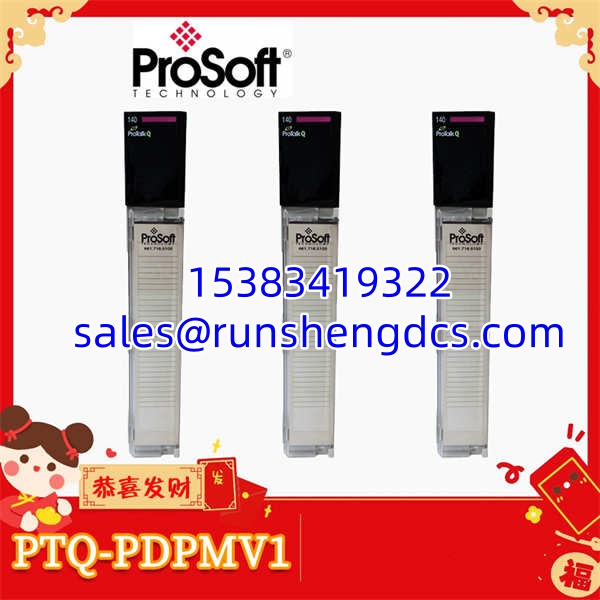
You have a Quantum rack controlling a process unit, and 40 PROFIBUS slave devices — VFDs, valve islands, remote I/O blocks — need to talk to that PLC. The PTQ-PDPMV1 is the single-slot module that makes that conversation happen. It plugs directly into the Quantum backplane, gets recognized as an option module, and starts scanning your PROFIBUS bus. The PLC reads and writes process data through the backplane while the module handles all the PROFIBUS protocol overhead on the field side. Async operation means the PROFIBUS scan does not block your PLC cycle — a detail that matters when your scan time budget is already tight.
What sets the DPV1 version apart from a plain DPV0 master is the Class 2 acyclic service channel. You can read and write parameters to your drives, pull extended diagnostics from field devices, and handle alarm acknowledgments — all without interrupting the cyclic I/O exchange. That is the difference between a module that just polls data and one that lets you actually manage your field devices from the PLC. The Siemens ASPC2 ASIC handles the heavy protocol lifting, and the firmware is flash-upgradable, which has saved more than one engineer from a full module swap when a protocol bug surfaced.
Troubleshooting Quick Reference
| Fault | Cause | Relevancy | Quick Check | Fix |
|---|---|---|---|---|
| Module not recognized in Quantum rack | Improper seating or backplane slot conflict | ~55% if new install or after maintenance | Check module LEDs; verify slot assignment in Unity Pro hardware config | Reseat module firmly; confirm slot is configured as option module in project |
| No PROFIBUS communication (all slaves fault) | Bus wiring fault, termination error, or baud rate mismatch | ~65% if entire segment is dead | Measure resistance between A/B lines (should be ~110Ω with terminators); check LED status | Verify 9-pin D-Sub pinout; confirm both ends terminated; match baud rate in PCB config |
| Intermittent slave timeouts | Loose connector, cable damage, or EMI on bus | ~50% in electrically noisy areas | Check specific slave address in PCB diagnostics; inspect cable routing | Re-terminate connectors; route PROFIBUS cable away from VFD power cables; verify shield grounding |
| Slave responds but data is wrong | Data mapping mismatch between PCB config and Unity Pro | ~45% after configuration change | Compare byte offsets in PCB slave config vs. PLC memory mapping | Realign data mapping tables; verify CRC consistency check passes |
| Hot standby switchover fails | Firmware mismatch between primary/standby modules or HEC config error | ~35% in redundant systems | Compare firmware revisions on both modules; check Unity HEC status bits | Match firmware versions; verify HEC parameters in Unity Pro project |
| Module powers up but no data transfer | Firmware corruption or lost configuration | ~30% after power event | Connect via PCB over Ethernet; check firmware version and config status | Re-download configuration via PCB; re-flash firmware if needed |

PROSOFT PTQ-PDPMV1
Application Scenarios & Pain Points
- Drive control in mineral processing: A SAG mill control system uses the PTQ-PDPMV1 to manage 18 variable-frequency drives over PROFIBUS. The Class 2 acyclic channel reads drive parameters (current, torque, temperature) while Class 1 handles the speed setpoint cyclically. Pain point — when a drive firmware update changes its parameter structure, the acyclic read returns garbage data, and nobody notices until the drive trips on an overtemperature condition that should have been caught by trending.
- Distributed I/O in water treatment: Multiple remote I/O stations connected via PROFIBUS repeaters, all polled by a single PTQ-PDPMV1 in the master PLC. Pain point — at 95 slaves across 3 repeater segments, the bus cycle time creeps up. Add one more I/O block and you blow past your acceptable scan time. The module handles 125 slaves on paper, but real-world cycle time depends on data volume per slave, not just slave count.
- Legacy brownfield replacement: A power plant running Quantum PLCs with PTQ-PDPMV1 modules installed 12+ years ago. Pain point — when a module fails, finding an exact-match replacement with compatible firmware is a gamble on the surplus market. A module with mismatched firmware may enumerate fine but fail the CRC consistency check against your existing Unity Pro project, forcing a full reconfiguration during a forced outage window.
- Real-world case: A controls engineer at a cement plant dealt with random PROFIBUS communication drops on a PTQ-PDPMV1 serving 24 slave devices. The module LEDs showed normal operation, but every 4–6 hours, 3 or 4 slaves would drop off the bus simultaneously for 2–3 seconds, then recover. Network analysis revealed the issue was not the module itself — it was a failing repeater in segment 2 generating burst noise that corrupted multiple slave addresses in one shot. The PTQ-PDPMV1 was doing exactly what it was supposed to do; the repeater was the culprit. Total diagnostic time: 3 shifts. A bus analyzer plugged in from day one would have found it in 20 minutes.