
Description
Key Technical Specifications
| Parameter | Specification |
|---|---|
| Manufacturer | Honeywell |
| Model | CC-TCF901 |
| Product Type | Control Firewall IOTA (mounting plate) |
| System Platform | Experion PKS / C300 Controller |
| Paired Module | CC-PCF901 Control Firewall (CF9) |
| Ethernet Ports | 8 ports + 1 uplink |
| Network Interface | FTE (Fault Tolerant Ethernet) A/B |
| Mounting | C-series controller rack |
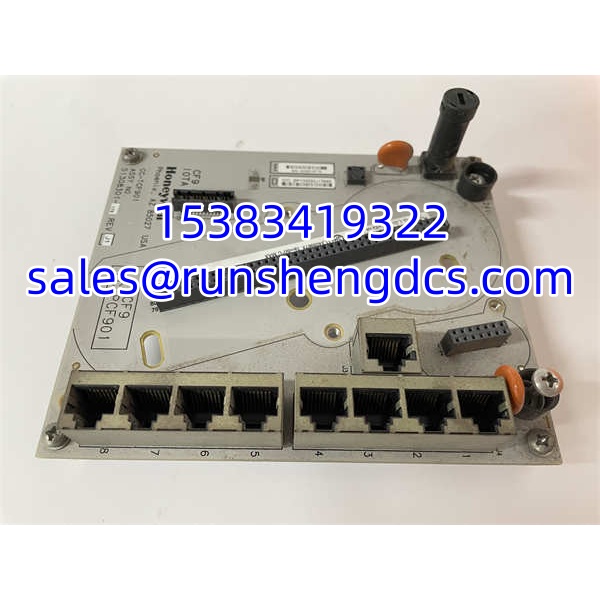
| Function | Provides mechanical mounting and FTE/Ethernet connectivity for CF9 |
| Active Firewall | Provided by CC-PCF901 module, not by the IOTA itself |
Product Introduction
The CC-TCF901 is easy to misidentify because the word “firewall” appears in its description, but it is not the firewall itself. It is the IOTA — the Input/Output Terminal Assembly — that the CC-PCF901 Control Firewall module plugs into. Think of it the same way a CC-TCNT01 is the IOTA for a C300 controller: the IOTA provides the mechanical mount, the backplane interface, and the external Ethernet/FTE connectors, while the module seated on top does the actual processing.
The CF9 firewall sits between the plant network and the C300 controller’s FTE network, filtering unauthorized traffic and providing a fixed, no-configuration security boundary. The CC-TCF901 IOTA provides the 8 Ethernet ports and 1 uplink that connect the CF9 module to the network infrastructure. It mounts in the C-series rack alongside the C300 controller IOTA and PM I/O chassis. Bottom line — if the CF9 module is healthy but the IOTA connectors are damaged or corroded, replacing the CC-TCF901 restores the physical interface. If the firewall function itself has failed, the CC-PCF901 module is the part that needs replacement.
QA/QC Transparency SOP
- Intake & Origin Verification — Record full model CC-TCF901, PCB revision, serial number, and cabinet origin. Inspect for bent RJ45 ports, damaged latch clips, corroded connector pins, or prior rework on the PCB.
- Visual & Mechanical Inspection — Verify all 8 Ethernet ports and the uplink port are physically intact. Check mounting screw holes, alignment pins, and the CC-PCF901 mating interface for wear or damage.
- Continuity Testing — Test pin-to-pin continuity across each RJ45 port and the backplane interface. Check for shorts between adjacent ports and verify isolation between FTE A and FTE B paths.
- Live Functional Verification — Install a known-good CC- module onto the IOTA in a verified C300 test rack. Confirm link lights on all ports, FTE A/B communication, and proper module recognition by the controller.
- Final QC & Anti-Static Packaging — Photograph nameplate, port faces, PCB condition, and test readings. Pack in anti-static shielding with rigid protection for the RJ45 connectors. Include a test summary and traceability record.
Field Engineer Gotchas
- IOTA vs. module confusion — The CC- is the IOTA plate. The CC- is the firewall module. Ordering the wrong one means the replacement won’t solve the actual fault.
- Port damage is common — Repeated plugging/unplugging of FTE cables can bend RJ45 latch clips or damage internal contacts. A port that looks fine externally may have intermittent connectivity.
- FTE A/B polarity matters — The yellow (FTE A) and green (FTE B) cables must connect to the correct ports. Swapping them can break the redundant FTE path and cause controller communication loss.
- CF9 is not a full IT firewall — The CF9 provides fixed filtering for control network protection. It does not replace a plant IT firewall and does not perform deep packet inspection or antivirus functions.
- Uplink port configuration — The single uplink port has a specific role in the FTE topology. Connecting it incorrectly can isolate the controller from the redundant FTE network.
- Rack slot alignment — The CC- must align precisely with the C-series rack guide rails. Forcing it can damage both the IOTA and the CC- module connector.
Honeywell CC-TCF901
Application Scenarios
- C300 controller network security upgrade — Installing a CF9 firewall assembly (CC- + CC-) to isolate the FTE network from the plant IT network.
- FTE port replacement — Replacing a CC- IOTA when RJ45 ports are physically damaged but the CC- module remains functional.
- Control cabinet refurbishment — Upgrading or replacing aging firewall IOTA assemblies during a planned turnaround or control system migration.
- Spare parts validation — Pre-testing a replacement CC- with a CC- module before installation to minimize commissioning risk.
FAQ
It is the IOTA mounting plate. The actual firewall module is the CC-, which installs onto the CC-.
How many Ethernet ports does it have?
8 Ethernet ports plus 1 uplink port.
What network does it connect to?
It connects to the FTE (Fault Tolerant Ethernet) network, which is Honeywell’s redundant control network for Experion PKS.
No. The CC- is a passive interface plate. The CC- module must be installed for firewall functionality.
Is it compatible with C200 controllers?
No. The CC- is designed for the controller family in the C-series rack. C200 controllers use a different architecture.
Does the CF9 firewall require configuration?
No. The CF9 provides fixed, no-configuration filtering. It is designed as a simple security boundary between the plant network and the control FTE network.
What cables connect to it?
Standard Cat5e/Cat6 Ethernet cables for FTE A (yellow) and FTE B (green) connections, per Honeywell FTE wiring conventions.