
Description
Key Technical Specifications
| Parameter | Detail |
|---|---|
| Manufacturer | Honeywell |
| Model | CC-TCF901 |
| Product Type | CF9 Control Firewall I/O Terminal Assembly (IOTA) |
| Platform | Honeywell Experion PKS C300 |
| Compatible Module | CC-PCF901 Control Firewall 9 module |
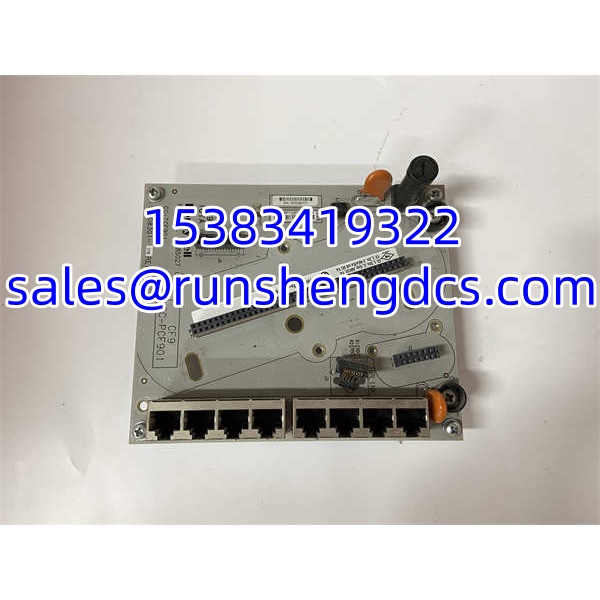
| Ethernet Ports | 9 × RJ-45 (8 FTE distribution + 1 uplink) |
| Uplink Function | Connects to FTE supervisory/monitoring network |
| Power | Provides 24 VDC to control/firewall devices |
| Mounting | C-Series cabinet carrier / IOTA mounting rail |
| Approx. Dimensions | 12.1 cm × 14.5 cm |
| Approx. Shipping Weight | 2 kg |
| Documentation | Verify with OEM datasheet; public listings confirm IOTA role, not full electrical ratings |
Product Introduction
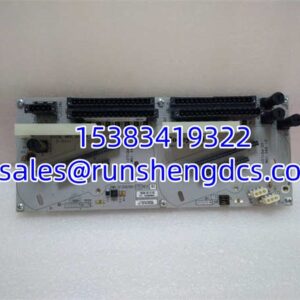
A loose FTE cable or mislabeled uplink port can knock out controller communications faster than a bad CPU. The CC-TCF901 is not the firewall processor itself. It is the IOTA that the CC-PCF901 Control Firewall 9 module plugs into, and it provides the 9-port RJ-45 interface that distributes FTE cabling inside the C300 cabinet.
Bottom line — it is the physical and power interface for the CF9 firewall, not the logic device. The CC-TCF901 connects up to eight FTE cables from controllers and C-series modules, while the ninth port serves as the uplink to the FTE supervisory network. Public sources confirm the 9-port RJ-45 layout and 24 VDC distribution function, but exact electrical ratings should be verified against the installed nameplate and OEM documentation.
QA/QC Transparency SOP
- Intake & Origin Verification: Verify part number CC-TCF901, label condition, and revision markings. Reject units with damaged RJ-45 ports, bent mounting tabs, or corroded bus contacts.
- Live Functional Testing: Install on a C-Series test carrier with a known-good CC-PCF901 module. Verify 24 VDC presence, port link activity, and uplink connectivity under no-load and loaded conditions.
- Electrical Parameter Tests: Check 24 VDC bus continuity, rail-to-chassis insulation, and voltage drop across the IOTA power path. Inspect RJ-45 contacts for oxidation or loose pins.
- Firmware/Config Verification: This IOTA has no firmware. Confirm compatibility by matching the cabinet drawing, CC-PCF901 module revision, and approved spare list.
- Final QC & Anti-Static Packaging: Photograph label and port layout, record serial/revision, verify all 9 RJ-45 ports are intact, and pack with ESD-safe protection.
Field Engineer Gotchas
- CC-TCF901 vs CC-PCF901 confusion. The CC-TCF901 is the IOTA; the CC-PCF901 is the firewall module that plugs into it. Ordering the wrong one means the cabinet slot still looks complete, but the FTE distribution path is missing.
- Uplink port miswiring. Port 9 is the uplink to the FTE supervisory network. Plugging a controller FTE cable into the uplink port can create unexpected communication faults.
- FTE-A/FTE-B color discipline. Yellow is typically FTE-A and green is FTE-B in C300 cabinets. Swapping them at the IOTA level makes troubleshooting harder later.
- 24 VDC bus seating. A loose power contact on the IOTA can cause intermittent firewall or controller communication loss. Check bus seating before replacing the CC- module.
- RJ-45 port damage. Repeated patching into the wrong port can wear out connectors. If a port feels loose, do not force it; damaged RJ-45 contacts create intermittent link drops.
Application Scenarios
- C300 cabinet FTE distribution: Terminating controller and C-series module FTE cables into the CF9 firewall IOTA before uplinking to the supervisory network.
- Firewall IOTA replacement during turnaround: Swapping a damaged CC-TCF901 while preserving FTE-A/FTE-B segregation and uplink routing.
- Network segmentation troubleshooting: Isolating whether a communication fault sits in the CC- module, the CC- IOTA, or the upstream FTE switch.
- Spare-parts standardization: Locking down approved CF9 IOTAs for sites running mixed C300 firewall hardware.
FAQ
No. CC- is the IOTA. The firewall module is CC-, which mounts onto this IOTA.
How many Ethernet ports does it have?
Nine RJ-45 ports: eight for FTE distribution and one uplink to the FTE supervisory network.
Does it run firewall rules?
No. The IOTA provides physical termination and 24 VDC distribution. Firewall processing is handled by the CC- module.
Not as a CF9 firewall IOTA. It is designed to support the CC- module and its FTE distribution function.
What voltage does it carry?
It provides 24 VDC to control/firewall devices. Exact current ratings should be confirmed from the OEM datasheet or installed hardware.
Is it hot-swappable?
Treat it as non-hot-swappable unless the OEM documentation explicitly allows it. Removing an active FTE IOTA can interrupt controller communications.
How do I confirm it is genuine?
Check the Honeywell label, CC- part number, 9-port RJ-45 layout, C-Series IOTA mounting features, and cabinet drawing match.