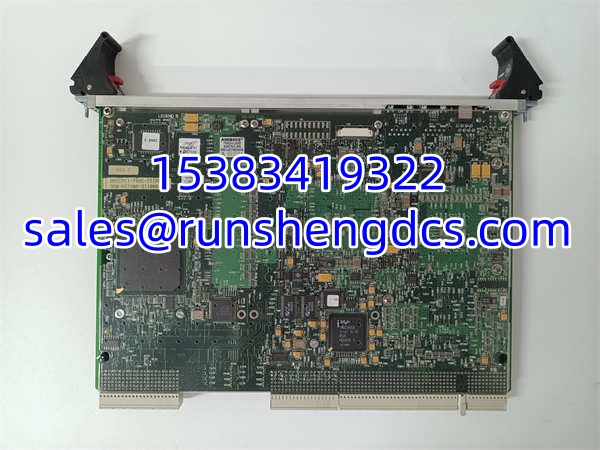

Description
Key Technical Specifications
- Form factor: 6U CompactPCI, single slot
- Processor: Intel Pentium M 1.6 GHz, 1 MB L2 cache
- Memory: Up to 1 GB DDR SDRAM soldered to board
- Bus interface: 64‑bit / 66 MHz CompactPCI, PICMG 2.0 Rev3.0, PICMG2.16
- Network: 2× 10/100/1000BASE‑T copper Ethernet
- Serial: 2× 16550‑compatible RS‑232 ports
- USB: 2× USB2.0
- Storage: Serial ATA interface
- Expansion: 2× PMC mezzanine sites (one 64‑bit 66 MHz, one 32‑bit 33 MHz)
- System management: IPMI remote management
- Hot swap: PICMG2.1 compliant hot‑swap capable
- Operating temperature: 0 °C to +60 °C (commercial grade; extended temp variants exist separately)
- Storage temperature: −40 °C to +85 °C
- Supported OS: Windows XP, Windows 2000, QNX, VxWorks, Linux
- Typical MTBF: 226,000 hours at 40 °C ambient
- Power draw: Typical 22 W; max 28 W
- Weight: 0.98 kg
Product Introduction
Legacy power and simulation racks hit this hard. When the CompactPCI SBC fails, the whole real‑time node goes offline, and lead times for modern drop‑in equivalents stretch for months. No new factory builds ship, so sites hold tested spare boards to avoid full system migration outages. This 6U SBC occupies either system slot or peripheral slot inside a CompactPCI crate. It boots the embedded operating system, executes user code, talks to backplane I/O and PMC cards, and streams data over its dual Ethernet ports. It does not contain hardwired process I/O on its own.
Shelf‑aged boards commonly suffer from bulging electrolytic capacitors that fail only under sustained thermal load. Dual independent Ethernet ports let operators separate control traffic from diagnostic traffic. Under nominal load, OS task scheduling jitter stays below 75 µs with a properly tuned real‑time kernel. Bottom line — it works, but always run multi‑hour thermal burn‑in before commissioning.
QA/QC Transparency SOP
- Intake & Origin Verification. Match primary and alternate part numbers plus serial number against source paperwork. Inspect PCB for capacitor bulging, solder cracks, connector pin corrosion. Document label and component‑side photos for traceability. Reject units showing liquid damage.
- Live Functional Testing (Comms, I/O, Load). Seat board in CompactPCI test chassis. Apply crate power. Boot supported OS image. Run continuous ping and iperf traffic on both Ethernet ports. Exercise serial, USB and SATA interfaces. Cycle CPU at near‑full load for minimum 4 hours. Confirm hot‑swap detection logic triggers as expected.
- Electrical Parameter Tests (Megger, Continuity). De‑energize crate. Run 500 V Megger between backplane signal pins and chassis ground. Insulation resistance must exceed 100 MΩ. Verify every edge connector pin path with a Fluke 87V.
- Firmware/Config Verification (Readout & Backup). Read BIOS revision. Save BIOS binary offline. Flag BIOS revisions known to cause boot hangs or PICMG bus negotiation failures; cross‑reference against the site’s existing BIOS matrix.
- Final QC & Anti‑Static Packaging. Recheck LED indicators and connector retention. Place board in conductive ESD bag, add rigid foam edge guards, pack into anti‑shock carton. Attach unique burn‑in test report ID externally.
Field Engineer Gotchas
- BIOS Rev Mismatch. Risk: Newer BIOS can break compatibility with older crate backplanes or existing PMC cards. Board powers up but hangs during PCI enumeration with no clear fault code. Solution: Match BIOS version to the site’s validated list before installation. One integrator swapped a board without checking BIOS; they spent 3 hours troubleshooting PMC detection failures.
- PMC site mechanical incompatibility. Risk: Some taller PMC modules physically interfere with the top PMC slot on the 7806. The board seats but shorts adjacent components under vibration. Solution: Verify PMC stack height before inserting mezzanine cards.
- ESD risk during hot‑swap. Risk: Even though PICMG hot‑swap is supported, exposed CompactPCI pins pick up static in dry control‑room air. A discharge can damage the PCI bridge chip with zero visible burn marks. Solution: Bond wrist strap to chassis ground, maintain contact while inserting.
- Capacitor fatigue on stored hardware. Risk: Boards can boot fine for 20–30 minutes, then crash once internal temperature rises. Visual inspection often shows no obvious swelling. Solution: Never rely on a quick power‑on test; extended burn‑in is mandatory for surplus units.
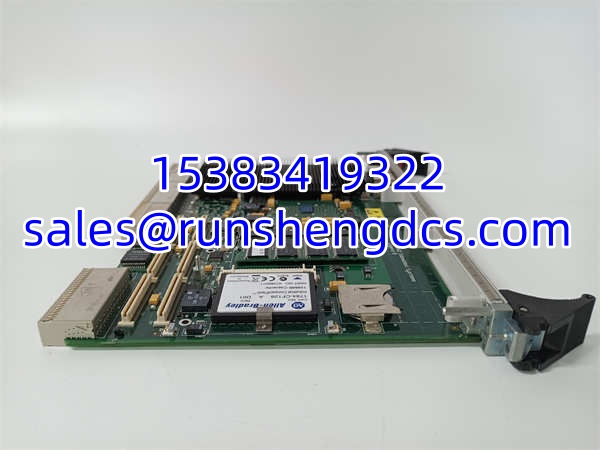
GE VMICPCI-7806-211000 350-657806-211000L
Application Scenarios
Power plant simulator training systems deploy these CompactPCI SBCs to run real‑time turbine and boiler process models. Dual Ethernet isolates simulation traffic from instructor‑station LAN. Substation automation racks use VMICPCI‑7806 nodes for protocol conversion and local data logging, paired with PMC serial or digital I/O mezzanines. Aerospace test benches run VxWorks on these boards for high‑speed hardware‑in‑the‑loop test sequences where replacement of the entire crate would be costly.
Case study: A utility simulator node crashed randomly every 2–5 hours under full model load. Technicians first swapped the power supply and backplane. Bench testing later found degraded bulk input capacitors on the SBC. Replacing the board eliminated crashes; no software changes required.
FAQ
Q: Does GE VMICPCI‑7806‑211000 support hot‑swap? A: It complies with PICMG2.1 hot‑swap specs. The host crate and system software must also support hot‑swap. Unplanned removal can corrupt running application state.
Q: My crate runs existing boards with BIOS V2.03. Will this drop in? A: Compatibility depends entirely on the installed BIOS. Newer BIOS builds may not enumerate older PMC mezzanines correctly. Request BIOS revision before purchase. Verify with OEM datasheet before installation.
Q: Can I use both PMC slots at the same time? A: Yes. One is 64‑bit/66 MHz, the other 32‑bit/33 MHz. Check mechanical clearance and power draw for each PMC card before stacking.
Q: What lead time applies for tested surplus stock? A: Pre‑burned tested units ship in 2–5 business days. Units needing capacitor rework and full thermal soak take 10–14 days. No new factory builds exist.
Q: Are refurbished boards tested with a real OS load? A: Every unit completes OS boot, Ethernet throughput, and CPU stress testing during QC. Our report captures bandwidth and uptime metrics. Site OS image validation is still required after installation.
Q: Can this SBC replace older VMICPCI‑7805 boards? A: Same 6U form factor fits the slot, but BIOS, memory mapping and PMC pin assignments differ. Direct drop‑in is not guaranteed without compatibility testing.
Q: What is the maximum SATA drive size supported? A: Depends heavily on BIOS version. Many older BIOS builds cap detection below 120 GB. Larger drives may require partitioning or alternate boot methods.