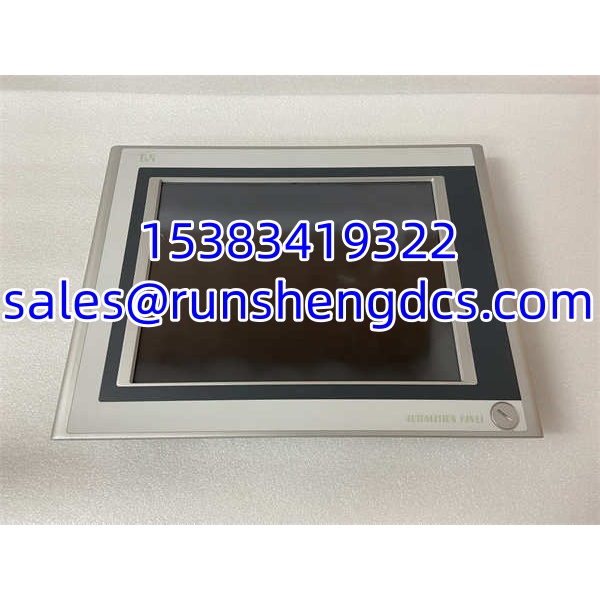

Description
Key Technical Specifications
| Parameter | Detail |
|---|---|
| Product Model | 5AP920.1505-01 |
| Manufacturer | B&R Industrial Automation (ABB) |
| Product Type | Automation Panel AP920 (Display/Touch Unit) |
| Display Size | 15″ color TFT |
| Resolution | VGA (1024 × 768 typical for AP920 15″ family; verify on nameplate) |
| Touch Type | Analog resistive (single-touch, glove-compatible) |
| Power Supply | 24 VDC ±15%, max 3.5 A |
| Interfaces | 3× USB 2.0; Smart Display Link (SDL) slot; Automation Panel Link slot |
| Network/Fieldbus | Dependent on connected Automation PC (not built into panel) |
| Mounting | Panel-mount (cutout installation) |
| Dimensions | Approx. 385 × 295 × 60 mm |
| Protection | IP65 (front) |
| Operating Temperature | −10 °C to +50 °C |
| Cooling | Fanless |
| Software | B&R Panel Designer / Automation Studio |
Product Introduction
A 15″ HMI that goes dark on a packaging line does not always mean the PLC has failed. More often, the panel’s backlight has aged out, the resistive touch layer has delaminated at the edges, or the Smart Display Link cable has worked loose after years of vibration. The 5AP920.1505-01 is one of those panels that keeps running long after its contemporaries have been retired — until it does not.
The B&R 5AP920.1505-01 is a 15″ Automation Panel from the AP920 family. It features a VGA-resolution color TFT display with analog resistive touchscreen, three USB 2.0 ports, an Automation Panel Link expansion slot, and a Smart Display Link interface for connecting to a remote Automation PC. The front bezel is rated IP65, making it suitable for washdown areas in food and beverage, pharmaceutical, and packaging applications. It runs fanless, which eliminates a common failure point in dusty environments.
Unlike a Panel PC, this unit does not contain its own CPU. It is the display and touch interface for a B&R Automation PC located elsewhere in the cabinet or up to 100 m away over SDL cabling. That separation is both a strength — you can replace a cracked screen without touching the PC — and a gotcha, because a dead panel can look exactly like a dead PC from the operator’s perspective.
Bottom line: if the Automation PC is alive (fans spinning, status LEDs normal) but the screen is black or unresponsive, the 5AP920.1505-01 or its SDL link is the first place to look.
QA/QC Transparency SOP
1. Intake & Origin Verification
Verify the full model number 5AP920.1505-01 and any revision suffix on the rear label. Inspect the front bezel for cracks, the touch surface for delamination or yellowing, and the rear connectors for bent pins or corrosion. Confirm it is an AP920 panel, not an AP951/AP981 (which have physical function keys).
2. Live Functional Testing
Connect to a compatible B&R Automation PC via Smart Display Link. Apply 24 VDC and verify power-up. Check backlight illumination, display clarity (no dead pixels, lines, or flicker), and touch responsiveness across all four corners and the center.
3. Electrical Parameter Tests
Use a Fluke 115 or equivalent multimeter to verify 24 VDC input at the terminal block (within ±15% tolerance). Measure current draw under load (max 3.5 A). Check USB port power output and SDL connector continuity. Verify no short circuits on power or signal lines.
4. Touch Calibration Verification
Run the B&R touch calibration routine to confirm the resistive touch layer reports accurate coordinates. Check for dead zones, drift, or phantom touches — common signs of an aging resistive layer.
5. Final QC & Anti-Static Packaging
Document test results, model number, revision, touch calibration status, and any visible cosmetic defects. Seal in ESD-safe packaging with corner protection for the glass. Include a test certificate referencing the Automation PC model and SDL cable length used during testing.
Field Engineer Gotchas
Panel vs. Panel PC Confusion
The 5AP920.1505-01 is not a standalone computer. It is a display/touch unit that requires a remote Automation PC via Smart Display Link. If you order this expecting a self-contained HMI with a built-in CPU, you will be disappointed. Conversely, do not replace a failed Automation PC with this panel — they are entirely different components.
AP920 vs. AP951/AP981 Mix-Up
The AP920 family is touch-only. The AP951 and AP981 families add physical function keys and system keys. They share the same 15″ form factor and mounting cutout but are not drop-in equivalents if your application relies on those physical keys. Verify the prefix: 5AP920 = touch only, 5AP951/5AP981 = touch + keys.
Smart Display Link Cable Integrity
A loose or damaged SDL cable is the most common cause of a “dead” panel. The SDL connection carries video, touch, USB, and power signals over a single cable. Intermittent black screens or touch dropouts often trace back to a worn connector or a cable that has been flexed beyond its bend radius. Reseat both ends before replacing the panel.
Resistive Touch Degradation
Resistive touchscreens wear out. After years of use, the touch layer can develop dead zones or register phantom touches. If the display looks fine but touch response is erratic, the panel itself — not the PC or software — is likely the culprit.
24 VDC Supply Quality
The panel requires 24 VDC ±15%. A sagging supply below ~20 VDC can cause backlight flicker or intermittent black screens that look like a panel failure. Measure at the panel’s power terminals, not just at the power supply output.
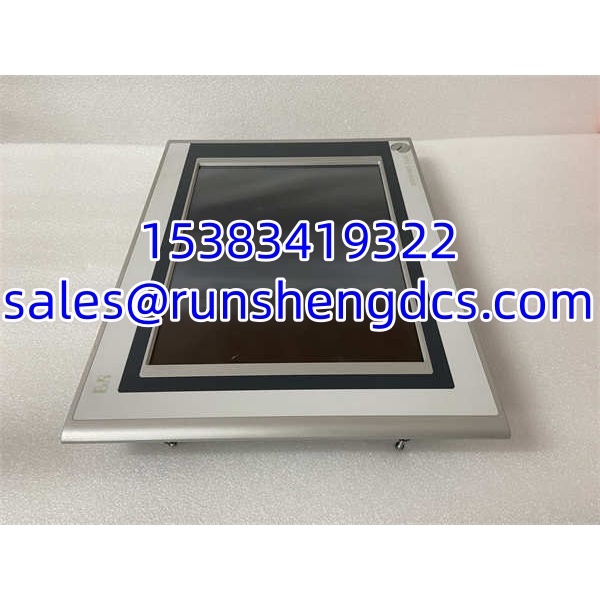
B&R 5AP920.1505-01
Application Scenarios
Packaging and Bottling Lines
The IP65 front and resistive touch make the 5AP920.1505-01 a common choice on packaging machines where operators wear gloves and panels are exposed to moisture and cleaning chemicals. The fanless design prevents dust ingestion in labeler and case-packer environments.
Food and Beverage Processing
Washdown-rated front bezel allows the panel to survive weekly sanitation cycles. The resistive touchscreen works reliably even when the surface is wet — unlike capacitive panels, which can misfire with water film on the glass.
Machine Tool Operator Stations
The 15″ VGA display provides enough screen real estate for multi-page HMI applications with trend displays, alarm lists, and manual jog controls. The three USB ports support flash drives for recipe transfer or data logging.
FAQ
Is the 5AP920.1505-01 a standalone HMI?
No. It is a display/touch panel unit that requires a remote B&R Automation PC connected via Smart Display Link (SDL). It does not have a built-in CPU or operating system.
panels are touch-only. AP951 and AP981 panels add physical function keys and system keys. All three families share similar display sizes and mounting dimensions but are not interchangeable if your application uses the physical keys.
Can I replace a 5AP920.1505-01 with a newer B&R panel?
Potentially, but verify compatibility. Newer B&R panels may use SDL3 or SDL4 instead of the original SDL interface, and the mounting cutout or connector positions may differ. Consult the B&R Automation Panel documentation before substituting.
Does it support Ethernet or fieldbus directly?
No. Network and fieldbus connectivity are provided by the connected Automation PC, not by the panel itself. The panel’s role is display, touch input, and USB expansion.
Can I use capacitive touch gloves with this panel?
The 5AP920.1505-01 uses analog resistive touch, which works with any stylus or gloved finger — no special capacitive gloves needed. This is one of its advantages in industrial environments where operators wear thick work gloves.
What if the screen is black but the PC is running?
Check the SDL cable connection at both ends first. Then verify 24 VDC at the panel’s power terminals. If power and cable are good, the panel’s backlight or internal electronics may have failed.
Is this panel still in production?
Availability varies. The family is a mature product line, and units are commonly available through surplus and refurbished channels. Confirm current status with B&R or an authorized distributor before specifying for new installations.