
Description
Key Technical Specifications
| Parameter | Specification |
|---|---|
| Product Family | Bently Nevada 3500 Series |
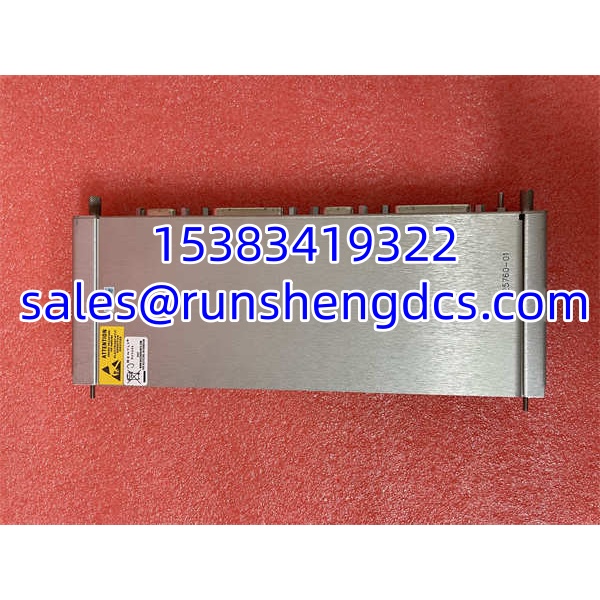
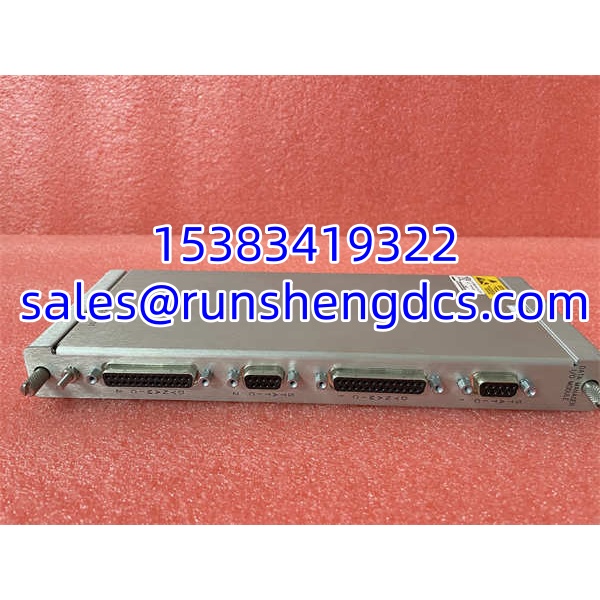
| Module Type | 3500/20 Rack Interface Module (RIM) |
| Part Number | 125760-01 |
| Rack Position | Slot 1 (leftmost) in 3500/05 frame |
| Communication Interfaces | RS232, RS422, RS485 serial; optional Ethernet TCP/IP |
| Power Consumption | ~15.5 W (display unit + interface module combined); ~5.6 W for -01 display variant |
| Display Support | Compatible with 3500/93 (LCD), 3500/94 (VGA), 3500/95 (PC) displays; up to 2 displays per rack |
| Configuration Software | 3500/01 Rack Configuration Software (v3.90+) |
| Operating Temperature | -30 °C to +65 °C typical |
| Storage Temperature | -40 °C to +85 °C |
| Humidity | Up to 95% non-condensing |
| Compliance | Part of API 670-compliant 3500 system; SIL 2 capable as part of certified system |
Product Introduction
If you are still running a 3500 rack that talks to the DCS over RS485 and gets configured through a serial cable, the module in Slot 1 is almost certainly this one. The Bently Nevada 3500/20 (125760-01) is the legacy Rack Interface Module — the RIM — that serves as the communication gateway between the 3500 backplane and the outside world. It handles configuration downloads from the 3500/01 software, routes alarm and process data to external systems, and drives local display units.
The 3500/20 has been largely superseded by the 3500/22M TDI, which adds native Ethernet, USB-B, and transient data capture capabilities. That does not make the RIM obsolete — it makes it a maintenance item. Sites with installed 3500/20 modules need qualified spares because the 3500/22M is not always a drop-in replacement without configuration migration. The 125760-01 draws roughly 15.5 W in a typical display-equipped setup and sits in Slot 1 of the 3500/05 rack. If your rack still runs one, keep a tested spare on the shelf. When it fails, you lose both configuration access and external data communication in one shot.
QA/QC Transparency SOP
- Intake & Origin Verification — Confirm P/N 125760-01 on the module label. Verify it is a 3500/20 RIM (not a 3500/22M TDI, which uses different part numbers such as 288055-01 or 138607-01). Photograph the serial number and revision for traceability.
- Live Functional Testing — Install the module into Slot 1 of a verified 3500/05 test rack populated with at least one monitor module (e.g., 3500/42M). Power the rack and confirm the RIM initializes without fault LEDs.
- Communication Verification — Connect via RS232 to a laptop running 3500/01 Configuration Software. Verify the software detects the rack, reads the module inventory, and can upload the current configuration. Test RS485 communication if the variant supports it.
- Electrical Parameter Tests — Measure module power draw at the rack supply; confirm it is within the expected range (~15.5 W with display interface, ~5.6 W for the -01 display variant alone). Check backplane communication integrity with adjacent modules.
- Final QC & Anti-Static Packaging — Record the test results, including software version used and communication test outcome. Label with test date and tester ID. Pack in ESD-safe bag with desiccant and include a one-page test summary.
Field Engineer Gotchas
- RIM vs. TDI Confusion — The 3500/20 (RIM) and 3500/22M (TDI) both sit in Slot 1, but they are not interchangeable without reconfiguration. The TDI uses different firmware and communication protocols. Solution: Verify Slot 1 module type before ordering. If migrating from RIM to TDI, plan for configuration migration and communication re-mapping on the DCS side.
- Serial Cable Pinout Matters — The 3500/20 uses a proprietary serial interface for configuration. Using a generic null-modem cable may not work. Solution: Use the OEM-specified RS232 cable or verify pinout against the 3500 installation manual. A wrong cable will look like a dead module.
- Display Compatibility — The 3500/20 supports specific display units (3500/93, 94, 95). Mixing display types or connecting more than two displays per rack can cause communication errors. Solution: Verify display P/N compatibility and stay within the 2-display limit per rack.
- Configuration Password Lock — The 3500/01 software typically requires a password (commonly “gates” on older installs) to download configuration changes. If the password was changed and not documented, you cannot modify the rack config even with a working RIM. Solution: Maintain a secure record of the configuration password alongside the archived config file.
- Firmware/Software Version Mismatch — Older RIM firmware may not be recognized by newer 3500/01 software versions, or vice versa. Solution: Match the configuration software version to the installed RIM firmware revision. Verify compatibility before attempting a download.
BENTLY 125760-01
Application Scenarios
- Legacy turbine protection rack — A 15-year-old 3500 installation on a steam turbine uses a 3500/20 RIM for DCS communication over RS485. The RIM fails, and the DCS loses all vibration and trip data. A spare 125760-01 restores communication within 30 minutes — no configuration change needed.
- Compressor station with serial-only infrastructure — The plant network does not support Ethernet at the field level. The 3500/20’s RS485 interface is the only viable communication path to the control room. Replacing it with a 3500/22M TDI would require network infrastructure upgrades.
- Display-driven local monitoring — Operators rely on a 3500/94 VGA display mounted at the rack for real-time vibration readings. The 3500/20 drives the display directly. A failed RIM blanks the display and cuts remote communication simultaneously.
- Configuration access loss during turnaround — A maintenance team needs to modify alarm setpoints on an old 3500 rack, but the RIM has failed and no spare is available. The 3500/01 software cannot connect without a functioning Slot 1 module. Work stops until a spare arrives.
FAQ
Q: Is 125760-01 the same as a 3500/22M TDI?
A: No. The 125760-01 is the 3500/20 RIM, a legacy communication interface. The 3500/22M TDI (P/N 288055-01, 138607-01) is its successor with Ethernet, USB-B, and transient data capabilities. They are not drop-in replacements without configuration migration.
Q: Can I replace a failed 3500/20 with a 3500/22M?
A: Technically yes — both occupy Slot 1 — but the configuration must be migrated, and the communication protocol changes. The DCS mapping, serial vs. Ethernet connectivity, and software version all need to be updated. Plan for engineering time, not just a hardware swap.
Q: What software do I need to configure a rack with a 125760-01?
A: Bently Nevada 3500/01 Rack Configuration Software, version 3.90 or later. Connection is typically via RS232 serial cable to the RIM.
Q: Does the 3500/20 support Ethernet?
A: Some variants include optional Ethernet connectivity, but the primary interface is serial (RS232/RS422/). If you need reliable Ethernet, the 3500/22M TDI is the better choice.
Q: How many displays can I connect to a 3500/20?
A: Up to two displays per rack, using compatible 3500/93 (LCD), 3500/94 (VGA), or 3500/95 (PC) display units.
Q: Is this module still in production?
A: The 3500/20 RIM is considered legacy. Bently Nevada’s current focus is on the 3500/22M TDI for new installations. However, 125760-01 units remain available through surplus and refurbished channels for maintenance of existing installations.
Q: What happens if the 3500/20 fails?
A: The 3500 rack continues to monitor and trip normally — the protection logic runs on the individual monitor modules, not the RIM. However, you lose configuration access, DCS communication, and display updates until the RIM is replaced.