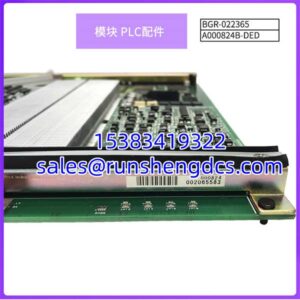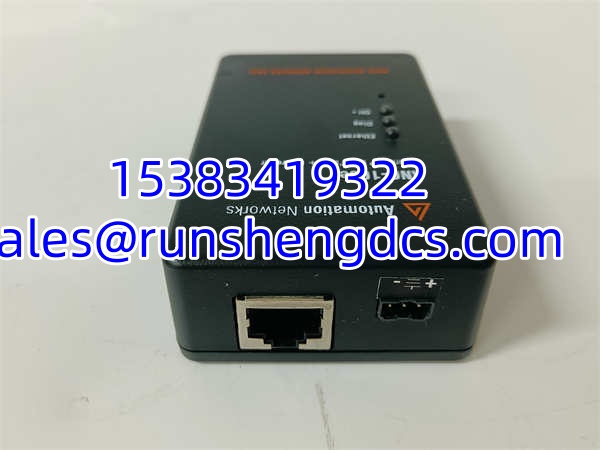

Description
Key Technical Specifications
| Parameter | Specification |
|---|---|
| Product Type | Protocol conversion gateway (DH+ / RIO ↔ EtherNet/IP) |
| EtherNet/IP Interface | 1× RJ45, 10/100 Mbps |
| DH+ / RIO Interface | 1× 2-pin Phoenix connector |
| Supported Baud Rates | 57.6K, 115.2K, 230.4K baud |
| External Power | 24 VDC via 3-pin Phoenix connector |
| Compatible Controllers (EtherNet/IP side) | ControlLogix, CompactLogix, MicroLogix 1400 |
| Compatible Controllers (DH+ side) | PLC-5, SLC 5/04, SLC 5/05, PanelView, Flex I/O adapters |
| Configuration Method | Built-in web server (standard browser), no proprietary software required |
| Mounting | DIN-rail or desktop |
| Node Limit | No specific gateway-side limit (bounded by DH+ protocol token-passing limits) |
| Termination Resistors | 150Ω for 57.6K/115.2K networks; 82Ω for 230.4K networks |
Product Introduction
You have a plant floor running PLC-5 controllers on DH+ that have been humming along for 20 years. Now corporate wants EtherNet/IP, data historians, and IIoT dashboards. Ripping out every PLC-5 is not in the budget. The AN-X2-AB-DHRIO sits between those two worlds — it plugs into the DH+ trunk on one side and presents itself as an EtherNet/IP device to your ControlLogix or CompactLogix on the other.
The gateway emulates a 4-slot ControlLogix chassis with an Ethernet module and a DH+ bridge module, which means your RSLinx or Studio 5000 sees it as a native EtherNet/IP device. You can read and write data to PLC-5 and SLC processors on the DH+ side using standard MSG instructions or CIP messaging. The built-in web server lets you configure baud rates, view diagnostics, and upload configuration files from any standard browser — no proprietary toolchain needed.
QA/QC Transparency SOP
Here is how a surplus AN-X2-AB-DHRIO should be verified before deployment:
- Intake & Origin Verification — Confirm the label reads AN-X2-AB-DHRIO. Check firmware revision markings. Inspect the Phoenix connectors for bent pins, corrosion, or broken latch clips. Verify the EtherNet/IP RJ45 port has intact contact springs.
- Live Functional Testing — Power the unit with a regulated 24 VDC supply. Connect the EtherNet/IP port to a laptop on the same subnet. Ping the gateway. Open the built-in web server in a browser and confirm the configuration page loads. Check that status LEDs (NS, NET, MS) illuminate correctly.
- DH+ Communication Test — Connect the DH+ Phoenix port to a known-good DH+ network with proper termination resistors. Verify the NET LED goes solid green. Confirm the gateway can exchange data with at least one PLC-5 or SLC node on the DH+ side using a test MSG instruction from a ControlLogix or via RSLinx.
- Electrical Parameter Tests — Measure input voltage at the 3-pin Phoenix connector under load — must remain within 24 VDC ±10%. Check current draw against the published specification. Verify insulation resistance between power input and signal connectors.
- Final QC & Anti-Static Packaging — Clear any test configurations. Package in anti-static shielding with foam protection for the Phoenix connectors. Include a test report documenting web server access, LED status, DH+ communication results, and firmware revision.
Field Engineer Gotchas
- Missing Termination Resistors — The DH+ network will not communicate reliably without proper termination. 57.6K and 115.2K baud require 150Ω resistors at each end of the trunk. 230.4K requires 82Ω. If the NS or NET LED is not solid green, termination is the first thing to check. One engineer spent two hours chasing a firmware bug that turned out to be a missing resistor at the far end of a 200-meter DH+ cable run.
- Minimum Cable Length — DH+ requires at least 10 feet (3 meters) of cable between the gateway and the nearest node. If your DH+ run is shorter than that, you need a stub cable or the signal reflections will corrupt communication. This is a Rockwell spec, not a suggestion.
- ANC-100E Identification — ANC-100E has very limited public documentation. It may be a companion module, a legacy part number, or a variant from a different product line. Do not assume it is interchangeable with the AN-X2-AB-DHRIO without confirming with ProSoft Technology or your supplier.
- DH+ Is Token-Passing — Bandwidth Is Real — DH+ is a serial token-passing protocol. Every node you add increases cycle time. The gateway itself does not impose a node limit, but the DH+ network does have practical throughput constraints. If you are polling dozens of PLC-5 processors, expect latency to accumulate.
- Web Server IP Assignment — The gateway needs a valid IP address on the EtherNet/IP subnet before you can access the web server. If you are deploying on a new network, plan the IP assignment (static or DHCP) before powering up. A gateway with no valid IP is a paperweight until you get physical access with a crossover cable and a laptop.
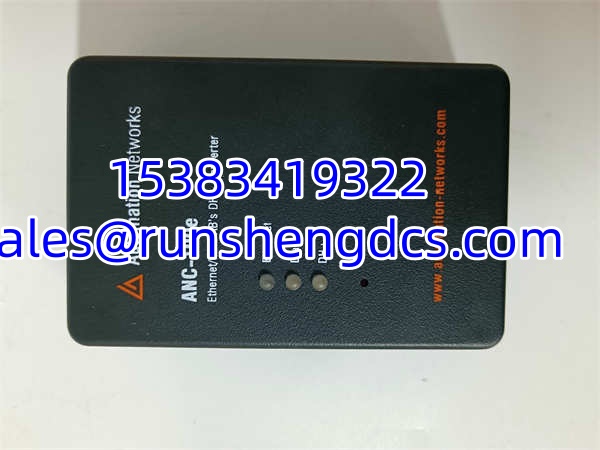
ANC-100E AN-X2-AB-DHRIO
Application Scenarios
- — A manufacturing plant has 16 controllers on three separate DH+ networks. Rather than replacing all controllers at once, three AN-X2-AB-DHRIO gateways bridge each DH+ segment to a central ControlLogix system over EtherNet/IP. Process data flows to a historian for analysis while the legacy PLC-5s continue controlling the process.
- Legacy PanelView Integration — An older PanelView HMI on a DH+ network needs to exchange data with a new CompactLogix controller on EtherNet/IP. The gateway provides the protocol bridge without replacing the HMI.
- Flex I/O Adapter Communication — Distributed Flex I/O adapter modules on a DH+ trunk need to be accessed from a modern ControlLogix rack. The AN-X2-AB-DHRIO makes the DH+ I/O appear as EtherNet/IP tags.
Field Case (Anonymized): A cable manufacturer in India needed to collect process data from 16 controllers spread across three production zones. Their new ControlLogix system used EtherNet/IP and could not talk to the DH+ PLC-5s directly. Three AN-X2-AB-DHRIO gateways were installed — one per DH+ segment — bridging all 16 PLC-5s to the ControlLogix backbone. The gateway data feed enabled real-time production monitoring, reduced scrap rates, and eliminated manual data collection rounds. The legacy controllers remained in service with zero process interruption.
FAQ
What RSLinx driver do I use to talk to PLC-5s through this gateway?
Use the Ethernet Devices driver in RSLinx Classic. Point it at the AN-X2-AB-DHRIO’s IP address. The gateway emulates a ControlLogix chassis, so RSLinx browses it like a native EtherNet/IP device.
Which OPC servers work with this gateway?
RSLinx Classic (Ethernet Devices driver), Wonderware (DASABCIP driver), and Kepware (ControlLogix Ethernet driver) have all been tested and confirmed working through the AN-X2-AB-DHRIO in DH+ bridge mode.
How many DH+ nodes can one gateway handle?
The gateway itself does not impose a hard node limit. The constraint comes from the DH+ protocol — it is a serial token-passing bus, so every additional node adds cycle time. For heavy node counts, expect increased latency.
Can I use this with MicroLogix 1400?
Yes. The AN-X2-AB-DHRIO supports MSG commands from MicroLogix 1400 processors over EtherNet/IP to reach DH+ network nodes.
What is the ANC-100E?
Public documentation on ANC-100E is limited. It may be a related ProSoft product, a companion module, or a legacy identifier. Verify with ProSoft Technology or your distributor before assuming compatibility or interchangeability with the AN-X2-AB-DHRIO.
Does this gateway need external power?
Yes. It requires 24 VDC supplied through the 3-pin Phoenix connector on the unit. It does not draw power from the EtherNet/IP port or the DH+ connection.
Can I configure this without proprietary software?
Yes. The built-in web server handles configuration, diagnostics, file upload, and mode settings through any standard web browser. No ProSoft-specific software is required for basic setup.