
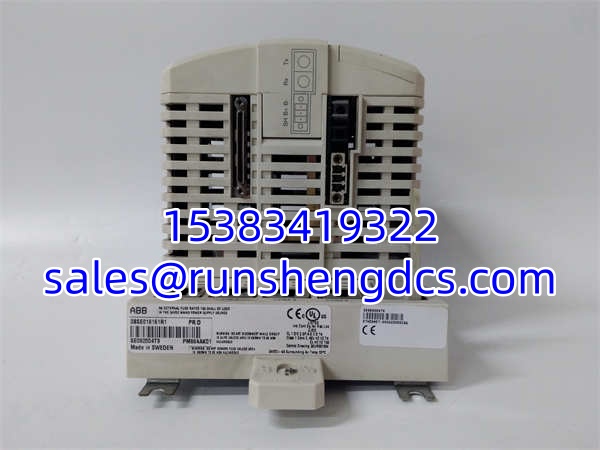

Description
Key Technical Specifications
- Product Model: PM864AK01 3BSE018161R1
- Manufacturer: ABB
- Product Type: Redundant CPU Module
- Memory (RAM): 32 MB
- Clock Frequency: 96 MHz
- Performance: 0.15 ms / 1000 Boolean Operations
- Communication: 2x RJ45 Ethernet, 2x RJ45 Serial (RS-232/RS-485)
- Redundancy: CPU, CEX Bus, Comm Interfaces, S800 I/O
- Operating Temperature: -40°C to +70°C
- Mounting: DIN Rail (TP830 Baseplate)
Product Introduction
Downtime in continuous process industries isn’t just an inconvenience; it’s a massive financial bleed. The ABB PM864AK01 3BSE018161R1 is engineered specifically to prevent this by providing hardware-level redundancy across the CPU, CEX bus, and communication interfaces. Sitting at the core of the AC800M platform, this controller ensures that if a primary module fails, the backup takes over seamlessly without dropping the process or losing data.
This isn’t a basic PLC. With 32 MB of RAM and a 96 MHz processor executing 1000 Boolean operations in just 0.15 ms, the ABB PM864AK01 3BSE018161R1 handles complex control algorithms and massive data logging with ease. It’s a classic workhorse in the AC800M lineup, designed for environments where uptime is non-negotiable. Bottom line — if your process can’t tolerate a single second of interruption, this redundant CPU is the standard solution. Just verify your firmware version matches the rest of your rack before ordering.
QA/QC Transparency SOP
- Intake & Origin Verification: We validate the ABB PM864AK01 3BSE018161R1 part number and hardware revision against ABB’s internal database to confirm it’s a genuine redundant CPU and not a non-redundant PM861 mislabeled by a previous owner.
- Live Functional Testing: Each unit is powered up on an AC800M test rack and tested for successful boot, redundancy switchover, and CEX bus communication with adjacent I/O modules.
- Electrical Parameter Tests: We verify the onboard battery voltage and test the Ethernet and serial ports for signal integrity and proper termination using a network analyzer.
- Firmware/Config Verification: The firmware version is read and backed up. We check for any active error flags in the controller’s diagnostic buffer that might indicate past failures.
- Final QC & Anti-Static Packaging: Units are visually inspected, cleaned, and packaged in anti-static bags with desiccant. The TP830 baseplate and terminators are verified to be included.
Field Engineer Gotchas
Firmware Version Mismatch: Redundant CPUs must run the exact same firmware version. Swapping in a ABB PM864AK01 3BSE018161R1 with a different rev than its partner will cause the redundancy sync to fail. Always match the firmware, or plan for a full system update.
Battery Replacement Neglect: The onboard battery backs up the RAM and real-time clock. If it dies, you lose your program and config on power loss. War story: Saw a plant lose 3 days of production because a tech replaced a failed CPU without checking the battery date. The backup CPU had a dead battery and couldn’t take over.
Baseplate Compatibility: This CPU requires the TP830 baseplate. Don’t try to force it onto a TP820 or other base. The CEX bus connectors are different, and you’ll bend pins. Verify the baseplate part number before installation.
Terminator Missing: The CEX bus and ModuleBus require terminators (TB850, TB807, TB852). If you’re replacing a CPU, ensure the terminators are present and properly seated. Missing terminators cause intermittent communication faults that are a nightmare to troubleshoot.
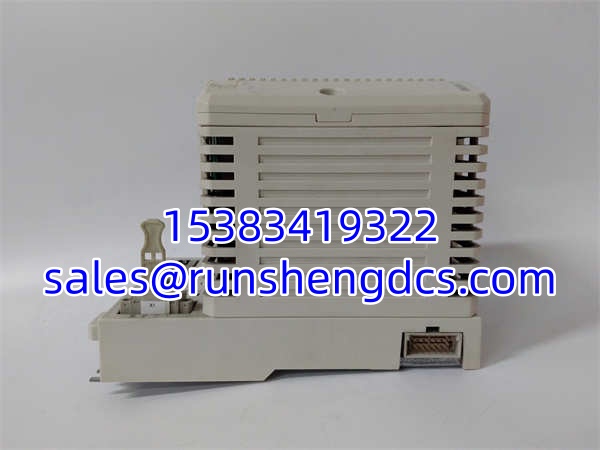
ABB PM864AK01 3BSE018161R1
Application Scenarios
Oil & Gas Refineries: Continuous distillation columns can’t afford a controller reset. The ABB PM864AK01 3BSE018161R1 provides the hardware redundancy needed to maintain process stability during a CPU failure, preventing dangerous pressure buildups or product loss.
Power Generation: Boiler control systems require deterministic response times. With 0.15 ms/1000 Boolean ops, this CPU handles the fast-loop combustion control while logging thousands of data points for compliance reporting.
Chemical Batch Processing: Complex recipe management and multi-stage reactions demand reliable control. The ensures that a hardware fault doesn’t ruin a $50,000 batch mid-process.
Case Study: A chemical plant in Texas experienced a CPU failure on their reactor controller during a critical exothermic reaction. The redundant took over in <50ms, and the operators never even noticed the switchover. The failed CPU was replaced during the next scheduled shutdown, with zero production loss.
FAQ
No. The “A” in indicates a specific hardware revision. While functionally similar, they may have different firmware compatibility or minor spec changes. Always match the exact part number.
No. Redundant pairs must be identical models. Mixing CPU types will prevent synchronization and is not supported by the AC800M firmware.
What is the maximum RAM available?
The has 32 MB of RAM. For larger applications, consider the PM866 or PM867 which offer 64 MB or more.
Does this support hot-swapping?
Yes, the supports hot-swapping in a redundant configuration. The backup CPU takes over, allowing you to replace the failed unit without stopping the process.
Is this module still supported by ABB?
This is classified as a “Classic Product.” It’s still supported, but ABB recommends migrating to newer AC800M CPUs for new projects. For existing systems, it remains a valid and reliable choice.
What baseplate does this use?
The requires the TP830 baseplate. Ensure you have the correct terminators (TB850, TB807, TB852) for the CEX and ModuleBus.
How do I check the firmware version?
Connect with Control Builder, go to the CPU properties, and check the “Firmware Version” field. Alternatively, the version is often printed on a label inside the battery compartment.




