
Description
Key Technical Specifications
| Specification | Value |
|---|---|
| Model / Order No. | PFEA112-65 / 3BSE050091R65 (also 3BSE030369R0065) |
| Load Cell Channels | 2 (supports A, B, SUM, DIFF modes) |
| Sensor Compatibility | ABB Pressductor PFTL/PFCL/PFRL series |
| Excitation | 0.5 A RMS, 330 Hz AC |
| Max Cable Resistance | 5 Ω total loop (2 load cells) |
| Signal Input Range | 0–65 mV/V |
| Measurement Accuracy | ±0.1% FS |
| Linear Error | <0.05% FS |
| Sampling Rate | 1 kHz |
| System Response Time | <10 ms |
| Digital Filter | 0.1–100 Hz low-pass, continuously adjustable |
| PID Control | Built-in, supports constant tension and taper winding |
| Analog Outputs | 2 isolated channels, 4–20 mA / 0–10 V configurable |
| Fieldbus | PROFIBUS-DP (standard on PFEA112) |
| Display | 2×16 character multilingual LCD |
| Power Supply (IP65) | DC 24V (18–36V) or AC 100–240V, 47–63 Hz |
| Power Consumption | ~7.5 W (IP20) / ~8 W (IP65) |
| Enclosure Rating | IP65 / NEMA 4 (dust-tight, low-pressure water jet resistant) |
| Operating Temperature | -25°C to +70°C (IP65 wide-temp version) |
| Storage Temperature | -40°C to +85°C |
| Mounting | Wall-mount or panel-mount (IP65 enclosed housing) |
| MTBF | 50,000 hours |
| Dimensions | ~170 × 105 × 32 mm (enclosed IP65 housing) |
| Weight | ~120 g (module only); ~0.8–1.2 kg with housing |
| EMC Compliance | CE certified, >40 dB interference rejection at 50/60 Hz |
Product Introduction
You’re running a cold rolling mill and the strip is snapping every time the line accelerates through the entry section. The tension is oscillating wildly because the old analog amplifier can’t keep up with the rapid load changes, and the operator is manually riding the draw reference just to keep the strip alive. You swap in a PFEA112-65, wire up the two PFTL load cells under the entry bridle rolls, set the nominal load per the sensor nameplate, enable the 10 Hz low-pass filter to kill the mechanical resonance, and let the built-in PID take over. The strip stops snapping. The PFEA112-65 is sampling at 1 kHz, filtering out the roll eccentricity noise, and adjusting the tension reference faster than the old analog loop ever could.
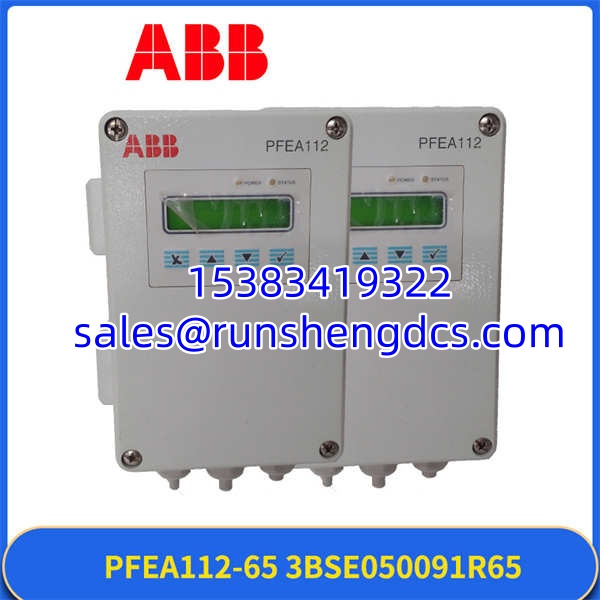
The PFEA112-65 is ABB’s mid-tier tension electronics unit in the Pressductor family. “PFEA” stands for Pressductor Force Electronic Amplifier. The “112” means it’s a 2-channel unit with PROFIBUS-DP built in. The “-65” means it handles load cells with up to 65 mV/V output — the high-sensitivity variant for demanding applications. It sits between the load cells and your drive or PLC: it excites the sensors at 330 Hz, reads the millivolt-level force signals, converts them to tension values using the wrap angle and gain settings, and outputs either a clean analog signal (4–20 mA or 0–10 V) or a digital value over PROFIBUS-DP. It can also run its own PID loop and directly drive a变频器’s analog speed reference for standalone tension control — no PLC required.
The enclosure is what makes the “-65” variant especially valuable. Unlike the IP20 DIN-rail version, the PFEA112-65 can be mounted directly on the machine frame near the load cells, minimizing cable length and reducing noise pickup. That matters in paper machines, rolling mills, and coaters where the electrical environment is brutal and running shielded cable back to a control room cabinet isn’t practical.
One thing to watch: the PROFIBUS-DP address must be set correctly and the bus terminator enabled at the last node, or you’ll get intermittent communication faults that look like sensor problems but aren’t. And always verify the load cell wiring polarity — pins 2 and 4 are the signal leads, and if they’re swapped, your tension reads negative.
Troubleshooting Quick Reference
| Fault | Cause | Relevancy | Quick Check | Fix |
|---|---|---|---|---|
| Tension reading is negative or inverted | Load cell signal wires (pins 2 and 4) swapped | 60% chance it’s polarity | Apply a known downward force to the load cell and check display sign | Swap pins 2 and 4 at the PFEA112-65 terminal block; verify per ABB wiring diagram |
| Display shows “BAD.CAL” | Calibration slope out of range (<0.2 or >5) or offset excessive | 50% chance it’s a bad calibration point or failing sensor | Review calibration history in the edit calibrate menu; check sensor nameplate nominal load matches parameter setting | Re-calibrate with verified reference weights; ensure Nominal Load parameter matches load cell nameplate exactly |
| PROFIBUS-DP communication loss | Address conflict, missing terminator, or cable shield broken | 55% chance it’s bus topology | Check PROFIBUS address setting in Miscellaneous Menu; verify terminator switch position | Set correct station address matching PLC configuration; enable terminator at last node; replace damaged bus cable |
| Tension value drifts with temperature | Long cable run causing signal attenuation, or sensor overheating | 45% chance it’s cable resistance or thermal drift | Measure loop resistance between and load cells; check if drift correlates with ambient temperature | Keep total loop resistance under 5 Ω; use the -65 variant for long runs; verify sensor is within operating temperature range |
| Oscillating tension output | PID gains too aggressive or mechanical resonance not filtered | 50% chance it’s tuning or filtering | Monitor tension trend; check if oscillation frequency matches a known mechanical resonance (roll eccentricity, gear mesh) | Reduce P gain; increase I time; enable low-pass filter at a cutoff below the resonance frequency |
| No display / unit dead | Power supply out of range or internal fuse blown | 40% chance it’s power | Measure DC 24V (18–36V) or AC 100–240V at power terminals; check for blown fuse | Verify power supply is within spec; replace fuse if blown; check for reverse polarity on DC supply |
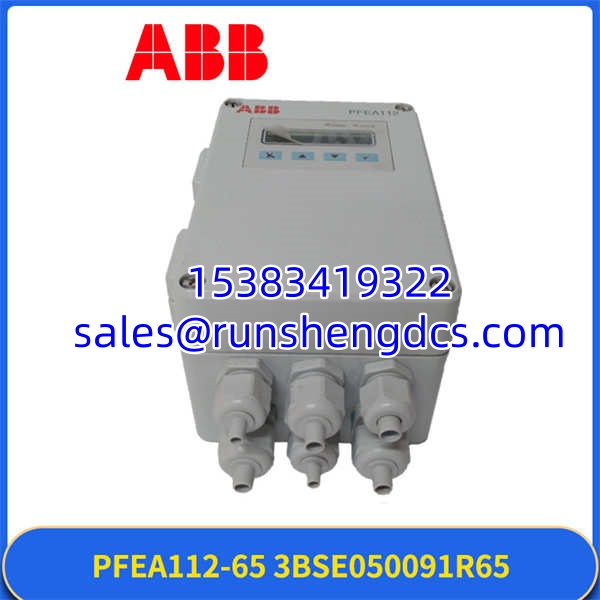
ABB PFEA112-65 3BSE050091R65
Application Scenarios & Pain Points
Cold rolling mill — entry section tension control: Two PFTL101BE load cells are mounted under the entry bridle rolls, wired to a . The controller reads the horizontal force component, applies the wrap angle gain correction, and outputs a 4–20 mA tension signal to the entry drive’s speed reference. The built-in PID maintains constant tension during acceleration and deceleration. Pain point: the rolling mill environment is electrically noisy with large VFDs and motor starters generating harmonics. If the ‘s low-pass filter isn’t set correctly, the tension signal will ride on top of the 50/60 Hz noise floor. Set the filter cutoff to just above your process bandwidth — typically 5–10 Hz for rolling mills — to reject the electrical noise without slowing the control response.
Paper machine — reel section taper tension: On a paper machine reel, the runs in taper winding mode, gradually reducing tension as the roll diameter increases to prevent core crushing and telescoping. The PROFIBUS-DP link sends real-time tension and diameter data to the AC 800M PLC for coordination with the rest of the machine. Pain point: taper tension profiles are application-specific. A generic linear taper rarely works well — you need to match the taper curve to the paper grade, basis weight, and core type. The ‘s PID parameters and taper profile need to be tuned on-site with actual production runs, not just set from the manual.
Metal strip slitting line — edge tension balance: A slitting line uses two load cells (one per side) to monitor edge tension independently. The runs in DIFF mode to detect and correct lateral tension imbalance that causes strip wandering and poor edge quality. Pain point: if the two load cells aren’t matched in capacity and calibration, the DIFF reading will have a persistent offset that looks like a tension imbalance but is actually a sensor mismatch. Always calibrate both load cells with the same reference weight before enabling DIFF mode.