
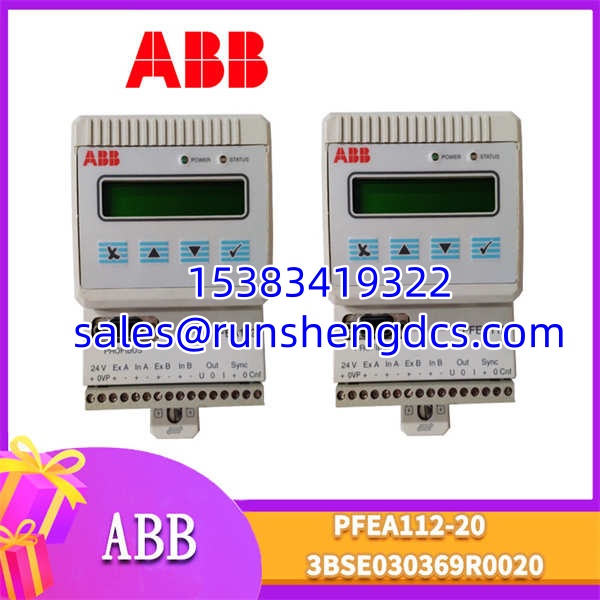

Description
Key Technical Specifications
- Product Type: Tension Controller / Signal Processor
- Supported Sensors: Piezoelectric load cells (PFCL/PFTL series)
- Input Channels: 2 independent load cell inputs
- Communication Protocol: Profibus-DP, Modbus RTU, RS-485
- Analog Output: 0-10 V DC (configurable)
- Control Accuracy: ±0.5% of full scale
- Processor: 32-bit RISC CPU
- Digital Filter: Configurable (e.g., 2.5 Hz cutoff for vibration rejection)
- Power Supply: 100-240V AC (verify specific variant; some are 12-48V DC)
- Dimensions: 170 x 105 x 32 mm
- Mounting: Standard DIN Rail
- Protection Rating: IP20 (IP65 variant is PFEA112-65)
Product Introduction
Web tension control failures usually show up as wrinkled material, edge tearing, or complete line breaks. The ABB PFEA112-20 prevents this by acting as the dedicated signal processing brain for piezoelectric load cells. It sits between the mechanical tension sensors (mounted under bearing blocks) and the plant PLC, converting micro-volt load cell signals into precise tension values via Profibus-DP or analog outputs.
This module handles the heavy lifting of digital filtering and PID control, keeping tension stable within ±0.5% even when motors start and stop abruptly. Bottom line — if your line uses ABB PFCL or PFTL load cells, this is the native OEM processor. Just double-check the power supply voltage on the physical label before ordering, as ABB shipped both AC and DC variants under similar part numbers.
QA/QC Transparency SOP
Tension controllers fail silently before they fail catastrophically. Here is how we verify them before shipping:
- Intake & Origin Verification: We trace lot codes and cross-reference serials against ABB manufacturing records. Counterfeit tension boards exist in the surplus market. We reject anything with rework solder joints or mismatched components.
- Live Functional Testing: Each PFEA112-20 is racked in a test setup. We inject simulated load cell signals, verify Profibus-DP link-up, and confirm analog outputs track linearly across the 0-10V range.
- Electrical Parameter Tests: Continuity checks on all terminal blocks. Insulation resistance testing on power and signal rails. Voltage verification on internal sensor excitation supplies.
- Firmware/Config Verification: We read out the installed firmware revision and back up the module configuration. Firmware mismatches cause the majority of field communication timeouts.
- Final QC & Anti-Static Packaging: Visual inspection of all connectors for bent pins or corrosion. Module ships in ESD-shielded packaging with a test summary sheet.
Field Engineer Gotchas
- Shield Grounding Errors: This board is extremely sensitive to EMI. Signal cables MUST be shielded twisted pair (e.g., Belden 8761). The shield must be grounded at the controller’s SG terminal only. Grounding at both ends creates a ground loop that manifests as erratic tension readings. I’ve seen crews spend hours replacing load cells before realizing the shield was grounded at the PLC end instead.
- Wrap Angle Gain Miscalculation: The controller assumes a standard wrap angle (usually 90° or 180°). If your roller geometry deviates, you MUST recalculate and set the Wrap Gain parameter. Failing to do this will result in tension readings that are consistently high or low, no matter how well you calibrate the zero point.
- Live Insertion Damage: The pluggable terminal blocks are NOT hot-swappable. Pulling or inserting the connector while powered will arc across the pins, oxidizing the contacts and causing intermittent signal loss months later. Always lock out power and verify zero voltage before touching terminals.
- Firmware Rev Mismatch: Replacing a PFEA112-20 with a different firmware revision can cause Profibus-DP handshake failures. Always read the firmware version from the old unit before ordering a replacement. Mismatched firmware requires a full parameter reconfiguration and can cause unexpected PID behavior.
- Zero Drift After Power-Up: Piezoelectric load cells drift with temperature. The PFEA112-20 has auto-zero functionality, but it must be triggered during a known zero-tension state (web removed). Running Set Zero while the web is under tension will permanently offset all subsequent readings.
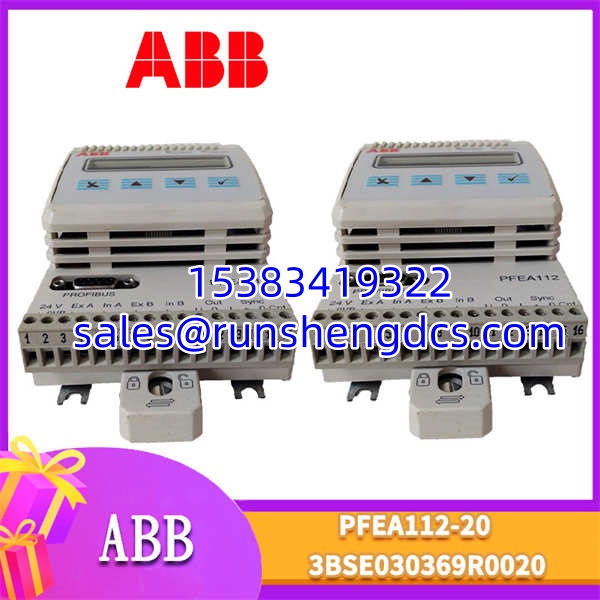
ABB-PFEA112-20-3BSE030369R0020
Application Scenarios
- Steel Cold Rolling Mills: Maintaining precise strip tension across multiple stands to prevent material stretching or breakage during high-speed rolling operations.
- Paper Converting Lines: Controlling web tension during slitting and rewinding to prevent edge curl and ensure uniform roll hardness.
- Film Extrusion: Regulating tension on thin polymer films where even minor fluctuations cause permanent deformation or wrinkling.
FAQ
Q: What is the difference between 3BSE030369R20 and 3BSE030369R0020?
They are identical. R0020 is simply the padded version of the ABB material code. Hardware, firmware, and configuration parameters are exactly the same. Either part number is a direct drop-in replacement.
Q: How many load cells can this controller handle?
Two independent channels. If your application requires four load cells, you need either a PFEA113 (4-channel) or two PFEA112-20 units. Do not attempt to wire four load cells in parallel to a single — the excitation current will be insufficient and readings will be inaccurate.
Q: Can I hot-swap this module during production?
No. The pluggable terminal blocks are not designed for live insertion. You must power down the system and verify DC bus discharge before replacement. Plan your maintenance window accordingly.
Q: My tension reading is drifting after startup. Is the board bad?
Probably not. Piezoelectric load cells exhibit thermal drift during warm-up. Allow 15-30 minutes for thermal stabilization before performing a Set Zero operation. If drift persists after warm-up, check for mechanical binding in the load cell mounting or excessive ambient temperature variation.
Q: Does this support Modbus TCP?
No. The natively supports Modbus RTU over RS-485 and Profibus-DP. For Modbus TCP, you need an external protocol gateway or a newer generation tension controller.
It has been discontinued by ABB, but it remains fully supported in current DriveWindow/TensionTool software and is widely available through surplus channels. For new builds, ABB recommends newer tension controller platforms, but the remains a valid drop-in for existing installations.
Q: How do I verify the Profibus-DP communication is stable?
Check the board’s LED indicators. A solid green PROFIBUS LED indicates active communication. A flashing LED indicates bus activity with intermittent errors. No LED means no bus connection. Use a Profibus diagnostic tool to check for baud rate mismatches or missing termination resistors at the bus ends.




