
Description
Key Technical Specifications
| Parameter | Specification |
|---|---|
| Model Number | GOP2 (G2010A 10.4ST) |
| Brand | ABB |
| Product Type | Graphical Operator Panel (HMI) |
| Display | 10.4-inch high-resolution graphical touchscreen |
| Processor | ARM Cortex-A9 |
| Memory | 512MB RAM / 512MB Flash |
| Communication | Ethernet, USB, Serial ports |
| Input Voltage | 24VDC (industrial standard) |
| Protection Rating | IP56 (dust and water ingress protection) |
| Net Weight | Approx. 3 kg |
| Companion Systems | ABB T800 control systems, excitation systems |
| Reference Price | Approx. CNY 6,990 – 12,000 (varies by supplier and condition) |
Product Introduction
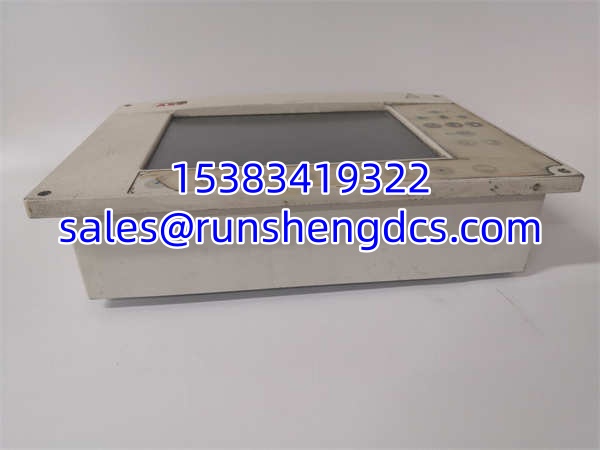
Replacing a dead HMI on a running process unit is one of those moments where “compatible” is not good enough — you need the exact panel that boots, connects, and renders the project screens without a firmware argument. The ABB GOP2 fills that slot. It is a graphical operator panel built to sit on control cabinets or panel doors, giving operators a local view into process variables, alarm states, and control commands without requiring a remote workstation.
Under the hood, the GOP2 runs on an ARM Cortex-A9 processor with 512MB RAM and 512MB flash, enough to handle graphical rendering and multi-task data refresh on a 10.4-inch touchscreen. Communication runs over Ethernet, USB, and serial ports, making it integrable with ABB T800 control systems, excitation systems, and other industrial automation architectures. The IP56 rating means it can handle dust and moisture exposure typical of plant-floor environments. One thing to flag: “GOP2” can refer to either a general-purpose HMI or a dedicated excitation-system operator panel depending on the supplier listing. Confirm the exact application context before ordering.
QA/QC Transparency SOP
- Intake & Origin Verification
Photograph the nameplate. Record the full model (GOP2 / G2010A 10.4ST), serial number, hardware revision, and date code. Cross-reference against the target control system’s configuration documentation to confirm this panel matches the required functional role. - Visual & Mechanical Inspection
Examine the screen for dead pixels, discoloration, scratches, or backlight bleed. Test touchscreen responsiveness across all zones — not just the center. Check the enclosure for cracks or deformation. Inspect all communication ports (Ethernet, USB, serial) for bent pins or oxidation. - Live Functional Testing
Apply 24VDC power. Confirm the panel boots cleanly with no error codes. Verify touchscreen accuracy by navigating through menu structures. Test each communication port for link establishment. If a compatible ABB T800 or target system is available on the test bench, connect and verify data refresh and command execution. - Firmware & Configuration Verification
Read the firmware version from the panel’s system information screen or via the service port. Log it. Compare against the target installation’s firmware requirements. Note: a surplus GOP2 ships without any project-specific screen files — those must be loaded separately during commissioning. - Final QC & Anti-Static Packaging
Label with QC pass status, test date, and firmware revision. Pack in anti-static shielding with foam protection on the screen face. Include a note that the panel requires project screen files to be downloaded before it is operational in the field.
Field Engineer Gotchas
- Model Ambiguity — HMI vs. Excitation Panel
“” shows up in surplus listings as both a general-purpose HMI and a dedicated excitation-system operator panel. These serve different systems and are not interchangeable. Bottom line — confirm with your supplier exactly which variant you are buying and what system it was pulled from. Mixing them up means a dead install. - No Project Screens on a Surplus Unit
A pulled will not contain your plant’s screen files. It boots to a default or blank state. You need the project configuration files and the engineering tool to download them. Budget commissioning time for this — it is not plug-and-play. - Firmware Version Mismatch
Different production batches ship with different firmware revisions. If your control system expects a specific firmware level, a mismatched panel may fail to communicate or exhibit erratic behavior. Read the firmware version off the panel before assuming it is a drop-in replacement. - Touchscreen Degradation on Aged Stock
Panels sitting in warehouse inventory for years can develop touch zones that are sluggish or unresponsive. Test every quadrant of the screen during incoming inspection. Do not sign off on a unit that only responds in the center. - 24VDC Power Quality
The panel expects clean 24VDC. Excessive ripple or voltage sag from a shared power supply can cause random reboots or communication drops. Measure the supply at the panel terminals before blaming the hardware.
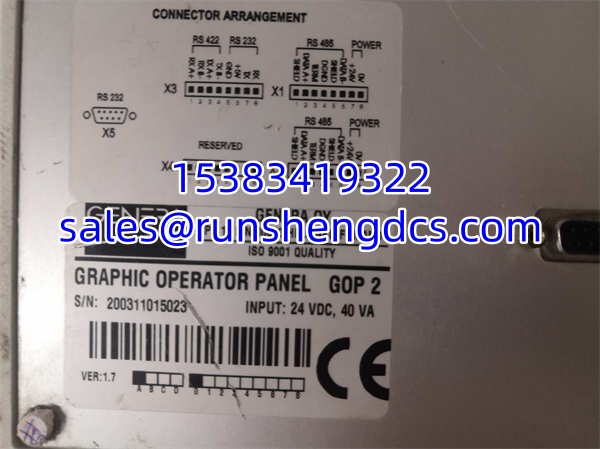
ABB GOP2
Application Scenarios
- ABB T800 control system local operator station — Provides on-panel process monitoring, parameter adjustment, and alarm management for chemical, power, or manufacturing applications running ABB T800 architecture.
- Generator excitation system operator interface — Displays excitation current, voltage, and regulator status. Allows operators to execute manual control actions during grid disturbances or AVR maintenance.
- Drive system local commissioning panel — Mounted on drive control cabinets for parameter setup, status monitoring, and fault diagnostics without requiring a remote engineering workstation.
- Legacy system spare replacement — Plants running older ABB control systems source surplus panels to replace failed units and restore local operator access.
FAQ
It is a graphical operator panel — an industrial HMI with a 10.4-inch touchscreen, ARM Cortex-A9 processor, and 512MB RAM/flash. It provides local process visualization and control for ABB automation systems. Full model designation is commonly G2010A 10.4ST.
Not without verification. Different ABB HMI models can differ in communication protocols, screen file formats, mounting dimensions, and firmware expectations. Confirm compatibility with your specific control system before ordering.
No. Surplus units ship without any project-specific configuration. You must download your plant’s screen files using the appropriate engineering tool before the panel is functional in your application.
Standard 24VDC industrial supply. Ensure the voltage is stable and ripple is within specification — poor power quality is a common cause of intermittent reboots and communication faults.
This panel belongs to an older product generation. Official manufacturing status should be confirmed directly with ABB or an authorized distributor. Surplus and refurbished units are available through third-party industrial spare-parts channels.
The panel provides Ethernet, USB, and serial communication ports. The specific protocols (Modbus, ABB proprietary, etc.) depend on the companion control system. Check your system documentation for the exact protocol requirements.
What is the typical surplus market price?
Pricing varies by condition, supplier, and region. Recent listings have ranged from approximately CNY 6,990 to CNY 12,000. Get a firm quote with serial number and condition details before committing to a purchase.