
Description
Key Technical Specifications
| Parameter | Specification |
|---|---|
| Model Number | G2010 A 10.4ST |
| Brand | ABB |
| Product Type | Industrial Control / Automation Module |
| System Family | ABB Process Control / Automation Systems |
| Designation Notes | “10.4ST” may refer to a specific configuration code, display size, or functional variant — confirm with OEM documentation |
| Mounting | Modular rack / panel mount (verify with OEM drawing) |
| Origin | Germany / Switzerland (varies by production batch) |
| Reference Price | Varies significantly by supplier, condition, and availability |
Product Introduction
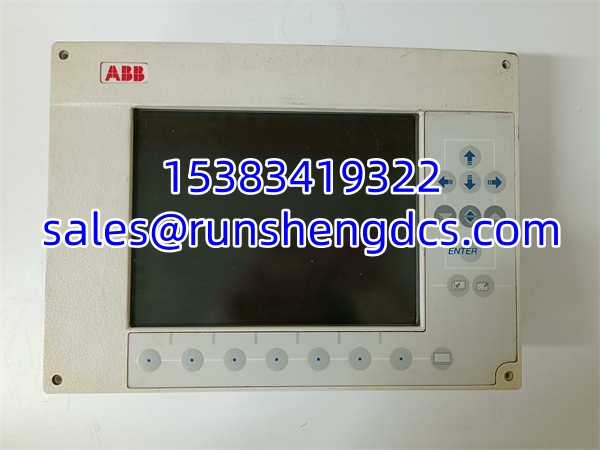
ABB’s industrial automation product lines span thousands of module variants, each designated for specific roles within process control, power management, or operator interface systems. The G2010 A 10.4ST belongs to this ecosystem — a component designed for integration within ABB control architectures.
Without access to the specific system configuration documentation, the exact functional role (whether operator interface, I/O module, communication gateway, or control processor) cannot be definitively stated from the model number alone. The “10.4ST” suffix suggests a specific configuration variant — possibly related to display size (10.4-inch), terminal configuration, or functional specialization. For accurate technical specifications, reference the original system documentation or contact ABB’s technical support with the full model designation and serial number.
QA/QC Transparency SOP
- Intake & Origin Verification
Photograph the module nameplate. Record the full model designation (G2010 A 10.4ST), serial number, hardware revision, and any ABB manufacturing markings or date codes. Cross-reference against the target system’s configuration documentation to confirm this module matches the required functional role. - Visual & Mechanical Inspection
Inspect the PCB for cracked solder joints, electrolytic capacitor bulging, corrosion, or thermal discoloration. Check all connector pins and terminal blocks for bending, oxidation, or contamination. Verify the module slides into the target rack slot or mounting position without forcing. - Electrical Parameter Tests
Using a calibrated multimeter and appropriate test equipment, measure input/output voltage ratings, continuity on signal paths, and insulation resistance between circuits and ground. Confirm no short circuits exist. Specific test parameters depend on the module’s functional classification — reference OEM test procedures. - Functional Verification
If test infrastructure supports it, install the module in a compatible ABB test rack or system. Verify that the controller recognizes the module, reports correct status diagnostics, and that all configured functions operate as expected. Log all diagnostic readouts. - Final QC & Anti-Static Packaging
Label with QC pass status, test date, and revision. Pack in anti-static shielding with foam protection on all connector faces. Include a note that the module must be matched to the correct system configuration and that firmware/software compatibility must be verified before commissioning.
Field Engineer Gotchas
- Model Designation Ambiguity
The “G2010 A 10.4ST” designation may refer to different functional modules depending on the system generation and configuration. Do not assume functional equivalence based on model number alone. Verify the exact functional role (operator interface, I/O module, communication processor, etc.) against the system documentation before installation. - Firmware / Software Compatibility
If this module contains firmware or requires configuration software, verify compatibility with the target system’s software version. A module pulled from one system generation may not be recognized by a different generation without firmware updates or configuration changes. - Display / Interface Specificity
If the “10.4ST” suffix indicates a 10.4-inch display or specific interface configuration, confirm that the physical dimensions, mounting pattern, and connector layout match the target installation. A mismatched display module will not fit the existing panel cutout or connector arrangement. - Configuration Data Must Transfer
If the module stores configuration data (I/O assignments, communication parameters, display layouts), a surplus unit will not contain the correct configuration for your system. Plan for configuration time during commissioning. Do not expect plug-and-play operation from a surplus module. - ESD During Handling
Always use a grounded wrist strap when removing or installing the module. Electrostatic discharge can damage sensitive electronics in ways that pass initial testing but fail under operational conditions.
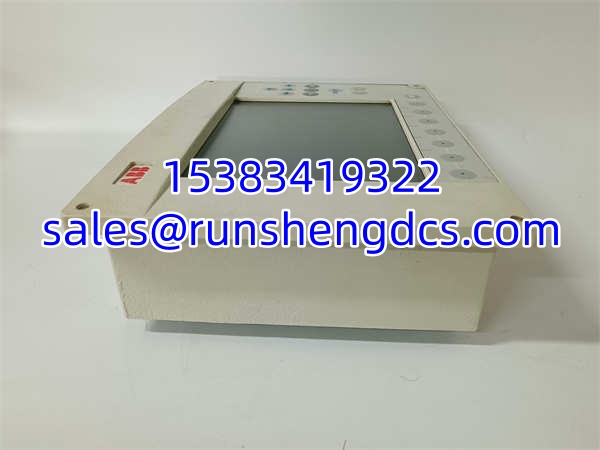
ABB G2010 A 10.4ST
Application Scenarios
- Operator interface stations — If the G2010 A 10.4ST functions as an operator display or interface module, it provides process visualization and operator control within ABB automation systems.
- Process control panels — Integrated into control panels for monitoring and controlling industrial processes (chemical, power, water treatment, manufacturing).
- Legacy system maintenance — Plants running older ABB control systems use surplus modules like the G2010 A 10.4ST to maintain spare parts inventory and minimize downtime during component failures.
- System expansions — Adding additional operator stations or control points to existing ABB automation architectures.
FAQ
The specific functional role depends on the system configuration. It may be an operator interface module, I/O module, communication processor, or other control component. Verify against the system’s original configuration documentation or contact ABB technical support with the full model and serial number.
Is this module compatible with all ABB control systems?
No. ABB’s product lines span multiple generations and system families. Compatibility depends on the specific system architecture, software version, and hardware revision. Verify compatibility with the target system before procurement.
Does this module require configuration before use?
Most likely, yes. If the module stores configuration data (display layouts, I/O assignments, communication parameters), a surplus unit will not contain the correct configuration for your system. Plan for configuration time during commissioning.
What does “10.4ST” mean in the model designation?
The exact meaning depends on ABB’s internal naming conventions. It may refer to a 10.4-inch display size, a specific terminal configuration, or a functional variant. Confirm with ABB documentation or technical support.
Not without verifying functional equivalence, physical dimensions, connector compatibility, and software/firmware compatibility. Substitution requires confirmation from ABB or detailed cross-reference documentation.
What is the typical lead time from surplus suppliers?
Stock availability varies. Some suppliers ship within 3–7 days from regional inventory. Others require sourcing from overseas warehouses, which can extend lead times. Confirm actual stock location and shipping timeline before committing to a project schedule.
Verify directly with ABB or an authorized distributor. This model may belong to a legacy product family with limited availability through official channels. Surplus and third-party distributors remain a viable sourcing path, but always confirm compatibility before purchasing.