
Description
Key Technical Specifications
| Parameter | Value / Status |
|---|---|
| Product Model | KOLLMORGEN 60WKS-M24022 |
| Manufacturer | Kollmorgen |
| Product Type | Servo drive / motor controller |
| Product Family | 60WKS series — pattern match only |
| Closest Referenced Pattern | 60WKS-M240/22 |
| Control Modes | Position, speed, and torque control — typical for this class |
| Communication | EtherCAT / CANopen referenced for similar 60WKS drives; verify on nameplate |
| Voltage Rating | Not confirmed |
| Current / Power Rating | Not confirmed |
| Feedback Interface | Not confirmed |
| Mounting / Form Factor | Not confirmed |
| Certification / Safety Data | Not confirmed |
Product Introduction
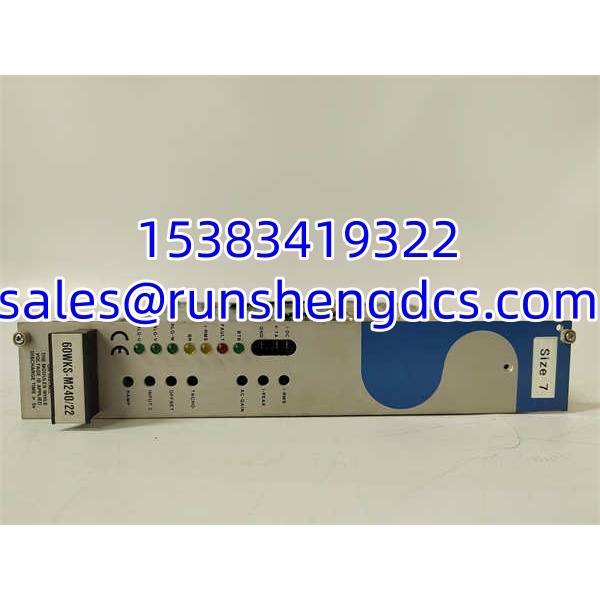
When a motion axis faults and the drive label is worn, faded, or formatted unusually, the first mistake is assuming the part number is complete. KOLLMORGEN 60WKS-M24022 looks like a Kollmorgen servo drive from the 60WKS family, likely related to the 60WKS-M240/22 pattern, but the exact suffix is not independently verified here. That makes it a candidate servo drive for industrial motion control — not a confirmed replacement part.
The practical value of this unit depends entirely on verification. If it is a 60WKS-family servo drive, it would normally be used to command a servo motor in position, speed, or torque mode, typically under a PLC, motion controller, or industrial network. But without the nameplate voltage, current rating, firmware revision, feedback type, and communication option, procurement and maintenance teams should not assume compatibility. Verify with the OEM datasheet or the actual unit label before installation.
QA/QC Transparency SOP
1. Intake & Origin Verification
Check the nameplate for the exact model: 60WKS-M24022, serial number, date code, voltage, current, power rating, and revision. Confirm Kollmorgen branding and compare the label format with known 60WKS drive documentation. If the supplier only provides a stock photo, do not accept it as verified.
2. Live Functional Testing
Power the drive in a controlled test bench with the correct supply voltage and a matched or known servo motor. Verify that the drive boots, clears faults, accepts enable commands, and runs in at least one control mode: speed, position, or torque. A drive that powers up but will not enable is not a confirmed replacement.
3. Electrical Parameter Tests
Use a multimeter to check input power terminals, DC bus, and control I/O for shorts or abnormal resistance. Inspect motor output phases for continuity and insulation issues before connecting a motor. Measure supply current during a low-speed test run and compare it against the nameplate rating.
4. Firmware/Config Verification
Read the drive identification through the commissioning software or fieldbus interface. Record firmware version, hardware revision, axis configuration, communication protocol, and any stored parameters. Back up the configuration before clearing or reprogramming anything.
5. Final QC & Anti-Static Packaging
Label the unit with test status, serial number, revision, and any limitations. Pack it in anti-static shielding, protect all connectors, and avoid moisture, dust, and mechanical shock. If the drive shows burnt terminals, damaged connectors, or failed enable tests, flag it as unverified or defective.
Field Engineer Gotchas
Wrong drive family assumption
Risk: The part looks like a Kollmorgen drive, so it gets installed without checking the exact 60WKS variant.
Solution: Confirm the full model number, including M24022, against the existing drive and machine documentation.
Blunt warning: “60WKS” is not enough. The suffix can change voltage class, feedback, firmware, or communication options.
Firmware or revision mismatch
Risk: The replacement drive powers up but throws communication, feedback, or axis faults.
Solution: Compare firmware version, hardware revision, and parameter set with the original drive before commissioning.
War story: A plant swapped a surplus servo drive with the same base family, then spent a shift chasing encoder and network faults. The real issue was a revision difference that changed feedback handling.
Motor feedback incompatibility
Risk: The drive accepts power but will not tune or run the motor.
Solution: Verify the feedback type — encoder, resolver, SFD, or absolute encoder — before assuming the drive matches the motor.
This one hurts because the drive may appear healthy until the axis tries to close the loop.
Communication protocol mismatch
Risk: The drive is connected to an EtherCAT, CANopen, or other network, but the replacement unit does not support the same protocol.
Solution: Confirm the physical port, protocol, and node configuration from the nameplate or software readout.
Do not assume all 60WKS drives share the same fieldbus option.
Power wiring and ESD risk
Risk: Wrong line voltage, missing grounding, or static discharge damages the control section during installation.
Solution: Lock out power, verify supply voltage, confirm motor phase wiring, and use ESD precautions when handling connectors.
A drive can look fine after a wiring mistake and still fail later under load.
KOLLMORGEN 60WKS-M24022
Application Scenarios
Automated production line axis replacement
A packaging or assembly line loses one servo axis. The maintenance team needs a verified Kollmorgen 60WKS-family drive that matches the original motor feedback, network protocol, and voltage class.
Robot or gantry motion control
Gantry systems, pick-and-place units, and small robotic axes require precise position and speed control. A confirmed 60WKS drive can restore motion if the original unit fails and the motor and controller remain compatible.
Printing, converting, or web-handling equipment
Registration, indexing, and tension control depend on stable servo response. A replacement drive must match the existing communication bus and feedback device, or the entire line timing can drift.
Machine tool or indexing table service
Indexing tables and positioning stages need repeatable motion. If the original drive fails, the replacement must support the same control mode and feedback resolution.
Anonymized case study
A food-packaging machine stopped on one servo axis. The HMI showed a drive fault, and the operator swapped in a surplus Kollmorgen 60WKS-family drive with a similar label. The new drive powered up, but the axis would not enable. The technician found the replacement used a different feedback configuration and network option than the original. After pulling the nameplate data, matching the feedback type, and reloading the axis parameters, the drive enabled and the machine returned to production. The failure was not the motor. It was an unverified drive suffix.
FAQ
Is 60WKS-M24022 the same as 60WKS-M240/22?
Not automatically. The pattern is similar, but 60WKS-M24022 must be verified against the actual nameplate. Do not assume they are interchangeable without checking voltage, current, revision, feedback, and communication options.
Will this drive drop into an existing Kollmorgen servo system?
Only if the model, firmware, feedback interface, communication protocol, and motor ratings all match. Physical similarity does not guarantee compatibility.
Does this drive support EtherCAT or CANopen?
Similar 60WKS drive references mention EtherCAT and CANopen, but the exact protocol for 60WKS- is not confirmed here. Check the nameplate, connector layout, or software identification before ordering.
Can I replace a failed drive with any 60WKS unit?
No. The 60WKS family can include different voltage classes, feedback types, firmware revisions, and network options. A mismatch can cause communication faults, feedback errors, or motor damage.
Why does the drive power up but not run the motor?
Common causes include firmware/revision mismatch, wrong feedback type, missing enable signal, incorrect communication configuration, or motor wiring errors. Read the drive ID and fault codes before replacing more hardware.
Is this module discontinued?
Availability should be treated as surplus-dependent unless confirmed by an authorized Kollmorgen source. Verify condition, revision, and test documentation before purchase.
What is the biggest procurement mistake with this part?
Buying based on “60WKS” alone. The real risk is ignoring the exact suffix, feedback type, communication protocol, and firmware revision. A cheap drive that does not match the axis can create far more downtime than it saves.