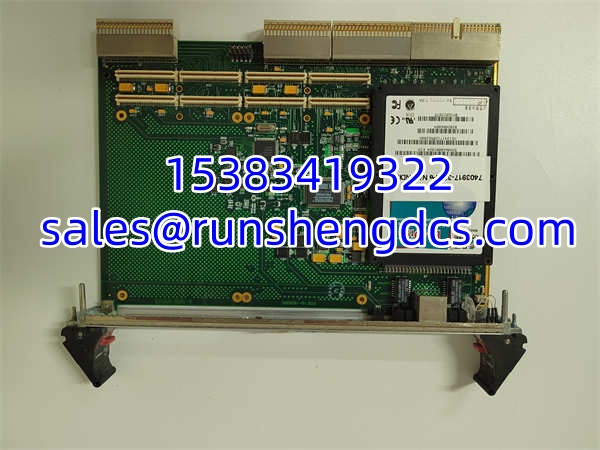

Description
Key Technical Specifications
| Parameter | Specification |
|---|---|
| Form Factor | 6U CompactPCI (cPCI) |
| PMC Slots | 2x (32/64-bit, 33/66 MHz) |
| PCI Bus | Primary & Secondary (Async) |
| Network Interface | 10/100/1000BaseTX (Front Panel) |
| Hot-Swap Support | Full Register with Blue LED Indicator |
| I/O Routing | J3/J5 Rear Connectors for PMC |
| Operating Voltage | 140 VDC Range (Verify per config) |
| System Memory | 256 MB (Carrier dependent) |
| Dimensions | 260mm x 340mm x 62mm |
| Weight | ~3.4 kg |
Product Introduction
Integrating legacy PMC I/O modules into modern cPCI chassis often creates a bottleneck when routing signals to the backplane. The GE CP238TA acts as the bridge, offering two PMC slots that map directly to the J3/J5 rear cPCI connectors. It’s a 6U carrier designed to handle the asynchronous clocking between the primary and secondary PCI buses, ensuring that a 33 MHz legacy data acquisition card doesn’t drag down a 66 MHz system bus.
Why keep this specific carrier in your spare parts strategy? The front-panel 10/100/1000BaseTX port is a massive advantage for field diagnostics without cracking the chassis. It supports full hot-swap registers with blue LED status indicators, meaning you can pull a failed module mid-operation without crashing the host controller. Bottom line — it’s a workhorse carrier, but since it’s discontinued, treat it like gold. Verify the exact bus width requirements of your PMC daughter cards before racking.
QA/QC Transparency SOP
- Intake & Origin Verification: Inspect the 6U cPCI edge connector for bent pins or gold wear. Cross-reference the CP238TA suffix against GE/Abaco manufacturing dates to identify known capacitor aging issues common in early 2000s runs.
- Live Functional Testing: Seat in a verified cPCI test chassis. Boot the host system and confirm both PMC slots are enumerated correctly. Test the front GigE port by pinging across the network and verifying link negotiation at 1Gbps.
- Electrical Parameter Tests: Measure 3.3V and 5V rails on the PMC slots under load. Perform continuity checks on J3/J5 rear pins to ensure no broken traces from previous hot-swap events.
- Firmware/Config Verification: Read the EEPROM/PLD configuration to verify bus arbitration settings. Ensure the hot-swap controller register matches the expected state for your target OS (VxWorks, Linux, or Windows).
- Final QC & Anti-Static Packaging: Run a 2-hour thermal soak with dummy PMC loads to check for voltage droop. Pack in ESD-safe shielding with port caps on the GigE and PMC slots to prevent dust ingress.
Field Engineer Gotchas
- Async Bus Clocking: The secondary PMC slot defaults to 66 MHz unless a 33 MHz card forces it down. Fix: Check the jumper or PLD setting for bus speed. War Story: Saw a technician blame a faulty PMC card for three days, only to find the carrier was forcing 66 MHz on a 33 MHz-only module.
- J3/J5 Pin Mapping: Not all PMC I/O maps to the rear cPCI connector automatically. Fix: Consult the CP238TA user manual for the specific pinout matrix. Warning: Assuming standard mapping will leave you with dead I/O channels.
- Hot-Swap LED Misinterpretation: Blue LED indicates hot-swap capability, not necessarily “good” status. Fix: Read the hot-swap register via software. Reality: I’ve seen blue LEDs lit on carriers with blown fuses. Trust the register, not the light.
- GigE Port ESD: The front RJ45 port is a prime target for ESD during field cabling. Fix: Always ground yourself before plugging in Ethernet. Warning: A static shock here can fry the PHY and leave you with no diagnostics.
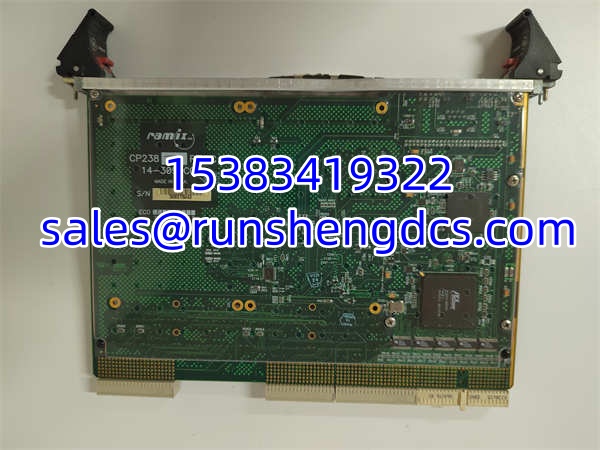
GE CP238TA
Application Scenarios
- Telecom Switching Routers: High-speed packet processing requiring legacy T1/E1 PMC cards routed through a cPCI backplane to a central packet processor.
- Power Grid Phasor Measurement: Synchronized data acquisition using GPS-timed PMC modules, leveraging the carrier’s GigE port for low-latency synchrophasor reporting.
- Military Radar Signal Processing: Ruggedized cPCI chassis in mobile platforms where hot-swapping a failed DSP module without powering down the vehicle is critical.
FAQ
Q: Can I use any PMC card in the CP238TA?
A: Generally yes, but verify voltage (3.3V vs 5V) and bus width (32/64-bit). The carrier supports both, but mismatched voltage will damage the card or carrier.
Q: Does the front GigE port support jumbo frames?
A: Typically yes, up to 9000 bytes, but this depends on the PHY and driver support in your host OS. Check the specific datasheet for your firmware revision.
Q: Is the CP238TA still in production?
A: No. GE/Abaco has discontinued this line. You are buying surplus, refurbished, or new-old-stock. Plan accordingly for long-term support.
Q: Can I hot-swap the PMC cards while the system is running?
A: Yes, provided your host OS and drivers support hot-swap events. The carrier provides the hardware signaling, but the software must handle the graceful removal.
Q: What happens if I plug in a 5V PMC into a 3.3V slot?
A: The has keying to prevent this physically. Do not force it. Forcing a 5V card into a 3.3V keyed slot will destroy the card’s I/O cells.
Q: How do I know if the secondary bus is running at 33 or 66 MHz?
A: Read the status register via your host software or check the PLD configuration jumpers. The secondary bus defaults to 66 MHz but will auto-downclock if a 33 MHz card is detected.
Q: Is this carrier compatible with VxWorks 6.x?
A: Yes, GE/Abaco provided BSPs for VxWorks 5.x and 6.x. Verify the specific BSP version matches your carrier revision. Newer VxWorks 7 may require custom drivers.