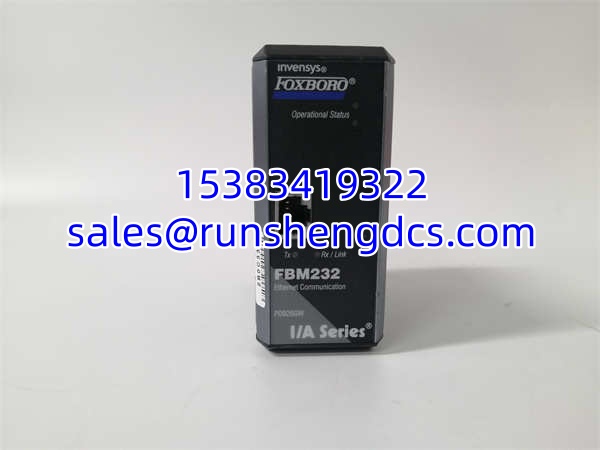

Description
Key Technical Specifications
| Parameter | Specification |
|---|---|
| Product Type | Ethernet Communication Module (FDSI) |
| Model | FBM232 |
| Part Number | P0926GW |
| Manufacturer | Foxboro (Schneider Electric) |
| System Platform | I/A Series / Foxboro Evo DCS |
| Ethernet Interface | 10/100 Mbps auto-negotiating (RJ45) |
| Port Configuration | Single-port |
| Internal Power Draw | ≤ 5W (typical) |
| Operating Temperature | -10°C to +70°C (verify wide-temp variant availability) |
| Storage Temperature | -45°C to +85°C |
| Humidity | 10%–95% non-condensing |
| Mounting | DIN rail or panel mount |
| Dimensions (W × H × D) | 50 mm × 136 mm × 118 mm |
Product Introduction
You’ve got a Foxboro I/A Series DCS running a plant that was commissioned fifteen years ago. The FBM232 (P0926GW) is one of those modules that sits quietly in the I/O subsystem, doing one job: giving the DCS a single Ethernet port to talk to field devices or upstream network infrastructure. It’s a Field Device System Integrator — not a switch, not a router, not a programmable gateway. It’s a bridge.
The FBM232 connects to the Foxboro Evo or I/A Series controller bus on one side and presents a standard 10/100 Mbps Ethernet RJ45 port on the other. Field devices, HMIs, or plant-level Ethernet segments plug into that port. Power draw stays under 5W, which matters when you’ve got dozens of these modules packed into an I/O cabinet with limited thermal headroom. For facilities still running I/A Series hardware, the FBM232 is a known quantity — it works, it’s been proven in the field for years, and replacement units are still findable through surplus channels.
QA/QC Transparency SOP
- Intake & Origin Verification: Confirm the module label reads with P/N P0926GW. Check the Foxboro/Schneider Electric branding and I/A Series markings. Inspect the RJ45 port for bent contact pins, debris, or corrosion. Examine the backplane connector for damaged or missing pins.
- Live Functional Testing: Seat the module in a compatible I/A Series I/O rack. Apply rated bus power. Verify the module powers up — status LEDs should indicate normal operation with no fault codes on the controller. Confirm the controller recognizes the in its I/O configuration scan.
- Electrical Parameter Tests: Measure supply current draw with a multimeter in series — confirm it stays within the ≤ 5W envelope. Run a megger test on power-to-ground isolation if the module has accessible isolation points. Verify continuity on all backplane connector pins against the Foxboro pinout diagram.
- Ethernet Communication Verification: Connect a laptop or network analyzer to the RJ45 port. Confirm link establishment at 10 or 100 Mbps (check LED indicators). Send a known data payload through the module and verify it passes to the DCS controller without errors. Check for packet loss over a sustained test window (minimum 15 minutes).
- Final QC & Anti-Static Packaging: Clear any site-specific IP addresses or configuration parameters unless the buyer requests retention. Pack in an anti-static bag with foam cushioning around the RJ45 port and backplane connector. Ship in a rigid carton to prevent physical damage in transit.
Field Engineer Gotchas
- The FBM233 (P0926GX) is the redundant Ethernet variant. The (P0926GW) is single-port, non-redundant. If your system architecture calls for redundant Ethernet paths, the won’t cut it. I’ve seen procurement teams order the wrong one because the part numbers look nearly identical. Read the full number.
- Phantom Spec Sheet Pollution: Multiple third-party websites list the with fiber optic ports, PoE, IEEE 1588, and ring redundancy protocols (O-Ring, MSTP). Those are features of generic industrial Ethernet switches, not this module. If your spec requires fiber or redundancy, you need a different piece of hardware. Don’t let a bad spec sheet send you down the wrong procurement path.
- I/A Series Bus Compatibility: The plugs into the Foxboro I/A Series I/O bus. It will not interface with a generic Modbus TCP network without the proper DCS-side configuration. Make sure your controller firmware supports the module type before you install it.
- Thermal Environment: The standard operating range is -10°C to +70°C. If this module is going into an outdoor cabinet in a hot climate or an unheated building in winter, verify whether your specific unit is a standard or wide-temperature variant. A module that works fine on the bench at 22°C can fail at 65°C ambient if it’s not rated for it.
- ESD During Handling: The RJ45 port and backplane connector are both ESD-sensitive. Ground yourself before touching the module. A static hit through the Ethernet port can fry the PHY chip — and you won’t see any external damage.
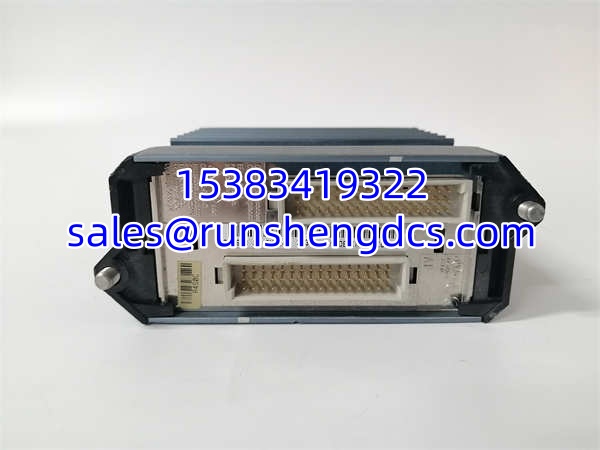
FOXBORO FBM232 P0926GW
Application Scenarios
- DCS-to-Plant Ethernet Bridge: A pulp and paper mill’s I/A Series DCS needs to exchange data with a new HMI server over the plant Ethernet backbone. The provides the single Ethernet port on the DCS side, bridging controller data to the plant network.
- Remote I/O Expansion: A water treatment facility uses Foxboro I/A Series controllers at a central plant building. An at a remote pump station provides the Ethernet link back to the main controller, carrying status and alarm data over standard Cat5 cabling.
- Legacy System Maintenance: A chemical plant running a 20-year-old I/A Series DCS loses an to a power surge. A surplus replacement unit is sourced, tested, and swapped in — restoring Ethernet communication to the controller within a single shift.
Field Case (anonymized): A refinery’s I/A Series DCS had an that intermittently dropped its Ethernet link every 4–6 hours. The maintenance team replaced the module twice. Same problem. The third investigation found the issue wasn’t the module — it was a corroded jack on the patch panel between the I/O cabinet and the network switch. The module was fine. The lesson: always check the cable plant before blaming the hardware.
FAQ
A: The I/A Series is a mature platform. Foxboro/Schneider Electric continues to support existing installations, but newer projects typically migrate to Foxboro Evo or newer architectures. Surplus and aftermarket stock of the remains available. Contact Foxboro/Schneider Electric directly to confirm current production and support status for your specific application.
A: No. The is a single-port FDSI module designed to integrate with the I/A Series DCS bus. It is not a managed or unmanaged Ethernet switch. It has one port — there’s no switching, routing, or port replication happening inside this module.
A: The P0926GW variant uses a standard copper Ethernet port (10/100 Mbps). It does not have a built-in fiber optic port. If your installation requires fiber, you’ll need a media converter between the ‘s port and your fiber run — or a different module altogether.
A: The FBM233 (P0926GX) provides redundant Ethernet connectivity. The (P0926GW) is single-port, non-redundant. If your system requires dual Ethernet paths for fault tolerance, you need the FBM233.
Q: Will this module work in a Foxboro Evo system?
A: The is part of the I/A Series FDSI family. Foxboro Evo systems can interface with I/A Series I/O in certain configurations, but compatibility depends on your specific Evo release and hardware setup. Verify with Foxboro/Schneider Electric documentation before deploying.
A: Standard Ethernet over Cat5/Cat5e copper is limited to 100 meters (328 feet) from the port to the next network device (switch, hub, or end device). If you need longer runs, use a media converter to fiber.
Q: Can I hot-swap this module in a live I/O rack?
A: The I/A Series platform supports hot-swap on many I/O modules, but you must verify this for the specifically in your controller’s hardware manual. Hot-swapping without proper procedure can cause a bus fault or temporary communication loss to connected devices.