
Description
Key Technical Specifications
| Parameter | Value |
|---|---|
| Network Protocol | ARCNET (ANSI/ATA 878.1) |
| Data Rate | 2.5 Mbps |
| Port Capacity | Up to 16 Ports (via 4 Slots) |
| Media Support | Coax, Twisted Pair, Fiber Optic (via EXP Modules) |
| Topology | Star, Bus, or Hybrid |
| Power Supply | Universal AC/DC Input |
| Mounting | 19″ Rack (2 Units = 7″ Height) or Wall Mount |
| Diagnostics | LED Indicators (Power, Timing, Reconfiguration) |
| Operating Temp | 0°C to +50°C (Typical) |
| Compliance | UL 60950, CSA 22.2 No 60950 |
| Watchdog Timer | Yes (Prevents Hub Lockup) |
| Expansion | EXP Series Plug-in Modules |
Product Introduction
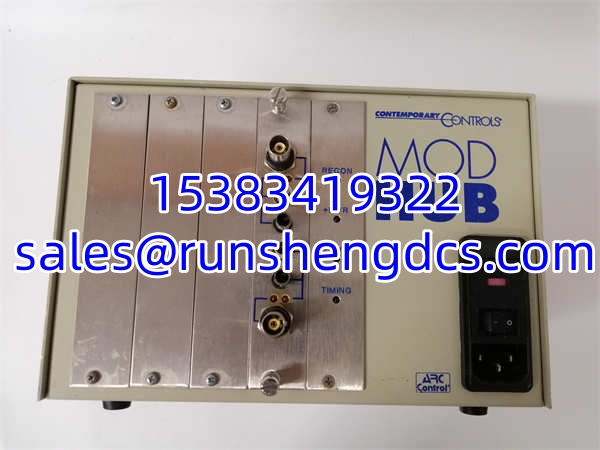
When your legacy ARCNET network starts dropping packets or the hub locks up, you’re usually looking at a failed backplane or a degraded power supply in the old unit. The CONTEMPORARY MODHUB-16E is the direct replacement for these aging 4-slot chassis, providing the physical layer regeneration needed to keep 2.5 Mbps ARCNET networks alive. It doesn’t just repeat signals; it actively retimes them using precision delay lines to minimize jitter, which is critical when you’re running long bus segments or mixing fiber and copper in the same star topology.
Bottom line — it’s a tank for legacy networks. The CONTEMPORARY MODHUB-16E uses low-power CMOS logic and includes a hardware watchdog timer that automatically resets the hub if it detects a lockup condition, saving you a truck roll to cycle power. The modular EXP slots let you mix media types (like adding a fiber uplink to a copper star), but you must verify the exact EXP module part numbers installed in each slot. A hub with four identical coax modules won’t talk to a fiber trunk, no matter how good the chassis is.
QA/QC Transparency SOP
- Intake & Origin Verification: We verify the CONTEMPORARY MODHUB-16E chassis revision and check the EXP module seating. Many of these units were pulled from 20-year-old installations; we inspect the backplane connectors for oxidation or bent pins that cause intermittent port failures.
- Live Functional Testing: The hub is powered up on a bench with a known-good ARCNET NIC. We inject traffic and verify that all 16 ports (across 4 slots) pass data without CRC errors. The watchdog timer is tested by intentionally inducing a bus fault to confirm the hub resets automatically within the spec window.
- Electrical Parameter Tests: Using a Fluke 87V, we measure the internal DC rail voltages under load. Universal power supplies in these units often have failing capacitors; we check for ripple voltage >100mV, which causes timing drift and packet loss.
- Firmware/Config Verification: We verify the EXP module configuration matches the physical media. A common issue is a fiber EXP module installed in a slot configured for coax in the DIP switches (if applicable) or a mismatched media type. We document the exact media type per slot.
- Final QC & Anti-Static Packaging: After passing, the CONTEMPORARY MODHUB-16E is sealed in an anti-static bag. We include a note listing the installed EXP module part numbers and their media types to prevent field installation errors.
Field Engineer Gotchas
- EXP Module Mismatch: The CONTEMPORARY MODHUB-16E chassis is just a shell; the EXP modules define the media. If you replace a hub but keep the old EXP modules, and one of those modules is marginal, your new hub will fail too. Always test the EXP modules separately or swap them with known-good spares during replacement.
- Bus Termination Errors: ARCNET is a token-passing bus; unterminated ends cause token loss. The CONTEMPORARY MODHUB-16E does not provide termination. If you’re using the bus topology link on the hub, verify 90Ω (or 75Ω for older coax) terminators are present at both physical ends of the bus segment. I’ve seen “bad hub” calls that were just missing terminators.
- Watchdog False Trips: In extremely noisy EMI environments, the watchdog can trigger on sustained bus errors. If your keeps resetting, check for ground loops or unshielded cables running next to VFDs. The hub is working as designed; your plant wiring is the problem.
- Power Supply Polarity: While many units have universal inputs, some older revisions have polarity-sensitive DC inputs. Check the label. Applying reverse polarity will instantly blow the input fuse or fry the bridge rectifier. Verify with a multimeter before plugging in.
CONTEMPORARY MODHUB-16E
Application Scenarios
Legacy Manufacturing Line Retrofit: A 1990s-era bottling line runs ARCNET for PLC-to-HMI comms. The original hub failed, and the OEM is long gone. The drops in, reusing the existing coax cabling and EXP modules, restoring comms without a full network migration.
Mixed-Media Building Automation: A university campus uses ARCNET for HVAC control across multiple buildings. The acts as the central star hub, with fiber EXP modules for inter-building links and coax EXP modules for in-building device drops, all in one chassis.
Oil & Gas Pipeline SCADA: Remote pump stations use ARCNET for RTU-to-HMI links. The ’s wide temperature range and watchdog timer handle the unconditioned environment, automatically recovering from lightning-induced bus faults without operator intervention.
FAQ
Can I use this hub with 20 Mbps ARCNET?
No. The is strictly a 2.5 Mbps hub. 20 Mbps ARCNET requires a different hub series (like the MODHUB-20). Mixing speeds on the same segment is not supported.
Does this hub support TCP/IP?
No. The is a Layer 1/Layer 2 ARCNET device. It does not route IP traffic. If you need TCP/IP over ARCNET, you need a protocol gateway (like a Contemporary Controls NIM or a third-party router).
How do I know which EXP modules are installed?
Look at the front panel labeling or the side of each EXP module. They are typically labeled with media type (e.g., “COAX”, “TP”, “FO”). If unlabeled, you’ll need to pull the module and check the part number on the PCB.
Is hot-swapping supported?
No. ARCNET hubs are not hot-swappable. Power down the before replacing EXP modules or the chassis. Pulling a module while powered can damage the backplane.
What’s the max cable length per port?
Depends on the media. For coax: ~2000 ft (600m). For twisted pair: ~2000 ft (600m) with shielded cable. For fiber: up to 2 km (multimode) or 10 km (single-mode). Always verify with the specific EXP module datasheet.
Can I daisy-chain these hubs?
Yes, but be careful with timing. ARCNET has a maximum round-trip delay limit. You can typically daisy-chain up to 4-6 hubs depending on cable lengths. Exceeding this causes token loss. Use the Contemporary Controls timing calculator or consult the manual.
Is the watchdog timer adjustable?
No. The watchdog timeout is fixed in hardware on the . It’s designed to reset within a few seconds of detecting a lockup. If you need longer recovery times, you have a physical layer problem, not a hub problem.