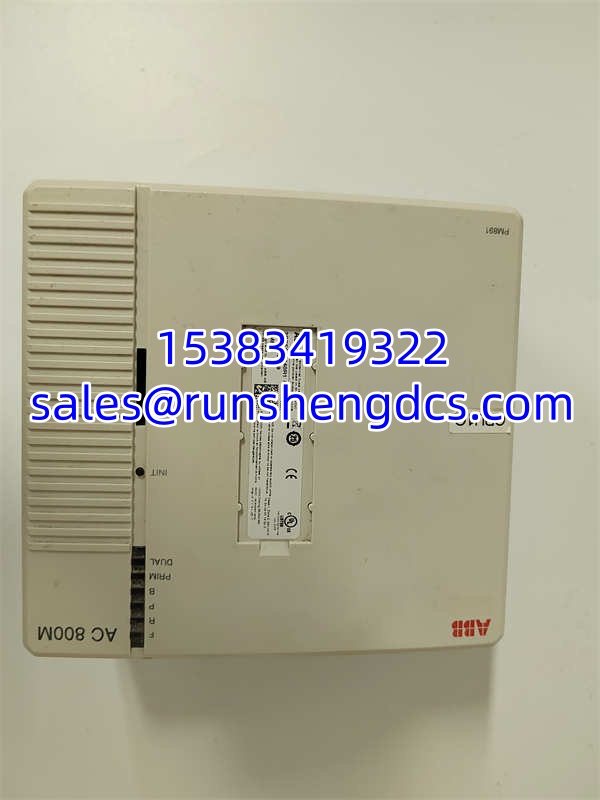

Description
Key Technical Specifications
| Parameter | Specification |
|---|---|
| Product Model | PM891 (3BSE053240R1) |
| Manufacturer | ABB Automation Technologies |
| Processor | Intel Pentium M, 1.2 GHz |
| Memory | 128MB RAM (Expandable to 512MB), 16MB Flash |
| Redundancy | Hot Standby Redundancy (HSR), <10ms Switchover |
| Communication | Dual 10/100Base-T Ethernet, CEX-bus |
| Serial Port | 1x RJ45 COM4 (Isolated, for configuration) |
| Storage | CompactFlash (Application/Firmware) |
| Power Supply | 24 VDC (19.2-30 VDC range) |
| Operating Temp | 0°C to +55°C |
| Protection Rating | IP20 |
| Dimensions | 174 x 186 x 94 mm |
| Weight | ~4 kg |
Product Introduction
When a plant’s distributed control system (DCS) requires hot standby redundancy without sacrificing scan times, standard controllers choke. The ABB PM891 sits at the top of the AC 800M family specifically to handle heavy process control and high-speed logic. It uses a 1.2 GHz Intel Pentium M processor and supports seamless failover in under 10ms. This means if the primary CPU dies, the backup takes over before the process I/O even registers a glitch.
We specify the 3BSE053240R1 because of its 128MB base RAM and expandability to 512MB. Most CPUs in this class max out at 64MB, which forces engineers to write convoluted code to fit into memory. The PM891 gives you the headroom to run complex batch recipes, advanced PID loops, and extensive historian buffering on a single node. Bottom line: it consolidates what used to take three mid-range CPUs into one highly available unit.
QA/QC Transparency SOP
We don’t trust “tested” stickers. Every PM891 3BSE053240R1 goes through a five-step validation process before it ships:
- Intake & Origin Verification: We trace the 3BSE053240R1 batch code against OEM production records to rule out counterfeit clones. Visual inspection checks for cold solder joints on the RJ45 ports and CEX-bus connectors.
- Live Functional Testing: The unit is mounted on a live AC 800M test rack. We run a 24-hour burn-in with a heavy control program to verify thermal stability and RAM integrity. Redundancy switchover is manually triggered and timed.
- Electrical Parameter Tests: Using a Fluke 115, we verify 24VDC input tolerance and check isolation resistance on the COM4 port. We also verify the CompactFlash slot reads/writes without errors.
- Firmware/Config Verification: We read the internal firmware version and compare it against the requested revision. If the previous user left custom network settings, we perform a factory reset.
- Final QC & Anti-Static Packaging: Unit is cleaned with contact-safe solvent, sealed in an ESD bag with desiccant, and shipped with a test certificate showing the actual measured switchover time and firmware version.
Field Engineer Gotchas
- CEX-Bus Termination: The PM891 uses a Communication Extension (CEX) bus for I/O modules. If you don’t terminate the bus correctly using the BC810 interconnect units, you’ll get intermittent I/O faults. War Story: Saw a tech spend three days chasing a “ghost” I/O failure, only to find the last module in the cluster was missing its terminator. Always check the physical termination.
- Redundancy Switchover Time: The spec says <10ms, but that assumes perfect network conditions. If your Ethernet cables are run next to VFDs without proper shielding, the switchover can exceed the tolerance of fast-acting drives. Solution: Use shielded Cat5e/Cat6 and ground the shields properly. Don’t daisy-chain through unshielded patch panels.
- CompactFlash Compatibility: The 3BSE053240R1 is picky about CF cards. Modern high-capacity cards (>2GB) often fail. Warning: Stick to industrial-grade cards under 2GB. I’ve seen systems refuse to boot because someone tried to use a 16GB consumer card. Always have a known-good spare.
- Battery-Free Design: This CPU has no internal battery. It uses flash memory for retention. Check: If you see “Memory Checksum Error” on boot, the flash might be corrupted. Don’t panic; reload the application from your backup. But if it happens repeatedly, the flash chip is dying.
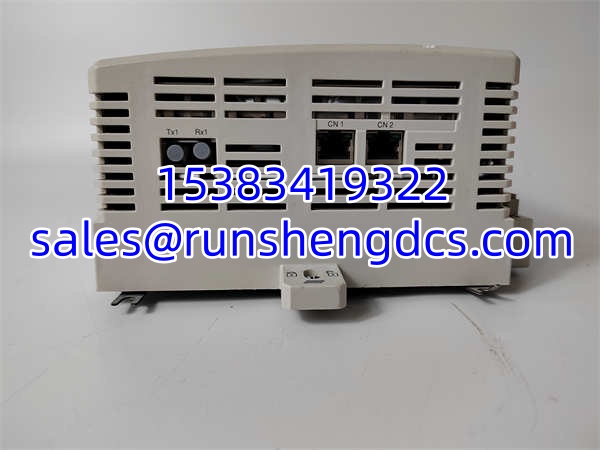
ABB PM891 3BSE053240R1
Application Scenarios
- Oil & Gas Refineries: Complex distillation columns require tight temperature and pressure control with zero downtime. The PM891’s hot standby architecture ensures that a single CPU failure doesn’t trigger a plant-wide shutdown.
- Power Generation Turbines: Steam and gas turbines need high-speed logic for overspeed protection and load control. The 1.2GHz processor handles the fast scan times required for turbine protection while managing the slower balance-of-plant I/O.
- Pharmaceutical Batch Processing: FDA compliance requires extensive data logging and recipe management. The 512MB RAM expansion allows the to store months of batch records locally, reducing the load on the 800xA server network.
FAQ
Can I hot-swap this CPU while the system is running?
Yes, but only if you have a redundant pair. The supports hot-swap of the backup unit. Never pull the primary CPU while the system is in redundant mode; you’ll force a switchover, and if the backup has any issues, you’re down. Always verify the backup is healthy first.
Is 3BSE053240R1 compatible with older AC 800M modules?
Generally, yes. The is backward compatible with most S800 I/O and older CEX-bus modules. However, verify the firmware version. If your system is on V5.0 and the new unit is V7.0, check the release notes for deprecated features. Always do a “Download Hardware Config” after swapping.
What is the maximum scan time?
It depends on the program size. With a 100k instruction program, expect ~10ms. With a 1M instruction program, expect ~50-80ms. The is designed for deterministic execution, but don’t expect sub-millisecond response for massive programs. Size your CPU based on actual instruction count, not just I/O count.
Why is my redundancy LED flashing red?
The backup CPU is out of sync. This usually means the application or firmware on the backup doesn’t match the primary. Fix: Force a synchronization from the primary. If it fails, check the Ethernet link between the two CPUs. Bad cabling is the #1 cause of redundancy sync failures.
Can I use standard Ethernet cables for the control network?
No. Use industrial-grade shielded Cat5e or Cat6. The ’s dual Ethernet ports are sensitive to EMI. Unshielded cables in a noisy environment will cause packet loss and trigger false redundancy switchovers. Ground the shields at both ends.
Do I need a CompactFlash card for operation?
Yes. The boots from the CF card. It stores the firmware, application, and configuration. Without it, the CPU is a brick. Always keep a formatted, loaded spare CF card on hand. Label it with the firmware version and application date.
What is the MTBF?
ABB typically rates the at >100,000 hours MTBF. The most common failure point isn’t the CPU itself; it’s the CompactFlash card or the Ethernet port. Inspect the physical connectors during your annual shutdown and replace CF cards every 5 years as a preventive measure.