
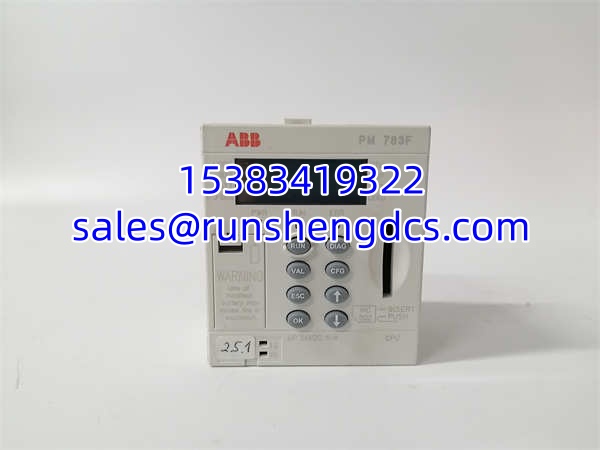

Description
Key Technical Specifications
- Product Model: PM783F
- ABB Order/Type Number: 3BDH000364R0002 — verify on nameplate
- Brand: ABB
- Product Type: DCS CPU module / controller module
- System Context: ABB DCS / industrial automation control systems
- Function: Controller CPU for DCS or PLC-based automation systems
- Mounting Style: Controller/chassis-mounted CPU module; exact mounting method not confirmed here
- Power Supply: Typically supplied through host controller chassis or system power arrangement; do not assume standalone supply requirements
- Communication Interface: Not confirmed in available references
- I/O Function: Not a discrete/analog I/O module; it is a CPU/controller module
- Documentation Status: No verified ABB OEM manual or datasheet confirmed here
- Verification Required: Full nameplate, firmware version, hardware revision, chassis slot, connector layout, and application parameters
Product Introduction
ABB PM783F 3BDH000364R0002 is identified in industrial spare listings as an ABB DCS CPU module, meaning it functions as a controller processor inside a DCS or industrial automation system. It is not a simple I/O card, power supply, or standalone PLC.
Its main use is as a replacement CPU/controller module for an existing ABB DCS or compatible control system. Because CPU modules are highly configuration-sensitive, correct application depends on matching the full type number, firmware version, hardware revision, chassis slot, and system parameters — not just the PM783F model name.
Installation & Configuration Guide
Preparation — 10 min
- Lock out and tag out the controller chassis or cabinet power.
- Confirm the failed unit label reads PM783F.
- Verify whether the full order number 3BDH000364R0002 appears on the nameplate.
- Photograph the module orientation, slot position, connectors, jumpers, DIP switches, and firmware labels.
- Record the host system type, chassis model, and slot assignment.
Removal — 5–10 min
- Confirm zero energy at the CPU module and associated chassis power.
- Label all connectors and cables before removal.
- Remove communication cables first, then control wiring, then ground if applicable.
- Release the CPU module from its slot or mounting position.
- Inspect the backplane, connectors, and pins for corrosion, bent pins, or burn marks.
Installation — 10 min
- Install the replacement PM783F in the same slot and orientation.
- Reconnect connectors in the reverse order of removal.
- Confirm each connector is fully seated and keyed correctly.
- Check that jumpers, DIP switches, or configuration markings match the original module.
- Do not force the module into the slot. Misaligned pins can damage the backplane.
Power-On & Test — 10 min
- Restore control power only.
- Watch for abnormal heat, noise, or burning smell.
- Check CPU status LEDs, if present.
- Verify the host system recognizes the CPU module.
- Confirm controller startup, communication, and process control function.
- If the system uses firmware, project files, or parameter sets, verify those are restored or matched.
Troubleshooting Quick Reference
| Fault | Likely Cause | Quick Check |
|---|---|---|
| CPU not recognized | Wrong revision, slot, or chassis mismatch | Compare full nameplate and slot position |
| No power/status indication | Chassis power, fuse, or CPU failure | Measure chassis supply and CPU input power |
| Communication failure | Cable, port, or protocol mismatch | Check communication wiring and host settings |
| Intermittent faults | Loose connector or backplane contact | Reseat module; inspect pins |
| Repeated fault after swap | Firmware, parameter, or upstream system fault | Compare firmware version and restore configuration |
| System fails to start | Project file, license, or hardware revision mismatch | Verify controller project, revision, and chassis compatibility |
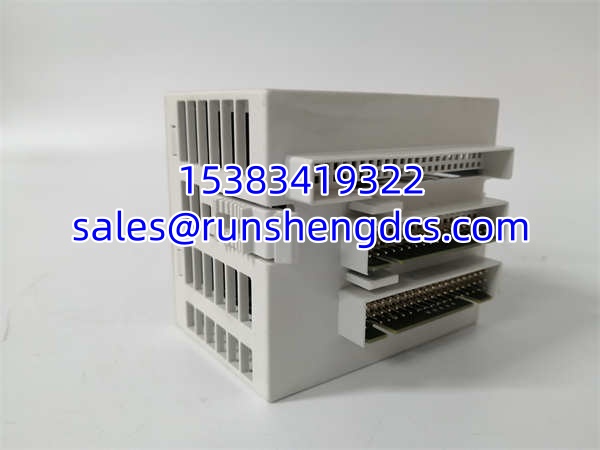
PM783F 3BDH000364R0002
Dimensions, Mounting & Wiring Notes
- Dimensions: H × W × D not confirmed in available references.
- Mounting Method: CPU/controller module installation in an ABB DCS or compatible chassis; exact mounting style not confirmed here.
- Terminal Notes: Connector type, pinout, and wiring colors are not confirmed. Do not assume terminal functions from generic surplus descriptions.
- Wiring Requirement: Verify chassis slot, connector keying, communication cables, power arrangement, and system parameters before energizing.
FAQ
Is ABB PM783F 3BDH000364R0002 a PLC I/O module?
No. Available references describe it as a DCS CPU module, so it should be treated as a controller/CPU module rather than a standard I/O card.
Not automatically. The full order/type number, firmware version, hardware revision, chassis type, and slot position must match. A label alone is not enough to guarantee compatibility.
It is associated with ABB DCS and industrial automation control systems. The exact host system must be verified from the installed equipment.
No. Use the full number 3BDH000364R0002, plus firmware version, hardware revision, photos, slot position, and host system details.
What is the biggest risk when replacing this CPU module?
Firmware mismatch, hardware revision mismatch, wrong chassis slot, connector damage, missing configuration, or incompatible system parameters.
Is this module new or refurbished?
Condition depends on the supplier. Ask for photos of the actual unit, including the full type label, revision, firmware markings, and connector condition.
Very likely. CPU modules usually require matching firmware, project files, parameters, or controller configuration. Plan for configuration verification before returning the system to service.




