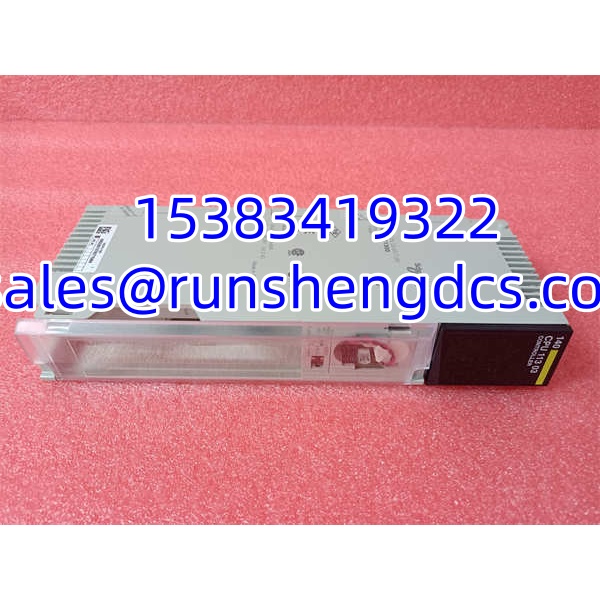

Description
Key Technical Specifications
| Parameter | Detail |
|---|---|
| Manufacturer | Schneider Electric |
| Model | 140CPU11303 |
| Product Type | Modicon Quantum CPU / processor module |
| Platform | Modicon Quantum 140-series |
| Processor | 80186-class processor, ~20 MHz |
| SRAM | 512 KB |
| IEC Program Capacity | 368 KB |
| LL984 / Ladder Logic | 16K |
| Registers | 10K available |
| Communication Ports | 1× Modbus RS232; 1× Modbus Plus |
| Ethernet Port | None onboard; Ethernet requires 140NOE-series modules |
| Memory Backup | Battery-backed RAM with RTC |
| Battery Type | Lithium 7 A 210 A, ~1.2 Ah, typical life ~10 years |
| Backplane Current | ~790 mA at 5 VDC |
| Operating Temperature | Typically 0 to 60 °C |
| Configuration Software | Unity Pro / Concept; newer projects may use EcoStruxure Control Expert |
| Certifications | CE, cULus, CSA, FM Class I Div 2 (verify per unit) |
Product Introduction
The 140CPU11303 is the kind of CPU that keeps a legacy Quantum rack alive. It does not have Ethernet, USB, or onboard analog channels. It sits in a 140XBP backplane, draws 5 VDC from a 140CPS power supply, and runs the logic that keeps valves, interlocks, permissives, and process loops moving.
With 512 KB SRAM, 368 KB of IEC program capacity, and 16K LL984 logic, it is a mid-range Quantum processor. It communicates through one Modbus RS232 port and one Modbus Plus port. If the plant needs Ethernet, that is handled through a separate 140NOE module, not through the CPU itself.
The real risk with this CPU is replacement discipline. 140CPU11302, 140CPU11303, 140CPU31110, 140CPU65150, and 140CPU65160 are not interchangeable. Swapping a smaller-memory CPU into an existing rack can cause program download failures, memory errors, or unexpected stops. Always confirm the exact model, firmware, and program size before purchasing or swapping.
QA/QC Transparency SOP
- Label Verification — Confirm the front label reads “140CPU11303.” Check for signs of relabeling, corrosion, or damaged serial tags.
- Physical Inspection — Inspect the backplane connector, battery compartment, key switch, LED window, and Modbus/Modbus Plus ports for bent pins, leakage, or burn marks.
- Battery & RTC Check — Verify the lithium battery is present and not leaking. A low-battery LED indicates imminent memory loss risk.
- Power-Up Test — If a Quantum test rack is available, verify the READY and RUN LEDs behave normally, the CPU passes power-on diagnostics, and no persistent ERROR LED is present.
- Communication Verification — Test Modbus RS232 and Modbus Plus communication if test equipment is available. Confirm the CPU can be reached by Unity Pro / Concept.
- Final QC & Packaging — Seal in an ESD bag with model, serial/asset tag, firmware revision if available, test status, and date. Include a test report when live testing is performed.
Field Engineer Gotchas
- Do not confuse 140CPU11303 with newer Ethernet CPUs. Models such as 140CPU65150, 140CPU65160, and 140CPU67160 have onboard Ethernet and different memory architectures. They are not drop-in replacements for 140CPU11303.
- No onboard Ethernet. If the rack uses Ethernet, it is almost certainly through a 140NOE module. Replacing the CPU will not restore Ethernet if the 140NOE module is faulty.
- Memory mismatch kills downloads. A 140CPU11302 has less memory than a 140CPU11303. Installing a smaller CPU into an existing application may prevent the program from downloading or running.
- Battery failure causes silent memory loss. If the battery is dead and power is removed, the RAM program can be lost. Always check the BAT LOW LED before removing power.
- Modbus Plus address must match. After CPU replacement, verify the Modbus Plus node address. A wrong address can break communication with HMIs, SCADA, and remote I/O.
- Key switch position matters. If the memory protect switch is enabled, online changes and downloads may be blocked. Check the MEM PROTECT LED before troubleshooting communication issues.
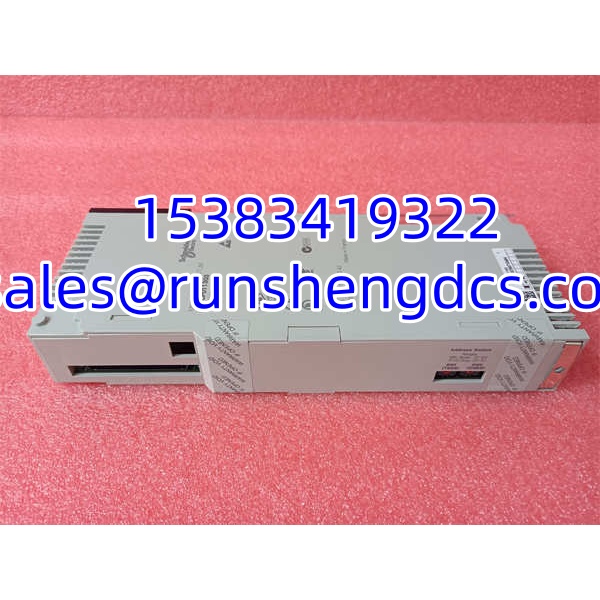
Schneider 140CPU11303
Application Scenarios
- Legacy process control systems. Water treatment, chemical processing, and power generation plants still running Modicon Quantum racks use 140CPU11303 for discrete and analog loop control.
- Brownfield maintenance. Facilities that cannot immediately migrate to M580 keep 140CPU11303 spares to avoid unplanned downtime.
- Modbus / Modbus Plus networks. Applications that rely on serial Modbus or Modbus Plus for HMI, SCADA, and remote I/O communication.
- Migration holdover. During migration to EcoStruxure Control Expert and Modicon M580, teams retain legacy Quantum CPUs to maintain existing logic while planning phased cutovers.
FAQ
What is the 140CPU11303?
It is a Schneider Electric Modicon Quantum CPU module, used as the central processor in legacy Quantum PLC racks.
Does it have Ethernet?
No. The 140CPU11303 has one Modbus RS232 port and one Modbus Plus port. Ethernet requires a separate 140NOE-series communication module.
What programming software does it use?
It is typically programmed with Unity Pro or Concept. Newer installations may use EcoStruxure Control Expert, which replaced Unity Pro from V14 onward.
Can I replace a 140CPU11302 with a 140CPU11303?
Usually yes, because the 11303 has more memory. However, always verify the existing program size, firmware compatibility, and rack configuration before swapping.
Can I replace a 140CPU11303 with a 140CPU65160?
Not as a direct drop-in. The 140CPU65160 is a different CPU family with Ethernet, different memory, and different configuration requirements. Migration requires engineering review.
Is this still in production?
It is a legacy Modicon Quantum CPU. Available stock is typically surplus, refurbished, or new-old-stock. Verify condition, battery status, and test results before purchase.
What is the warranty on surplus CPUs?
A 1-year warranty is typical for verified surplus stock, covering manufacturing defects and DOA failures. Damage from incorrect installation, program loss, battery failure, or power events is not covered.