
Description
Key Technical Specifications
| Parameter | Detail |
|---|---|
| Manufacturer | National Instruments (NI) |
| Model | GPIB-140A/2 |
| Product Type | Fiber-optic GPIB bus extender |
| Standards | IEEE 488.1 / IEEE 488.2 compliant |
| Max Extension Distance | Up to 2 km per link |
| Max Devices in Extended System | Up to 28 devices (including extenders) |
| Data Transfer Rate | Up to 2.2 MB/s (HS488, GPIB-140/140/2 family spec) / up to ~2.8 MB/s reported for HS488 variants; confirm exact unit capability |
| Fiber Connector | ST-style optical connector (HFBR1312/HFBR1316 or equivalent) |
| Deployment Mode | Must be used in pairs; point-to-point fiber link |
| Software Transparency | Existing GPIB control programs typically work without modification |
| Typical Applications | Remote instrument control, ATE systems, distributed test cells, EMI-sensitive environments |
Product Introduction
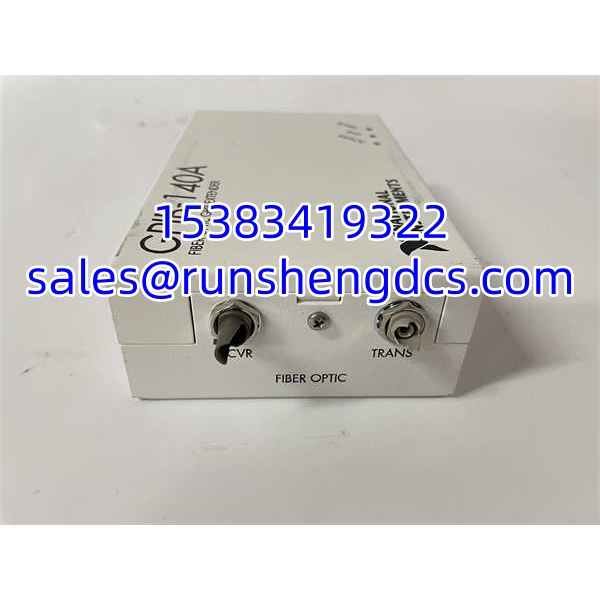
The NI GPIB-140A/2 is a fiber-optic bus extender that allows two physically separate GPIB segments to behave as one logically continuous GPIB system. Each extender connects to a local GPIB bus via a standard IEEE 488 cable, then converts GPIB signals for transmission over fiber-optic cable to a paired extender on the remote side.
The “/2” suffix is important. GPIB-140A supports up to 1 km per extension link, while GPIB-140A/2 supports up to 2 km. Both models increase the device loading limit beyond the standard IEEE 488 constraint of 15 devices per contiguous bus, allowing up to 28 devices in the extended system.
This device is not a GPIB controller card for a PC. It is a bus extender that sits between two GPIB segments. A typical deployment uses one GPIB-140A/2 near the controller and another GPIB-140A/2 near the remote instruments, connected by a single fiber-optic link. Because it is functionally transparent, most existing GPIB applications continue to work without software changes, provided the extended timing and loading rules are respected.
NI GPIB-140A 2
QA/QC Transparency SOP
- Model Verification: Confirm the unit is specifically /2, not GPIB-140, GPIB-140/2, , or GPIB-140B. These families are not all mutually compatible.
- Pair Matching: Verify that a matched pair is available. A single extender cannot form a working link.
- Fiber Connector Check: Confirm ST-style fiber connectors and verify compatibility with the installed fiber cable type.
- Power-Up & LED Check: Apply power and verify POWER, LINK, and ERROR indicators per the NI manual.
- Link Validation: Connect the pair over fiber and confirm that remote GPIB devices are recognized by the controller.
- Functional Test: Run basic GPIB commands (IDN query, read/write) to each remote instrument. Verify timing, error handling, and parallel poll behavior if used.
- Final Documentation: Record model, serial number, firmware/revision if available, fiber type, link distance, and test results.
Field Engineer Gotchas
- Must Be Used in Pairs: A single /2 will not work alone. Fix: Always procure and test matched pairs.
- Not Compatible with GPIB-140/140/2: /2 uses a different protocol across the fiber link than the older GPIB-140/GPIB-140/2. Fix: Do not mix generations.
- A/2 vs A Distance Difference: = up to 1 km; /2 = up to 2 km. Fix: Confirm the suffix before installation.
- Fiber Cable and Connector Match: The unit uses ST-style connectors. Fix: Verify fiber type, polarity, and connector cleanliness before blaming the extender.
- Parallel Poll Behavior: Functional transparency has minor exceptions for parallel poll response modes. Fix: Validate parallel poll behavior during commissioning.
- Legacy Product: NI /2 is not a current mainstream product. Fix: Confirm spare availability, repair options, and migration path to modern GPIB or LXI/Ethernet-based instrumentation.

NI GPIB-140A 2
Application Scenarios
- Remote test cells: Controlling GPIB instruments located in shielded rooms, cleanrooms, or hazardous areas.
- Distributed ATE systems: Extending GPIB across multiple racks or bays without exceeding IEEE 488 cable length limits.
- EMI-sensitive environments: Using fiber to eliminate ground loops and electromagnetic interference on long GPIB runs.
- Legacy system maintenance: Replacing failed extenders in existing NI /2 installations.
FAQ
A: No. It is a fiber-optic GPIB bus extender, not a PC interface card.
Q: What does the “/2” mean?
A: /2 supports up to 2 km per extension link, compared to up to 1 km for .
A: No. It must be used in pairs to form a fiber-optic link.
A: No. /2 uses a different fiber-link protocol and is not compatible with //2.
Q: Does it require software changes?
A: Generally no. It is functionally transparent for most GPIB applications, though parallel poll behavior should be verified.
Q: What should I check before buying surplus?
A: Exact model (/2), matched pair availability, fiber connector type, physical condition, power supply, and compatibility with the existing GPIB system.