
Description
Key Technical Specifications
| Parameter | Typical Value / Note |
|---|---|
| Drive model | D136-002-005 |
| Dongle model | D138-002-002 |
| Drive type | Digital servo drive / motion controller |
| Control modes | Position, speed, torque; electronic gear, electronic cam, point-to-point |
| Encoder interfaces | Incremental, SinCos, Hiperface, EnDat, SSI |
| Fieldbus options | EtherCAT and other real-time interfaces depending on variant |
| Configuration method | Pluggable smart card or commissioning software |
| Dongle function | Hardware license / security key for MOOG motion control software or controller functions |
| Typical applications | Printing, packaging, textile, CNC, material handling, test rigs |
| Condition | Surplus/refurbished unless otherwise stated |
Product Introduction
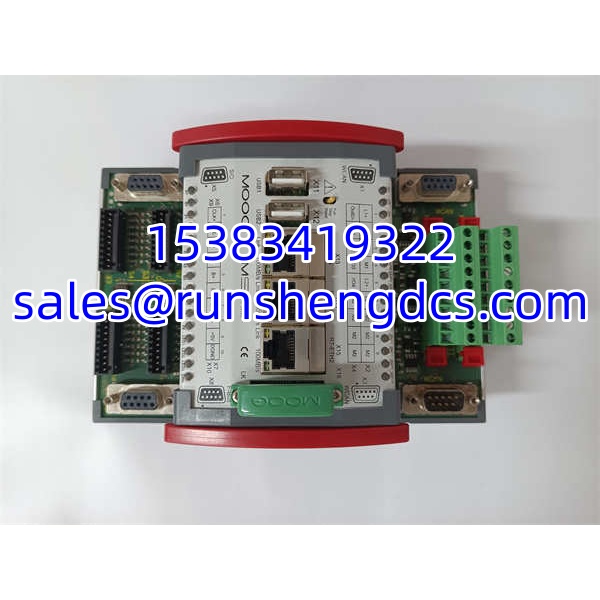
MOOG D136-002-005 is a high-performance servo drive designed for applications that require precise position, speed, and torque control. It integrates multi-encoder support, built-in motion functions, and parameter cloning capability, which makes it suitable for printing presses, packaging machines, CNC axes, web handling, and test systems where repeatability and tuning stability matter.
The included D138-002-002 dongle is not a generic USB accessory. It is a MOOG hardware license key used to activate or validate protected software and controller functions within the MOOG motion control ecosystem. For procurement, the critical check is pairing: the dongle must match the intended software version, controller family, and commissioning scope. A drive can power up normally, yet configuration or advanced functions may remain restricted if the dongle is missing, mismatched, or deactivated.
QA/QC Transparency SOP
- Intake & Origin Verification — Confirm MOOG branding, D136-002-005 drive label, D138-002-002 dongle marking, serial numbers, and hardware revisions. Reject units with damaged connectors, burnt components, or missing dongle.
- Drive Power-Up Test — Apply rated auxiliary and motor supply per nameplate. Verify front-panel LEDs, boot sequence, and absence of persistent fault codes.
- Encoder & I/O Check — Connect a compatible encoder and verify feedback acquisition. Test digital/analog I/O response where accessible.
- Dongle Recognition Test — Insert D138-002-002 into the designated host interface and confirm the commissioning software or controller recognizes the license. Record any error messages or activation limits.
- Parameter & Firmware Verification — Read firmware revision, encoder configuration, fieldbus option, and stored parameters. Back up existing settings before any change.
- Final QC & Anti-Static Packaging — Document drive serial, dongle serial, firmware, test results, and physical condition. Pack drive and dongle separately in anti-static material with moisture protection.
Field Engineer Gotchas
- Dongle-drive mismatch — D138-002-002 is a MOOG hardware license key, but its exact activation scope depends on software version and controller family. Do not assume it unlocks every D136 variant.
- Firmware compatibility — A newer commissioning tool may not recognize an older dongle, or an older dongle may not activate functions required by a newer firmware release.
- Encoder type must match parameter set — EnDat, Hiperface, SinCos, and incremental encoders are not interchangeable without reconfiguration. Wrong encoder settings cause following errors or drive faults.
- Parameter cloning risk — Copying parameters from another machine without verifying motor data, encoder resolution, and safety limits can cause unstable motion or overtravel.
- EtherCAT/network conflicts — If the drive is used on EtherCAT or another real-time bus, verify node address, PDO mapping, and ESI/EDS files before connecting to the live network.
- Counterfeit or reprogrammed dongles — Hardware license keys from unverified surplus channels may fail after software updates. Always test dongle recognition before site installation.
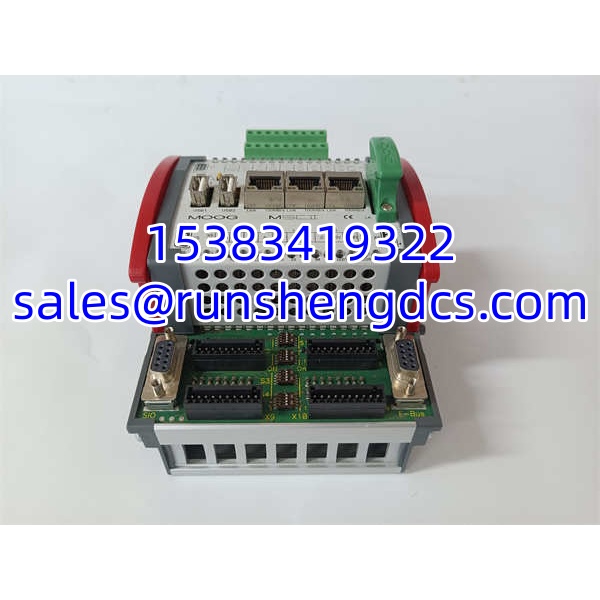
MOOG D136-002-005带D138-002-002加密狗
Application Scenarios
- Printing press axis replacement — Restoring a failed servo drive on a register control or web tension axis where encoder feedback and electronic gearing are required.
- Packaging machine retrofit — Using D136-002-005 for camming, indexing, or synchronous feeding while retaining existing MOOG commissioning workflows.
- Test rig or hydraulic-electric hybrid system — Deploying the drive for precise position or force control, with D138-002-002 enabling licensed configuration tools.
- Legacy MOOG system maintenance — Keeping an existing MOOG motion platform operational when original spare drives or dongles are no longer available new.
FAQ
It is primarily referenced as a MOOG hardware license / security key for motion control software and controller functions. Some listings describe it as a controller module, but its practical role in this bundle is license activation.
Can I use D136-002-005 without the dongle?
Basic drive operation may be possible without the dongle, but configuration, advanced functions, or software commissioning may be restricted. Verify the exact license requirement before installation.
It typically supports incremental, SinCos, Hiperface, EnDat, and SSI encoders. The enabled interface depends on hardware option and parameter configuration.
Parameter cloning is supported via smart card or software, but motor data, encoder type, safety limits, and machine calibration must be verified before download.
Is this bundle suitable for new installations?
It can be used if the system design matches the drive’s encoder, bus, and power ratings. For new projects, confirm current MOOG availability, firmware support, and dongle compatibility with the OEM.
What should I check before purchasing?
Confirm drive serial number, firmware revision, encoder option, fieldbus option, dongle serial number, dongle activation status, and whether the commissioning software version is still supported.
Do you provide warranty?
Typical surplus/refurbished supply carries a limited functional warranty. Exact terms depend on stock condition and should be confirmed before purchase.