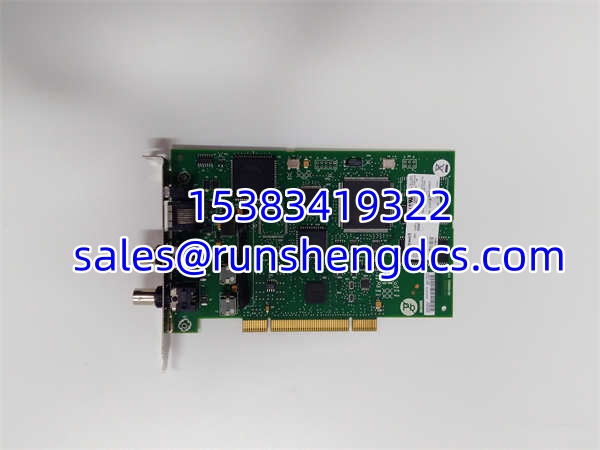

Description
Key Technical Specifications
- Model Number: TC-PCIC02-100
- Manufacturer: Honeywell Process Solutions
- Series/System: Experion TPS / Experion PKS / ControlNet
- Bus Interface: PCI / PCIe (via Magma PE3R PCIe-to-PCI converter)
- Fieldbus Protocol: Rockwell Automation ControlNet
- Network Topology: Coaxial Trunk with Tap and Drop Cable
- Max Nodes: Dependent on ControlNet network design and repeaters
- Termination: Requires terminators at trunk segment ends or Tap Dummy Loads (TDL)
- Compatibility: Dell PowerEdge R330XL, HP ProLiant DL360p Gen8, Dell PowerEdge T610
- Application: Experion LCN Node Setup and Bridge Hardware
Functional Role & Application Analysis
The Honeywell TC-PCIC02 is a universal PCIC card designed to integrate ControlNet networks directly into Honeywell Experion servers. Engineers deploy this module to bridge the gap between Honeywell’s distributed control systems and standard ControlNet field devices. It acts as the physical and logical interface on the server, translating ControlNet traffic so the Experion software can manage remote I/O, drives, and intelligent instruments.
Typical deployment scenarios include:
- Experion Node Setup: Installing the TC-PCIC02 inside an Experion server to establish ControlNet communication for distributed I/O scanning.
- Legacy System Maintenance: Replacing failed ControlNet interface cards in aging TPS or Experion R4xx/R510.1 systems to maintain plant uptime.
- PCIe Server Integration: Using the Magma PE3R PCIe-to-PCI converter box to install this PCI-based card into modern PCIe-only servers like the Dell PowerEdge R330XL.
- ControlNet Trunk Expansion: Serving as a network node on a coaxial trunk segment, requiring proper termination to prevent signal reflection and network faults.
Our Quality Standard & Testing Process
We understand that a failed ControlNet interface card can isolate entire sections of your Experion network. Sourcing obsolete Honeywell hardware carries risk, and we mitigate that risk through a strict, multi-stage validation process. Every TC-PCIC02 module we ship is verified functional, not just visually inspected. We do not sell untested pulls.
- Visual & Component Inspection: Technicians clean the board and inspect for physical damage, corrosion, or compromised solder joints, paying special attention to the PCI edge connector and coaxial BNC port.
- Live System Test: The module is installed in a live Honeywell test rack (or via Magma converter) and powered up to verify backplane communication, correct IRQ assignment, and stable power draw.
- Full-Function Diagnostics: We connect a ControlNet analyzer and slave simulator to verify scheduled and unscheduled data transfer, confirm network timing, and validate termination integrity.
- Warranty Backing: Only modules passing all diagnostic tests are approved for shipment. Every unit is backed by our full 12-month warranty, giving you confidence in critical infrastructure.
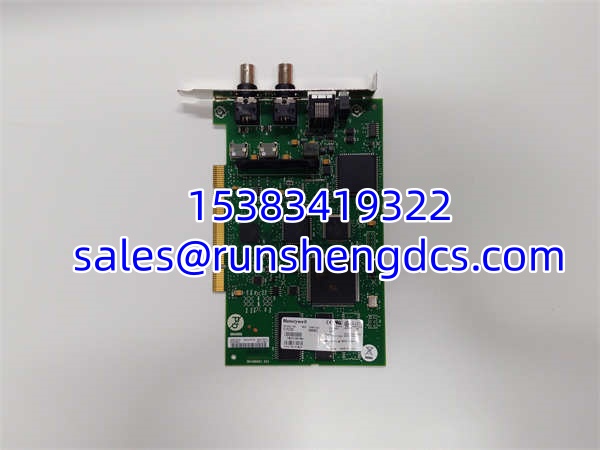
Honeywell TC-PCIC02
Compatibility & Migration Paths
Do not assume all ControlNet PCIC cards are interchangeable. The TC-PCIC02 has specific hardware, firmware, and installation requirements. Verifying these details before ordering prevents costly downtime and return logistics.
- Firmware/Hardware Revisions: Confirm your Experion server BIOS version meets Honeywell requirements. For example, HP ProLiant DL360p Gen8 servers require BIOS version P71 02/11/2014 or later.
- Required Components: This card requires a Magma PE3R PCIe-to-PCI converter for modern PCIe-only servers. Ensure your ControlNet trunk has proper terminators at both ends and Tap Dummy Loads (TDL) on unused drop cables.
- Replacement & Alternatives: The TC-PCIC02-100 is the universal PCIC card for Honeywell ControlNet networks. Verify your existing card’s exact revision before ordering. If you are migrating from legacy TPS to Experion PKS, confirm software compatibility with your current release.
- Get Expert Help: Unsure about your server compatibility, BIOS requirements, or ControlNet network design? Contact our technical team today for a free compatibility check. Provide your server model, BIOS version, and current card revision for immediate validation.