
Description
Key Technical Specifications
| Parameter | Specification |
|---|---|
| Product Model | IS215UCVEH2AB |
| VMIVME Part Number | VMIVME-7614-132 / 350-017614-132 D |
| Manufacturer | GE / GE Fanuc |
| Product Type | VME Controller Card / Embedded CPU Board |
| System Platform | GE Mark VIe Speedtronic Control System |
| Bus Interface | VME64 (ANSI/VITA 1-1994) |
| Processor | Intel-based (Pentium-class or equivalent) |
| Operating System Support | VxWorks, QNX real-time operating systems |
| Ethernet Ports | 1 × 10/100 Mbps Ethernet (front panel) |
| Serial Ports | 2 × COM ports (RS-232/422/485 configurable) |
| LAN Port | 1 × additional LAN interface (front panel) |
| Mezzanine Slot | 1 × PMC/Mezzanine card slot (for expansion) |
| Power Supply | 5V DC |
| Power Consumption | Varies by configuration (typical 10–15W) |
| Operating Temperature | -20°C to +70°C |
| Storage Temperature | -40°C to +85°C |
| Humidity | 5–95% RH, non-condensing |
| Vibration Endurance | IEC 60068-2-6 compliant |
| Shock Endurance | IEC 60068-2-27 compliant |
| EMC Compliance | IEC 61000-4 series |
| Mounting | Standard VME card, fits Mark VIe 13-slot or 21-slot rack |
| Front Panel Features | Ethernet, 2× COM, LAN, mezzanine opening, status LEDs |
| Backplane Connectors | Vertical pin connectors + right-angle edge connectors |
| Redundancy Support | Yes (dual/triple redundant configurations) |
| Diagnostic Features | Remote diagnostics, local fault logging, LED status indicators |
| Country of Origin | USA |
Product Introduction
When a turbine controller card fails, the entire unit trips — and in a combined-cycle power plant, an unplanned trip can cost tens of thousands of dollars per hour in lost generation. The GE IS215UCVEH2AB (VMIVME-7614-132 / 350-017614-132 D) is a VME-bus embedded controller card designed for GE’s Mark VIe Speedtronic control system, serving as the central processing brain for gas turbine, steam turbine, and hydro turbine control applications.
The IS215UCVEH2AB is part of GE’s Mark VIe platform, which is the successor to the widely deployed Mark V and Mark VI turbine control systems. Mark VIe migrated from GE’s proprietary proprietary hardware to a VME64-based architecture using commercial off-the-shelf (COTS) components, improving performance, maintainability, and long-term availability. The “UCVE” designation stands for “Universal Controller VME,” indicating this card’s role as the general-purpose controller within the Mark VIe rack.
At the heart of the IS215UCVEH2AB is an Intel-based processor running a real-time operating system (typically VxWorks or QNX). This processor executes the turbine control application code — including speed control, temperature control, fuel scheduling, load sharing, and protective tripping functions — with deterministic timing critical for turbine safety. The card communicates with I/O modules in the same rack (analog input cards like VAIC, thermocouple cards like VTCC, servo cards like VSVO, RTD cards like VRTD, and turbine-specific cards like VTUR) over the VME backplane, collecting sensor data and issuing actuator commands in real time.
The front panel of the IS215UCVEH2AB provides critical connectivity:
- 1 × Ethernet port: Used for communication with the HMI (Human-Machine Interface), engineering workstation, and plant DCS. This port also supports remote diagnostics and firmware updates.
- 2 × COM ports: RS-232/422/485 serial ports for connecting to auxiliary devices, serial printers, or legacy equipment.
- 1 × LAN port: Additional network interface for redundant network paths or connection to a separate control network.
- Mezzanine card slot: Allows installation of a PMC (PCI Mezzanine Card) for additional functionality such as extra communication ports, specialized I/O, or synchronization modules.
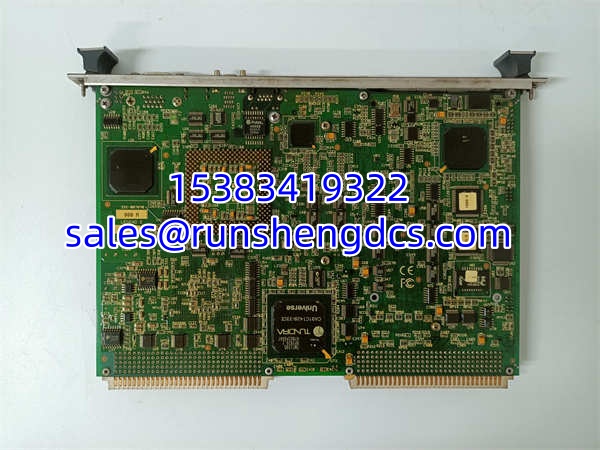
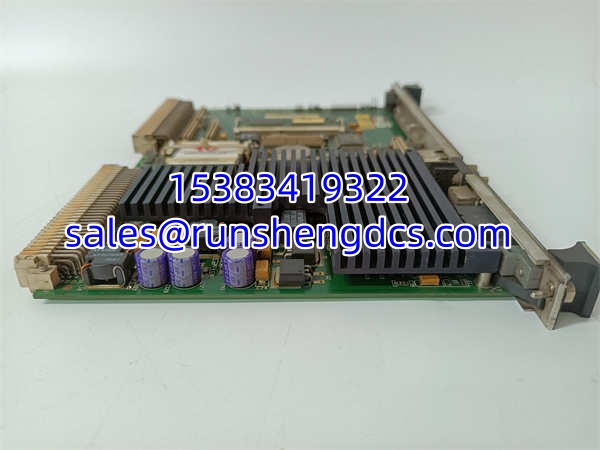
The card mounts in a standard Mark VIe VME rack, available in 13-slot or 21-slot configurations. Two retaining screws (top and bottom of the front panel) secure the card in the rack after insertion. The backplane connectors include vertical pin connectors for the VME bus and right-angle edge connectors for additional signals. A small daughterboard is mounted at an angle near the center of the card, covered by a heatsink that dissipates heat from the processor.
One of the most important features of the IS215UCVEH2AB is its support for redundant configurations. Mark VIe systems can be configured as simplex (single controller), dual redundant (two controllers in hot standby), or triple modular redundant (TMR, three controllers voting). In a redundant configuration, the UCVE cards synchronize their state over a dedicated redundancy network, so if the primary controller fails, the standby controller takes over seamlessly without tripping the turbine. This redundancy is critical for base-load power generation where unplanned outages are extremely costly.
The also includes comprehensive diagnostic capabilities. Local LEDs on the front panel indicate power status, run/stop state, fault conditions, and communication activity. The card logs fault records locally, and these records can be retrieved remotely via Ethernet for troubleshooting. The Mark VIe system also supports online firmware updates, allowing patches and upgrades to be applied without taking the turbine offline — a significant advantage over older Mark V/VI systems that required a shutdown for firmware changes.
This controller card is used across a wide range of power generation applications:
- Gas turbine control: Speed control during startup, temperature control during operation, load control during grid-connected operation, and protective tripping on overspeed, overtemperature, or vibration.
- Steam turbine control: Similar functions for steam turbines in combined-cycle or nuclear power plants.
- Hydro turbine control: Speed/load control for hydroelectric generators.
- Industrial process control: Some Mark VIe systems are used outside power generation for large compressor control, pump control, and other industrial applications requiring high-reliability real-time control.
QA/QC Transparency SOP
- Intake & Origin Verification: Confirm the catalog number is and the VMIVME part number matches VMIVME-7614-132 / 350-017614-132 D. Verify the card’s origin — whether it came from a Mark VIe system teardown, surplus stock, or new-old-stock inventory. Check the PCB date code, revision level, and compare the firmware version against your system requirements. Inspect the physical condition: look for bent pins on the backplane connectors, corrosion on the front panel ports, damaged retaining screws, or signs of overheating on the heatsink.
- Visual Inspection: Examine the PCB for swollen capacitors, burnt components, cold solder joints, or traces damaged by vibration. Check the mezzanine card slot for bent pins or debris. Verify that the heatsink is securely attached and the thermal pad is intact. Inspect the front panel for cracks, missing port covers, or damaged LED lenses.
- Power-Up & POST Test: Insert the card into a known-good Mark VIe VME rack with 5VDC power applied. Observe the front panel LEDs during power-on self-test (POST). The power LED should illuminate, and the run/stop LED should indicate the card’s boot state. A successful POST should result in the card entering run mode without fault LEDs illuminating. If the card fails POST, note the LED pattern for troubleshooting.
- Network Communication Test: Connect an Ethernet cable from the front panel Ethernet port to a PC running the Mark VIe engineering tool (ToolboxST). Verify that the PC can discover the controller on the network. Check that the controller responds to ping commands. Verify that the ToolboxST software can connect to the controller and read the current configuration, firmware version, and fault log.
- Serial Port Test: Connect a serial cable to each COM port and verify communication using a terminal emulator (e.g., HyperTerminal, PuTTY). Configure the COM port parameters (baud rate, parity, stop bits) to match the connected device and verify data transmission in both directions. Test the LAN port similarly by connecting to a separate network and verifying connectivity.
- Backplane Communication Test: With the card installed in a populated Mark VIe rack, verify that it can communicate with other cards in the rack over the VME backplane. Use ToolboxST to read I/O values from connected modules (e.g., analog input cards, thermocouple cards) and verify that data is being exchanged correctly. Write a test value to an output card and verify the output changes.
- Redundancy Test (if applicable): If testing a redundant pair of UCVE cards, verify that the redundancy synchronization is working. Force a failover by removing the primary card and confirm that the standby card takes over without interruption. Verify that the fault log records the failover event.
- Firmware & Configuration Verification: Read the firmware version and compare it against your system’s required version. If an upgrade is needed, perform the firmware update via Ethernet using ToolboxST. Verify that the configuration loads correctly after the update. Download the current fault log and review it for any historical errors.
- Final QC & Packaging: After passing all tests, inspect the front panel ports for cleanliness and install port covers if missing. Verify the retaining screws are tight and the card is properly seated in the rack. Document all test results including POST status, network connectivity, serial port functionality, backplane communication, and firmware version. Package in an ESD-safe bag with desiccant and shock-absorbing foam. Include a test report with all verification data.
Field Engineer Gotchas
- vs IS215UCVEH2AF: The suffix letters (AB, AF, AE, etc.) indicate hardware revision or firmware variant. While these cards are generally compatible within the Mark VIe system, mixing revisions in a redundant configuration can cause synchronization issues. Always verify that redundant pairs have matching revision levels. The “AB” revision is an earlier version; “AF” and later revisions may include hardware improvements or updated firmware.
- VMIVME part number confusion: The VMIVME-7614-132 / 350-017614-132 D designation is the VMIC (VMIC was acquired by GE Fanuc) part number for this controller. When ordering replacements, some suppliers list only the IS215 part number, while others list only the VMIVME number. Make sure you’re ordering the correct card — the VMIVME number is the key identifier for the hardware revision.
- VME rack slot assignment: In a Mark VIe system, the UCVE controller card must be installed in specific slots (typically slot 1 or slot 2, depending on the rack configuration). Installing the card in the wrong slot can prevent it from booting or communicating with other cards. Always consult the Mark VIe hardware manual for the correct slot assignment.
- 5VDC power requirement: The requires 5VDC from the VME backplane. Do not attempt to power this card from an external 24VDC supply — it will be destroyed. The Mark VIe rack power supply provides the correct 5VDC. Verify the rack power supply is operational before inserting the card.
- Firmware compatibility: The runs firmware that must be compatible with the ToolboxST engineering software version and the firmware on other cards in the rack. Mismatched firmware versions can cause communication failures or unexpected behavior. Always check the Mark VIe firmware compatibility matrix before upgrading any card’s firmware.
- Mezzanine card compatibility: If your application uses a mezzanine card (PMC) in the UCVE’s mezzanine slot, ensure the mezzanine card is compatible with the hardware revision. Some older mezzanine cards may not work with newer UCVE revisions, and vice versa.
- Redundancy network cabling: In redundant configurations, the UCVE cards communicate over a dedicated redundancy network (usually Ethernet). Ensure the redundancy network cables are properly connected and the network switches are configured correctly. A broken redundancy network cable can cause the standby controller to falsely detect a primary failure and initiate an unnecessary failover.
- Heat dissipation: The generates significant heat from the processor and heatsink. Ensure adequate airflow through the Mark VIe rack. Blocked ventilation or failed rack fans can cause the card to overheat and trip. Monitor the card’s temperature via ToolboxST and set appropriate alarm thresholds.
- Battery-backed RAM: Some UCVE configurations include battery-backed RAM for retaining critical data during power loss. If the battery fails, the retained data is lost. Check the battery voltage during preventive maintenance and replace the battery before it fails. A dead battery can cause loss of configuration data or fault logs.
- ESD sensitivity: Like all VME cards, the is sensitive to electrostatic discharge. Always use proper ESD precautions (wrist strap, ESD mat) when handling the card. Never touch the backplane connectors or PCB components directly.
GE IS215UCVEH2AB VMIVME-7614-132350-017614-132 D
Application Scenarios
- Combined-cycle power plant: In a 500 MW combined-cycle plant, two cards are configured in dual redundant mode within a 21-slot Mark VIe rack. The primary UCVE card executes the gas turbine control application, managing fuel flow, inlet guide vane position, and exhaust temperature during startup, loading, and normal operation. The standby UCVE card synchronizes its state with the primary over the redundancy network. If the primary card fails, the standby takes over within milliseconds, preventing a turbine trip. The Ethernet port connects to the plant’s control network, allowing operators to monitor turbine parameters from the central control room HMI. The COM ports connect to a serial printer for alarm logging and to a vibration monitoring system for real-time vibration data.
- Simple-cycle peaking plant: In a 50 MW simple-cycle gas turbine used for peaking power, a single card (simplex configuration) controls the turbine. During startup, the UCVE card ramps the turbine speed from zero to full speed using a speed control algorithm, monitoring acceleration rate and turbine vibration. Once synchronized to the grid, the card switches to load control mode, adjusting fuel flow to match the dispatch setpoint from the grid operator. The UCVE card also monitors exhaust temperature, compressor discharge pressure, and bearing temperatures, tripping the turbine if any parameter exceeds safe limits. The Ethernet port connects to a local HMI for operator control and to the plant’s SCADA system for remote monitoring.
- Industrial cogeneration facility: In a chemical plant with a cogeneration gas turbine providing steam and electricity, the card controls the turbine in extraction-condensing mode. The UCVE card manages both electrical load and steam extraction pressure simultaneously, adjusting fuel flow and extraction valve position to maintain both setpoints. The COM ports connect to a steam flow meter and a pressure transmitter for additional process data. The LAN port connects to the plant’s DCS for integration with the overall process control system. The card’s diagnostic features allow the maintenance team to monitor turbine health and schedule preventive maintenance based on operating hours and fault history.
Anonymized case study: A 100 MW gas turbine at a combined-cycle plant in Texas experienced repeated nuisance trips during startup. The turbine would trip on “controller communication fault” approximately 30 seconds after the start command, just as the turbine was approaching firing speed. The maintenance team replaced the UCVE card with a spare, but the problem recurred. A GE field engineer was called in and discovered that the redundancy network cable between the primary and standby UCVE cards had a loose RJ-45 connector. During startup, the increased vibration from the accelerating turbine caused intermittent loss of the redundancy network connection. The standby card interpreted this as a primary controller failure and attempted to take over, but the switchover logic detected an inconsistent state and tripped the turbine. Replacing the Ethernet cable with a new, properly crimped cable resolved the issue. Lesson learned: always check network cable connections during preventive maintenance, especially in high-vibration environments near rotating equipment.
FAQ
Q: What’s the difference between and IS215UCVEH2AF?
A: The suffix letters indicate hardware revision or firmware variant. The “AB” revision is an earlier version, while “AF” and later revisions may include hardware improvements, updated firmware, or additional features. Both are compatible with the Mark VIe system, but when using redundant configurations, it’s recommended to use matching revisions on both cards to avoid synchronization issues. Always check the Mark VIe hardware compatibility matrix before mixing revisions.
Q: Can I use the in a Mark V or Mark VI system?
A: No. The is designed specifically for the Mark VIe system, which uses a VME64 backplane architecture. Mark V and Mark VI systems use different hardware architectures and are not compatible with VME-based cards. If you have a Mark V or Mark VI system, you need the appropriate controller card for that platform (e.g., IS200UCVEH1 for Mark VI).
Q: What software do I use to configure the ?
A: The is configured using GE’s ToolboxST engineering software, which runs on a Windows PC. ToolboxST connects to the controller via Ethernet and allows you to download the control application, monitor real-time data, view fault logs, update firmware, and configure communication parameters. You’ll need the appropriate version of ToolboxST that supports your controller’s firmware version.
Q: Can I hot-swap this card?
A: The Mark VIe system supports hot-swap of controller cards in redundant configurations. In a dual redundant or TMR configuration, you can remove a failed UCVE card and insert a replacement while the system is running. The new card will automatically synchronize with the running controller(s) and join the redundancy group. However, in a simplex (single controller) configuration, removing the UCVE card will cause a turbine trip. Always consult the Mark VIe maintenance manual before performing hot-swap procedures.
Q: What happens if the UCVE card fails?
A: In a redundant configuration, the standby UCVE card takes over automatically without tripping the turbine. The fault is logged, and an alarm is raised on the HMI. In a simplex configuration, a UCVE card failure will cause the turbine to trip on “controller fault.” The turbine cannot be restarted until the failed card is replaced and the system is reset. This is why redundant configurations are strongly recommended for critical applications.
Q: Is this card still available new?
A: The is part of GE’s Mark VIe platform, which is still supported by GE Vernova (the energy business spun off from GE). However, specific revisions like the “AB” may be superseded by newer revisions. New and surplus units are available from GE and independent suppliers. For critical applications, I’d recommend keeping a verified spare in your inventory — while the card is robust, the processor, memory, and battery components can fail after years of continuous operation in harsh industrial environments.