
Description
Key Technical Specifications
| Parameter | Specification |
|---|---|
| Product Type | 4-Channel Position Monitor |
| Platform | Bently Nevada 3500 System |
| Channel Count | 4 (programmed in pairs) |
| Accepted Inputs | Proximity transducers, RPT, DC LVDT, AC LVDT, rotary potentiometer |
| Measurement Functions | Axial (thrust) position, differential expansion, case expansion, valve position |
| Differential Expansion Types | Standard single ramp, non-standard single ramp, dual ramp, complementary |
| Alarm Configuration | User-programmable via 3500 Rack Configuration Software |
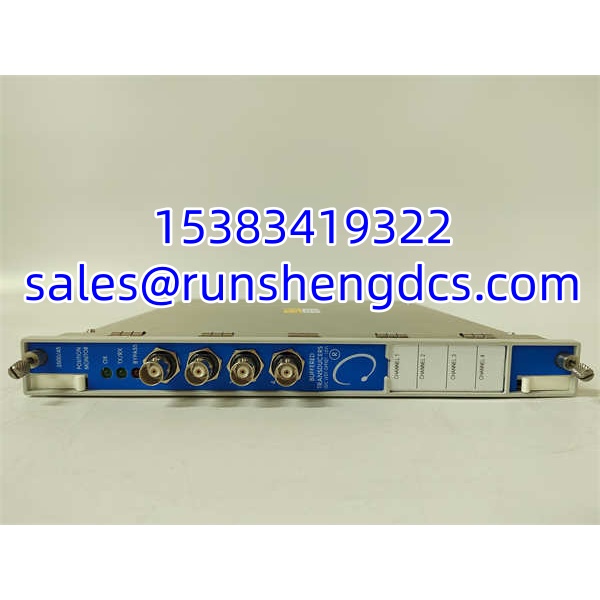
| Front Panel Indicators | OK LED, TX/RX LED, Bypass LED |
| Sensor Buffer Output | BNC connectors on front panel (short-circuit protected) |
| Configuration Method | 3500 Rack Configuration Software |
| Typical Application Standard | API 670 (verify with OEM documentation for specific compliance claims) |
Product Introduction
When a steam turbine trips on unexplained axial position or differential expansion alarms, the first suspect is rarely the sensor itself — it is usually the monitor card interpreting that sensor signal. The Bently Nevada 3500/45 sits in that exact spot in the TSI (Turbine Supervisory Instrumentation) chain. It is a 4-channel position monitor that accepts inputs from proximity probes, rotary position transducers, DC/AC LVDTs, and rotary potentiometers, then conditions those signals and compares them against programmable alarm setpoints.
What makes the 3500/45 worth specifying over a generic analog comparator is its channel-pair architecture. Channels 1&2 can run one measurement function while Channels 3&4 run another — for example, axial position on one pair and differential expansion on the other. Only Channels 3&4 can handle case expansion monitoring. The module integrates into the 3500 rack alongside power supplies (3500/15), frame interface modules (3500/20), and relay modules (3500/32M or 3500/33), giving you a centralized machinery protection backbone. Bottom line — if your turbine protection scheme calls for thrust position or differential expansion monitoring, this is the card that does it.
QA/QC Transparency SOP
1. Intake & Origin Verification
Pull the module from its packaging. Check the front panel label for the exact part number — it should read 3500/45 with a suffix like -01-00. Confirm the front panel part number (e.g., 176449-04) and backplane part number (e.g., 135137-01) match expected revisions. Inspect the BNC connectors for bent pins or corrosion. Reject units with cracked housings, burnt traces near the backplane edge connector, or missing front panel labels.
2. Live Functional Testing
Mount the module in a powered 3500 rack with a known-good 3500/15 power supply and 3500/20 frame interface. Confirm the OK LED illuminates steadily and the TX/RX LED shows active communication with the rack. Using the 3500 Rack Configuration Software, read the module identity from the rack. Force each channel pair through its configured measurement type and verify that the software reflects valid readings — not frozen values, not erratic jumps.
3. Electrical Parameter Tests
With a calibrated multimeter, verify the sensor supply voltage at the front panel BNC connectors. For proximity transducer inputs, check that the supply sits within the expected range (typically around -24 Vdc, verify against the specific I/O module datasheet). Measure continuity on the backplane edge connector pins. If the module has been in service, check for abnormal current draw compared to the typical module specification — a significant deviation usually means an internal fault.
4. Firmware/Config Verification
Connect via the configuration software and read the firmware revision from the module. Document it. If the module came from a live installation, upload the existing configuration file and archive it before making changes. Confirm that channel pair assignments, alarm setpoints, scaling ranges, and bypass settings match the target application. A module with someone else’s alarm thresholds is a liability, not a spare.
5. Final QC & Anti-Static Packaging
Label the module with its part number, firmware revision, test date, and pass/fail status. Cap all BNC connectors to prevent contamination. Place in an anti-static bag with the backplane connector protected by foam or a connector guard. Include a printed test summary showing LED status, communication verification, and channel readback results.
Field Engineer Gotchas
Channel Pair Assignment Mismatch
- Risk: You configure axial position on Channels 3&4 expecting it to work, but case expansion is the only function restricted to that pair — or you assign two incompatible functions to the same pair.
- Solution: Remember the rule: channels are programmed in pairs. Ch 1&2 handle one function, Ch 3&4 handle another. Only Ch 3&4 can do case expansion.
- War story: A technician spent two hours chasing a “faulty” 3500/45 because case expansion on Ch 1&2 returned garbage. The module was fine. The configuration was wrong.
I/O Module Mismatch
- Risk: The 3500/45 accepts multiple sensor types, but each sensor type requires a specific I/O module. Plug a DC LVDT into a rack configured for proximity transducer I/O, and you get nonsense readings or no reading at all.
- Solution: Before wiring anything, confirm which I/O modules are installed in the rack and whether they match the sensor type your application demands.
- Blunt warning: The monitor card does not magically adapt to whatever sensor you connect. The I/O module in the rack determines compatibility.
Firmware Revision Conflicts
- Risk: A replacement 3500/45 has a different firmware revision than the rest of the rack. The configuration software may reject the download, or worse — accept it with subtle behavioral differences in alarm processing.
- Solution: Match firmware revisions across the rack whenever possible. If a mismatch is unavoidable, test alarm response and communication behavior thoroughly before returning the machine to service.
- Bottom line: “It boots up” does not mean “it protects correctly.”
BNC Connector and Shielding Issues
- Risk: The front panel BNC connectors provide buffered sensor outputs. If these are left uncapped in a dusty or humid cabinet, corrosion builds on the center pin, causing intermittent signal loss.
- Solution: Always cap unused BNC connectors. During installation, verify that sensor cable shields are grounded at one end only to avoid ground loops.
- Seen it happen: A plant had random axial position spikes traced to a single corroded BNC connector that had been left exposed for months during a turnaround.
BENTLY 3500-45
Application Scenarios
Steam turbine axial thrust monitoring
Large condensing steam turbines require continuous axial position monitoring to detect thrust bearing wear or failure before metal-to-metal contact occurs. The 3500/45 accepts dual proximity probe inputs, computes axial position, and drives alarms through the 3500 relay modules for trip or alert.
Differential expansion measurement on extraction turbines
Extraction and back-pressure turbines experience significant differential expansion between the rotor and casing during startup and load changes. The 3500/45 supports standard single ramp, non-standard single ramp, dual ramp, and complementary differential expansion configurations — making it one of the few monitor cards that handles all four without requiring separate hardware.
Case expansion monitoring on large turbines
Only Channels 3&4 on the 3500/45 can perform case expansion measurement. This function tracks the absolute expansion of the turbine casing relative to a fixed reference, critical for maintaining proper internal clearances during thermal transients.
Valve position feedback
For turbine control valve position indication, the 3500/45 can accept rotary potentiometer or LVDT inputs and scale them to a user-defined range. This provides continuous position feedback to the DCS or operator panel.
Anonymized case study:
A combined-cycle power plant experienced a nuisance trip on differential expansion during a cold startup. The DCS trend showed the 3500/45 reporting a sudden spike on the dual-ramp diff-exp channel. The instrumentation team initially suspected a probe failure. After pulling the configuration, they discovered that the replacement 3500/45 had been loaded with a configuration from a different unit — one with a non-standard single ramp setup instead of the required dual ramp. The sensor signals were being interpreted against the wrong ramp curve, generating a false alarm. Reloading the correct configuration and verifying the ramp parameters against the OEM documentation resolved the issue. The module itself was never faulty.
FAQ
Is the 3500/45 the same as the 3500/42?
No. The 3500/42 handles vibration measurements (radial vibration, acceleration, velocity, eccentricity). The 3500/45 handles position measurements (axial position, differential expansion, case expansion, valve position). Different measurement domains, different internal processing. Do not substitute one for the other.
Can I use the 3500/45 without a 3500 rack?
No. The 3500/45 is a rack-mounted module. It requires a 3500 frame (e.g., 3500/05), a power supply (e.g., 3500/15), and a frame interface module (e.g., 3500/20) to operate. It is not a standalone instrument.
What sensors does the 3500/45 accept?
Proximity transducers (eddy current type), rotary position transducers (RPT), DC linear variable differential transformers (DC LVDT), AC LVDTs, and rotary potentiometers. The specific I/O modules installed in the rack determine which sensor types are actually supported in your configuration.
Does the 3500/45 provide 4–20 mA outputs?
The 3500/45 provides buffered sensor outputs via front panel BNC connectors. For scaled 4–20 mA outputs, you typically need the appropriate I/O module variant. Verify with the specific part number suffix and OEM documentation — not all 3500/45 configurations include analog current outputs.
Can I hot-swap a 3500/45 in a live rack?
The 3500 system is designed for high availability, but hot-swap procedures depend on your specific rack configuration, relay logic, and whether the machine is in a protected state. Consult the 3500 system manual and your site’s maintenance procedures before pulling a live module. Improper hot-swap can cause momentary loss of protection.
My replacement 3500/45 has a different firmware revision. Will it work?
It may boot and communicate, but firmware differences can affect alarm processing behavior, configuration compatibility, and communication timing with other rack modules. Match firmware revisions when possible. If a mismatch is unavoidable, perform a full functional test of all alarm setpoints and relay drive logic before returning the machine to service.
How do I configure alarm setpoints on the 3500/45?
Use the Bently Nevada 3500 Rack Configuration Software. Connect to the rack via the communication interface, select the 3500/45 module, and set alarm thresholds for each channel. After setting alarm points, make sure the alarm is explicitly enabled — a common oversight is setting the value but forgetting to activate the alarm output.