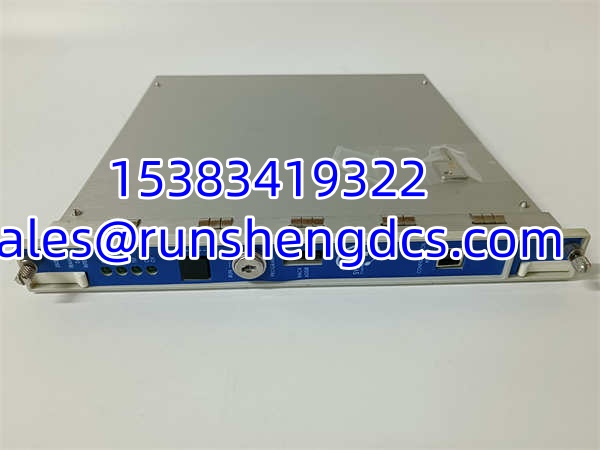

Description
Key Technical Specifications
| Parameter | Value / Notes |
|---|---|
| Module Type | Transient Data Interface (TDI) |
| Front Panel P/N | 288055-01 |
| Rear Connector P/N | 146031-01 (verify with your rack) |
| Rack Slot | Slot 1 (adjacent to power supply) — mandatory per rack |
| Communication | Ethernet link to host software (System 1) |
| Data Collection | Steady-state (standard) + transient/waveform (with optional channel-enable disk) |
| Compatible Monitors | M-series: 3500/40M, 3500/42M, 3500/44M, 3500/45, 3500/50M, etc. |
| Protection Path | NOT part of the critical protection trip path — failure does not affect machinery protection |
| TMR Support | TMR version available with monitor channel comparison voting |
| Configuration Tool | 3500 Rack Configuration Software (V4.5+) via RS232 or Ethernet |
| Standards | API 670 compliant (as part of 3500 system) |
| Operating Temp | -30°C to +65°C (system-level spec) |
Product Introduction
Every 3500 rack needs a brain that talks to the outside world — that is what the 3500/22M does. It sits in Slot 1, right next to the power supply, and handles all communication between the monitoring modules inside the rack and your host software (typically GE/Baker Hughes System 1). Without it, your vibration monitors are collecting data in a vacuum with no way to push it upstream.
The 3500/22M consolidates two older functions into one module: the 3500/20 Rack Interface Module (RIM) functionality and the data collection capability previously handled by separate TDXnet communication processors. It continuously gathers steady-state data from all M-series monitors in the rack and, with the optional channel-enable disk installed, captures high-resolution transient waveform data for diagnostic analysis. Here is the critical point for anyone managing machinery protection: the TDI is not part of the protection trip path. If the 3500/22M fails, your monitors still trip relays and protect the machine — you just lose the ability to view data or configure the rack remotely.
QA/QC Transparency SOP
For surplus or refurbished 3500/22M modules, a proper test sequence should include:
- Intake & Origin Verification — Confirm the front panel reads 3500/22M with P/N 288055-01. Check the rear connector P/N (should be 146031-01 or matching variant). Inspect for physical damage, bent pins on the rear connector, or signs of moisture ingress.
- Visual & Mechanical Inspection — Verify the module slides cleanly into a 3500/05 rack Slot 1 without binding. Check that the Ethernet port connector is intact with no bent contacts. Confirm LED indicators are present and undamaged.
- Live Functional Testing — Install in a powered 3500 rack with at least one M-series monitor present. Verify the TDI powers up without fault LEDs. Connect via 3500 Rack Configuration Software and confirm the software recognizes the module and reads its firmware version. Verify the TDI can read monitor data from adjacent slots.
- Communication Verification — Connect the Ethernet port to a host PC running System 1 or equivalent. Confirm the TDI establishes a network link and transmits steady-state data. If the optional transient disk is installed, trigger a waveform capture and verify data transfer completes without errors.
- Final QC & Anti-Static Packaging — Clear any site-specific configuration to factory defaults. Package in ESD-safe bag with foam protection for the rear connector. Include a test report documenting power-up status, software recognition, and communication pass/fail.
Field Engineer Gotchas
Gotcha #1: Forgetting the TDI is not in the protection path.
Do not assume a TDI fault means the machine is unprotected. The 3500/22M handles data and configuration only. The monitors (3500/40M, 3500/42M, etc.) and relay modules (3500/32, 3500/33) execute protection independently. If your TDI goes dark, the machine is still protected — but you are flying blind on diagnostics. Fix it before you lose visibility into developing faults.
Gotcha #2: Firmware mismatch with Rack Configuration Software.
The 3500 Rack Configuration Software version must be compatible with the TDI firmware. A TDI running older firmware may not be recognized by newer software versions (and vice versa). Always check the firmware revision on the replacement module and confirm your software version supports it before attempting a configuration download.
Gotcha #3: Wrong rear connector P/N.
The front panel P/N (288055-01) and rear connector P/N (146031-01) are separate items. Some surplus listings only reference the front panel number. If your rack uses a different rear connector variant, the module will not mate properly with the backplane. Verify both P/Ns against your existing rack BOM.
Gotcha #4: TMR vs. non-TMR confusion.
In Triple Modular Redundant (TMR) configurations, the system requires a TMR-rated TDI that performs monitor channel comparison voting. Installing a standard (non-TMR) 3500/22M into a TMR rack will cause configuration errors or degraded redundancy. Check whether your rack is configured for TMR before ordering.
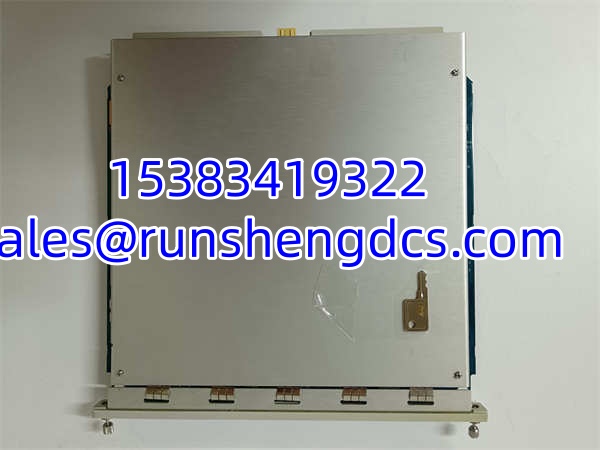
Bently 3500/22M 288055-01
Application Scenarios
- Gas turbine vibration monitoring — The 3500/22M collects steady-state and transient vibration data from multiple 3500/42M displacement/velocity monitors across bearing pedestals, feeding waveform data to System 1 for orbit analysis and Bode plot generation during startup and coastdown.
- Centrifugal compressor protection — In API 670-compliant compressor packages, the TDI aggregates radial vibration, axial displacement, and temperature data from all monitoring channels and transmits it to the plant DCS via System 1 for operator display and trending.
- Steam turbine startup diagnostics — During turbine roll and warmup, the TDI captures transient waveform data (with the optional disk enabled) to record vibration signatures through critical speeds, enabling post-startup analysis of rotor balance and bearing condition.
- Power generation fleet monitoring — Multiple 3500 racks across a power plant feed data through their respective TDI modules to a centralized System 1 server, giving the vibration engineering team a unified view of all rotating equipment health.
Case Study (Anonymized): An offshore gas compression platform had a 3500 rack where the original TDI module failed — the Ethernet port stopped responding and System 1 lost all communication with the rack. The operations team panicked, thinking the machine protection was compromised. In reality, the monitors and relays continued operating normally (the trip path is hardware-based and independent of the TDI). A surplus 3500/22M was sourced and installed. The catch: the replacement module had an older firmware revision that the site’s Rack Configuration Software (V5.2) refused to communicate with. The team had to first connect via RS232 with an older software version to update the TDI firmware before the Ethernet link would function. Lesson learned — always verify firmware compatibility before deploying a surplus TDI.
FAQ
Does a failed 3500/22M take the machine out of protection?
No. The TDI is not part of the critical protection trip path. Machinery protection (vibration trips, temperature trips, relay outputs) is handled by the individual monitor modules and relay modules independently. A TDI failure only affects your ability to view data, configure the rack, or communicate with System 1.
Can I hot-swap the 3500/22M in a live rack?
The 3500 system supports hot-swap of modules, but verify this applies to the TDI in your specific rack configuration. In most cases, you can pull and replace the TDI without powering down the rack. However, expect a temporary loss of communication with System 1 during the swap.
What is the difference between 3500/20 and 3500/22M?
The 3500/20 is the original Rack Interface Module (RIM). The 3500/22M (TDI) integrates the RIM function with built-in communication processor capability, eliminating the need for a separate TDXnet module. If your rack originally used a 3500/20 plus a separate communication processor, the 3500/22M can replace both.
Do I need the optional channel-enable disk?
Only if you require transient waveform capture (high-resolution dynamic data for diagnostic analysis). Without the disk, the TDI collects steady-state data only — which covers most routine monitoring needs. If your vibration engineering team performs orbit analysis or needs waveform snapshots during machine transients, get the disk.
Is 288055-01 the complete module or just the front panel?
288055-01 is the front panel part number. The rear connector is a separate part (typically 146031-01). When ordering a replacement, confirm whether the surplus unit includes both the front panel and rear connector as an assembled module, or if you need to source the rear connector separately.
What software do I need to configure this module?
Bently Nevada 3500 Rack Configuration Software (V4.5 or later). It connects via RS232 cable or RJ45 Ethernet to the TDI. You will need the configuration password (commonly “gates” for default setups, but verify with your site’s security policy).