Description
Product Introduction
When an operator needs a dedicated, local interface right at the machine level, the ABB PP836A 3BSE042237R2 is the go-to solution for clear and reliable visualization. This 6.5-inch TFT color display panel serves as a critical human-machine interface (HMI) within ABB’s automation ecosystem, allowing personnel to monitor real-time process data, adjust parameters, and acknowledge alarms without relying on a centralized control room PC. The ABB PP836A 3BSE042237R2 is specifically engineered to deliver high-resolution graphics (640×480 pixels) and crisp character rendering, ensuring that even complex system states are instantly readable in harsh industrial lighting.
Beyond its visual capabilities, the ABB PP836A 3BSE042237R2 is designed for seamless integration into distributed I/O architectures. It operates on a standard 24V DC power supply and consumes a highly efficient 3.5W, minimizing heat generation in tightly packed control panels. Whether deployed as a standalone function key panel or integrated with ABB’s Panel Builder 800 software, the ABB PP836A 3BSE042237R2 provides the exact local control and monitoring footprint that plant managers need to maintain operational efficiency and reduce response times during process upsets.
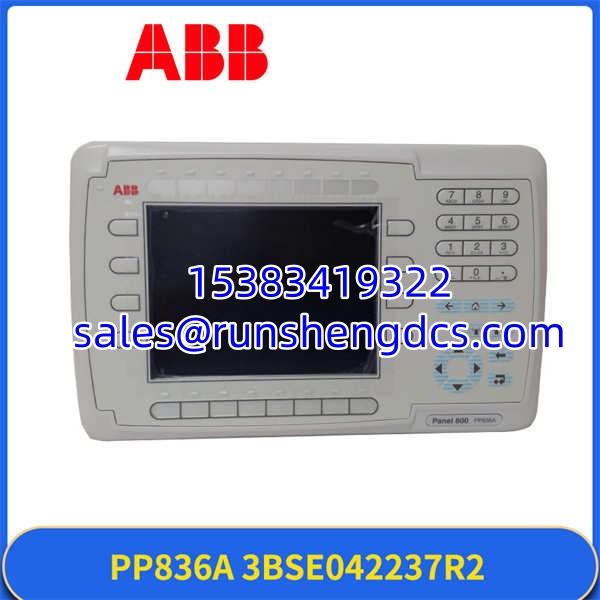
ABB-PP836A-3BSE042237R2
Key Technical Specifications
| Parameter | Value |
|---|---|
| Product Model | PP836A 3BSE042237R2 |
| Manufacturer | ABB |
| Product Type | Control Display Panel / Function Key Panel |
| Display Size | 6.5 inches |
| Display Technology | TFT Color LCD |
| Resolution | 640 x 480 pixels |
| Operating Voltage | 24V DC |
| Power Consumption | 3.5 W |
| Operating Temperature | -25°C to +70°C |
| Installation Type | Control Room / Panel Mount |
| Software Compatibility | Panel Builder 800 |
| Weight | 2.5 kg |
Compatibility & Replacement Matrix
- PP836 3BSE042237R1 → PP836A 3BSE042237R2 : Direct — Hardware revision update; R2 is fully backward compatible with R1 projects and mounting hardware.
- PP835 3BSE042234R1 → : Needs Adaptation — The PP835 is a touch panel, while the is a function key panel. Screen layouts and navigation logic will need to be reconfigured.
- PP825 3BSE042240R1 → : Needs Adaptation — Upgrading from a 5.7″ CSTN display to a 6.5″ TFT requires adjusting the project resolution and physical panel cutout size.
- PP820 3BSE042243R1 → : Direct Upgrade — Massive visual upgrade from a 260×64 monochrome FSTN display to a 640×480 color TFT; requires Control Builder M project recompilation.
Quality Inspection & SOP Transparency
We don’t just look at the box and ship it. Here is the actual procedure our technicians follow for every 3BSE042237R2 that leaves the warehouse.
- Incoming Inspection: We verify the serial number against ABB’s manufacturing database and inspect the TFT glass for any micro-scratches, dead pixels, or backlight bleeding. The 6.5-inch screen is the most delicate component, so we ensure the factory protective film is intact and the rear connectors show no signs of forced insertion.
- Live Functional Test: The unit is powered up on a calibrated 24V DC bench supply. We verify that the backlight illuminates evenly without flickering and that the boot sequence reaches the ABB logo screen without hanging. We then connect it to a Panel Builder 800 engineering station to confirm communication handshakes.
- Key and Display Verification: Every physical function key is pressed to ensure tactile feedback and correct electrical registration. We load a test project to verify that all 640×480 pixels render colors accurately and that text is sharp, ruling out any internal ribbon cable degradation.
- Thermal Burn-In: The display is left running a high-contrast test pattern for 12 hours at an elevated ambient temperature to ensure the backlight inverter and power regulation circuits do not overheat or fail prematurely.
- Final QC & Packaging: After passing the burn-in, the unit is wiped down, sealed in an anti-static bag with heavy-duty foam corner protectors, and labeled with the test date and technician ID to guarantee it arrives at your facility in pristine condition.
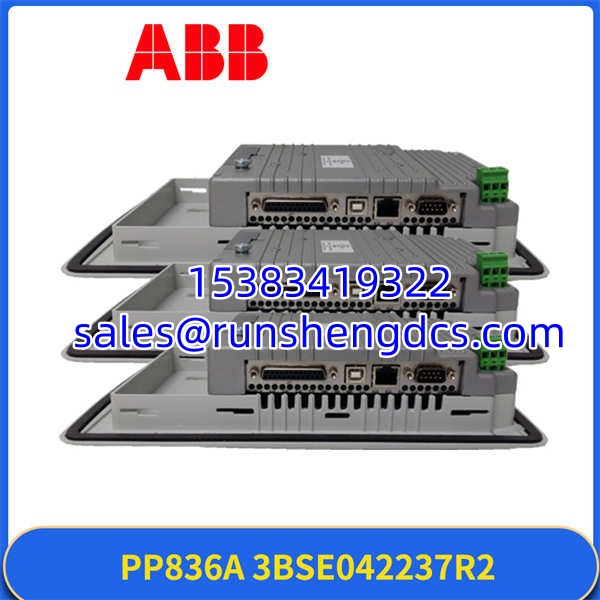
ABB-PP836A-3BSE042237R2
Common Replacement Pitfalls
- Touch vs. Function Key Confusion: This is the most frequent mistake. The (3BSE042237R2) is a function key panel, not a touchscreen. If your existing HMI relies heavily on on-screen soft keys, swapping to this model will require significant project redesign or adding external hardware buttons.
- Resolution Mismatches: Upgrading from older PP820 or PP825 models means your existing graphics will likely not fill the 640×480 screen correctly. You must open the project in Panel Builder 800 and adjust the canvas size, or the display will default to a scaled or distorted view.
- Power Supply Sizing: While the only consumes 3.5W, if you are daisy-chaining multiple displays or adding I/O modules to the same 24V DC rail, ensure your power supply has adequate headroom to handle the inrush current during simultaneous boot-ups.
- Cable Pinout Verification: When replacing an older panel, double-check the communication and power cable pinouts. Even within the ABB ecosystem, connector assignments can change between hardware revisions, and forcing a mismatched cable can fry the display’s logic board.
- Firmware and Software Alignment: Ensure your engineering PC is running a compatible version of Panel Builder 800. Trying to download a newer project to an older firmware revision on the can result in a bricked display requiring factory service.
FAQ
No, the is a function key panel. It relies on physical buttons for navigation and input. If you require touch functionality, you should look at the PP835 (3BSE042234R1) or PP845 (3BSE042235R1) models instead.
Can I use this panel with an AC 500 PLC?
Yes, the is designed to integrate seamlessly with ABB’s AC 500 and AC 800M controller families, as well as distributed I/O setups. It communicates via standard ABB module bus or fieldbus adapters depending on your system architecture.
What software do I need to configure this display?
You will need ABB’s Panel Builder 800 software to design the graphics, configure the function keys, and download the project to the . Ensure your software license covers the specific screen size and driver requirements.
Is this a genuine ABB part or a third-party clone?
This is a 100% genuine, factory-sealed ABB component. We source directly from authorized distribution channels, and the serial number can be verified through ABB’s official systems. We do not sell refurbished or cloned displays.
Do you offer a warranty on this display panel?
Yes, we provide a 1-year warranty covering manufacturing defects and DOA (dead on arrival) issues. The warranty covers internal electronics and backlight failure under normal operating conditions, but excludes physical damage to the TFT glass caused by improper installation.